Finished Game
On this page we will learn
- what Space Rescue looks like with every mechanic added
- how the Rooms and objects in the finished game fit together
- where to find the finished code
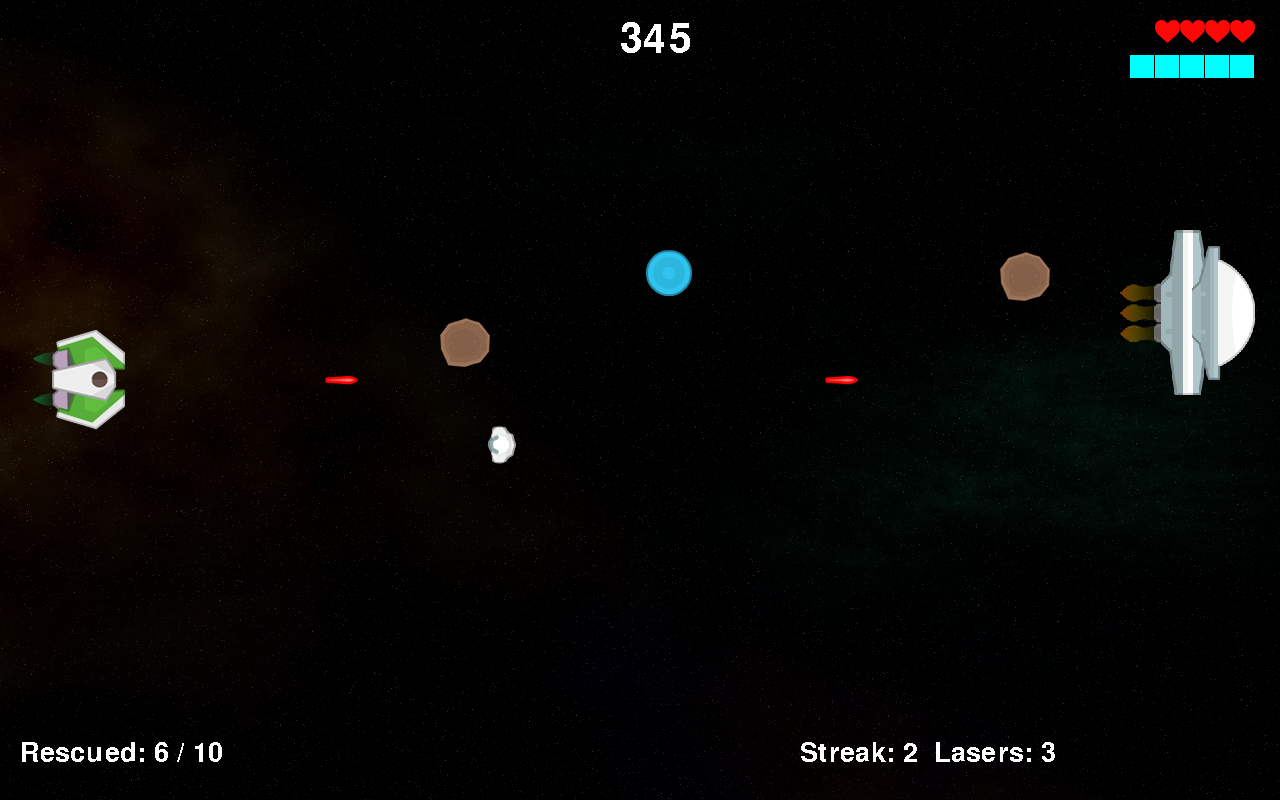
This is Space Rescue after the 14 lessons and all the Game Design pages. The Attractor ship has 4 lives, has rescued 6 of its 10 astronauts, and has a streak of 2, so it can have 3 lasers on the screen. A shield pickup is floating towards it.
How to play
- Press Space on the welcome screen.
- Choose a difficulty: E (Easy), M (Medium) or H (Hard).
- Choose a ship: S (Swerver) or A (Attractor).
- Fly up and down with W and S, and shoot with Space.
- Rescue 10 astronauts by flying into them. Don't shoot them!
- Shoot or dodge the asteroids Zork throws at you.
- Press Ctrl to use your ship's special power when the power meter is full.
Rooms
| Room | What it does | Page |
|---|---|---|
| WelcomeScreen | shows the title, starts the music, resets the game when space is pressed | 1. Welcome Screen, Audio |
| DifficultySelect | lets the player choose Easy, Medium or Hard | Difficulty |
| ShipSelect | lets the player choose the Swerver or the Attractor | Ship Choice |
| GamePlay | the game itself, plus the HUD and the sound effects | 2. GamePlay Room onwards |
| HighScores (extension) | saves the score and shows the top five | Saving Data with a Database |
Objects
| Object | What it does |
|---|---|
| Title | shows the title image and starts a new game |
| DifficultyMenu, ShipMenu | show the menu images and save the player's choice |
| Ship | moves, shoots lasers, uses its shield and special power |
| Zork | moves up and down, and spawns asteroids, astronauts and bonus pickups |
| Asteroid | bounces across the screen, and takes a life when it hits an unshielded ship |
| Astronaut | drifts across the screen, and is rescued when it touches the ship |
| Laser | flies right, and destroys the first asteroid or astronaut it hits |
| RepairKit, Shield | bonus pickups that add a life or turn on the ship's shield |
| Score, Lives, Rescued, Streak, PowerMeter | the HUD items |
The code
The finished code is in the tutorial files, in the design/ship_choice folder (or own_game/databases with the high score table). Compare it with your own game if something isn't working, or use it as a starting point for your own improvements.
Where next?
Space Rescue still has room to grow. Some ideas:
- use the animation frames in Images (for example Asteroid_frames and Zork_Frames) to animate the sprites
- add a You Win Room that shows when the player reaches the goal
- make Zork fire faster as the player gets closer to the goal
- add a boss fight where the player has to shoot Zork
Use the Design Thinking Flowchart to plan each one.