9. Ship and Asteroid Collision
In this lesson we will learn
- what hitboxes and collisions are
- how to detect a collision between two objects
- what
selfandothermean in a collision - how to use GameFrame's built-in collision handling
Terminology
- collision – when two objects in a game touch or overlap.
- rectangular collision – a way of detecting collisions by putting a rectangle around each object and checking whether the rectangles touch or overlap.
- hitbox – the invisible rectangle around an object that is used to detect collisions.
Hitboxes
Collisions are when two objects in a game touch or overlap. GameFrame uses rectangular collisions, which put a rectangle around each object. These rectangles are often called hitboxes.
We've already been using hitboxes. For example, our asteroids look like this:

But in our planning we've been treating them like this:
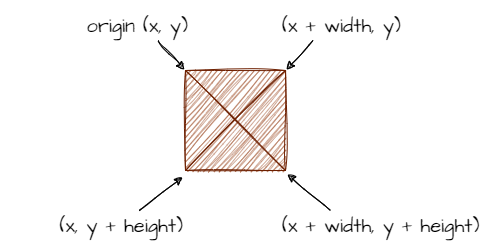
When the top of Zork's hitbox touches the top of the screen, we reverse Zork's direction. That's a hitbox colliding with the edge of the screen.
Collisions
Two objects collide when their hitboxes touch or overlap. That's when:
- obj_1's left side is less than obj_2's right side and
- obj_1's right side is greater than obj_2's left side and
- obj_1's top is less than obj_2's bottom and
- obj_1's bottom is greater than obj_2's top
Using the coordinates in this image:
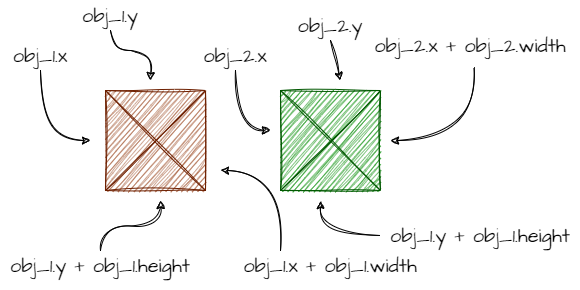
the code would be:
if (obj1.x < obj2.x + obj2.width and
    obj1.x + obj1.width > obj2.x and
    obj1.y < obj2.y + obj2.height and
    obj1.y + obj1.height > obj2.y):
That's a lot of code to understand and remember. Luckily this is just background, because GameFrame (using Pygame) has collisions built in.
Let's check the RoomObject methods to see how GameFrame handles collisions. There are two methods:
register_collision_object(collision_object)handle_collision(self, other, other_type)
Collision terms
Every collision involves two objects:
- self → the object whose event handler is running
- other → the object that self has collided with
Register collision objects
A Room can have lots of objects, so an object could collide with many others. We might not care about all of those collisions, so we register the ones we do care about with register_collision_object. We call it in the object's __init__ method, and it tells GameFrame to watch for collisions between this object (self) and objects of the class we name.
Handle collisions
On every tick, GameFrame checks whether any registered collisions have happened. If one has, it calls the object's handle_collision method and passes it two things:
other→ the object we collided with, so we can use its attributes and methods (for exampleother.x_speed = 0)other_type→ the class name of the other object as a string, so we can handle different kinds of collision differently (for example, hitting the player vs hitting a bullet)
With that theory sorted, let's plan the collision between asteroids and the ship.
Planning
First, which class should handle the collision between Ship and Asteroid? Either could, but to make life easier later on, we'll get the Asteroid to handle it.
Let's use the simplest outcome for the collision: end the Room. Thinking back to the WelcomeScreen, we end a Room with self.room.running = False. GameFrame then moves to the next Room in levels. GamePlay is the last Room, so the game goes back to the WelcomeScreen.

Coding
Open Objects/Asteroid.py and add the highlighted code below to the __init__ method.
Code explanation
- line 25 → registers collisions with
Shipobjects, so GameFrame tells this asteroid when it touches the ship.
Now add the code below to the bottom of the Asteroid class, then save the file.
| Objects/Asteroid.py | |
|---|---|
Code explanation
- line 53 → defines
handle_collision, which GameFrame calls when a registered collision happens. - lines 54–56 → a docstring that explains what the method does.
- line 58 → checks if the collision is with a
Ship… - line 59 → …and ends the GamePlay Room, which ends the game.
PRIMM
- Predict what will happen when an asteroid hits the ship.
- Run MainController.py and fly into an asteroid.
- Investigate: why does the game go back to the welcome screen?
Commit and push
- In GitHub Desktop, type Ship and asteroid collision in the Summary box.
- Click Commit to main.
- Click Push origin.