12. Astronauts
In this lesson we will learn
- how to plan a new object with several IPO tables
- how to use what we already know to create, move and delete an object
- how to handle collisions with more than one kind of object
Now we'll add the people we're trying to rescue: the astronauts. This lesson doesn't introduce any new ideas. It puts together things we've already done, so let's go straight to planning.
Planning
We want to:
- create an
Astronaut class
- have Zork spawn astronauts at random times
- move astronauts across the screen when they spawn
- delete astronauts when they leave the left of the screen
- rescue (delete) an astronaut when it collides with the Ship
- vaporise (delete) an astronaut when it collides with a Laser
Here they are as IPO tables.
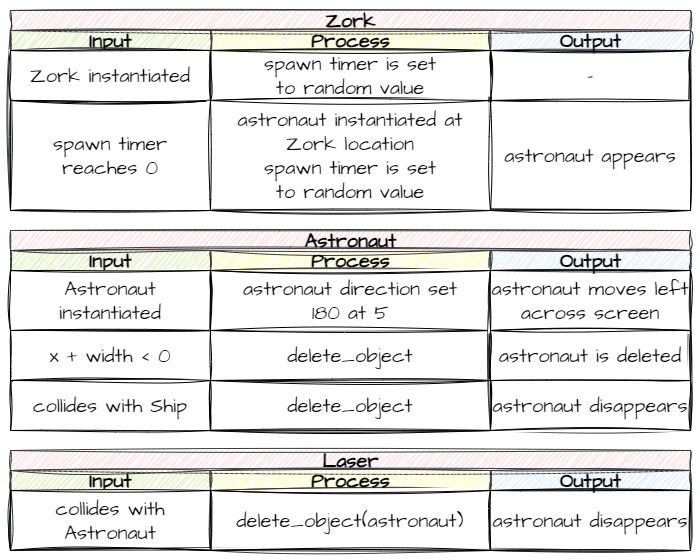
We've done every part of these before. They're just put together differently, so let's code them.
Coding
Create the Astronaut class
Create a new file in the Objects folder, add the code below and save it as Astronaut.py.
| Objects/Astronaut.py |
|---|
| from GameFrame import RoomObject
class Astronaut(RoomObject):
"""
Class for the astronauts escaping from Zork
"""
def __init__(self, room, x, y):
"""
Initialise the astronaut instance
"""
# include attributes and methods from RoomObject
RoomObject.__init__(self, room, x, y)
# set image
image = self.load_image("Astronaut.png")
self.set_image(image,50,49)
# set travel direction
self.set_direction(180, 5)
# handle events
self.register_collision_object("Ship")
def step(self):
"""
Determines what happens to the astronaut on each tick of the game clock
"""
self.outside_of_room()
# --- Event Handlers
def handle_collision(self, other, other_type):
"""
Handles the collision event for Astronaut objects
"""
# ship collision
if other_type == "Ship":
self.room.delete_object(self)
def outside_of_room(self):
"""
removes astronauts that have exited the room
"""
if self.x + self.width < 0:
self.room.delete_object(self)
|
Code explanation
- line 1 → imports the
RoomObject class.
- line 3 → defines the
Astronaut class as a subclass of RoomObject.
- lines 4–6 → a docstring that explains what the class is for.
- line 8 → defines the
__init__ method.
- lines 9–11 → a docstring that explains what the method does.
- line 13 → runs
RoomObject's __init__ method.
- lines 16–17 → loads Astronaut.png and gives it to the astronaut at 50 × 49 pixels.
- line 20 → starts the astronaut moving left (
180°) at 5 pixels per frame, slower than the asteroids.
- line 23 → registers collisions with
Ship objects.
- line 25 → defines the
step method, which runs on every tick.
- lines 26–28 → a docstring that explains what the method does.
- line 29 → calls
outside_of_room on every tick.
- line 32 → defines
handle_collision.
- lines 33–35 → a docstring that explains what the method does.
- line 37 → checks if the astronaut collided with the Ship…
- line 38 → …and deletes the astronaut, because it's been rescued.
- line 40 → defines the
outside_of_room method.
- lines 41–43 → a docstring that explains what the method does.
- line 44 → checks if the astronaut has gone past the left edge of the screen…
- line 45 → …and deletes it.
Open Objects/__init__.py, add the highlighted code below and save it.
| Objects/__init__.py |
|---|
| from Objects.Title import Title
from Objects.Ship import Ship
from Objects.Zork import Zork
from Objects.Asteroid import Asteroid
from Objects.Laser import Laser
from Objects.Astronaut import Astronaut
|
Code explanation
- line 6 → imports the
Astronaut class, so GameFrame can find it.
Spawn astronauts
Now we need Zork to spawn astronauts at random times, the same way it spawns asteroids. Open Objects/Zork.py and add the highlighted code below.
| Objects/Zork.py |
|---|
| from GameFrame import RoomObject, Globals
from Objects.Asteroid import Asteroid
from Objects.Astronaut import Astronaut
import random
class Zork(RoomObject):
"""
A class for the game's antagonist
"""
def __init__(self, room, x, y):
"""
Initialise the Zork object
"""
# include attributes and methods from RoomObject
RoomObject.__init__(self, room, x, y)
# set image
image = self.load_image("Zork.png")
self.set_image(image,135,165)
# set initial movement
self.y_speed = random.choice([-10, 10])
# start asteroid timer
asteroid_spawn_time = random.randint(15, 150)
self.set_timer(asteroid_spawn_time, self.spawn_asteroid)
# start astronaut timer
astronaut_spawn_time = random.randint(30, 200)
self.set_timer(astronaut_spawn_time, self.spawn_astronaut)
def keep_in_room(self):
"""
Keeps the Zork inside the top and bottom room limits
"""
if self.y < 0 or self.y > Globals.SCREEN_HEIGHT - self.height:
self.y_speed *= -1
def step(self):
"""
Determine what happens to Zork on each tick of the game clock
"""
self.keep_in_room()
def spawn_asteroid(self):
"""
Randomly spawns a new Asteroid
"""
# spawn Asteroid and add to room
new_asteroid = Asteroid(self.room, self.x, self.y + self.height/2)
self.room.add_room_object(new_asteroid)
# reset time for next Asteroid spawn
asteroid_spawn_time = random.randint(15, 150)
self.set_timer(asteroid_spawn_time, self.spawn_asteroid)
|
Code explanation
- line 3 → imports the
Astronaut class, so Zork can create astronauts.
- line 29 → chooses a random number of ticks between 30 and 200.
- line 30 → starts a timer that calls
spawn_astronaut when it finishes.
Then add the highlighted code below to the bottom of the Zork class, and save the file.
| Objects/Zork.py |
|---|
| from GameFrame import RoomObject, Globals
from Objects.Asteroid import Asteroid
from Objects.Astronaut import Astronaut
import random
class Zork(RoomObject):
"""
A class for the game's antagonist
"""
def __init__(self, room, x, y):
"""
Initialise the Zork object
"""
# include attributes and methods from RoomObject
RoomObject.__init__(self, room, x, y)
# set image
image = self.load_image("Zork.png")
self.set_image(image,135,165)
# set initial movement
self.y_speed = random.choice([-10, 10])
# start asteroid timer
asteroid_spawn_time = random.randint(15, 150)
self.set_timer(asteroid_spawn_time, self.spawn_asteroid)
# start astronaut timer
astronaut_spawn_time = random.randint(30, 200)
self.set_timer(astronaut_spawn_time, self.spawn_astronaut)
def keep_in_room(self):
"""
Keeps the Zork inside the top and bottom room limits
"""
if self.y < 0 or self.y > Globals.SCREEN_HEIGHT - self.height:
self.y_speed *= -1
def step(self):
"""
Determine what happens to Zork on each tick of the game clock
"""
self.keep_in_room()
def spawn_asteroid(self):
"""
Randomly spawns a new Asteroid
"""
# spawn Asteroid and add to room
new_asteroid = Asteroid(self.room, self.x, self.y + self.height/2)
self.room.add_room_object(new_asteroid)
# reset time for next Asteroid spawn
asteroid_spawn_time = random.randint(15, 150)
self.set_timer(asteroid_spawn_time, self.spawn_asteroid)
def spawn_astronaut(self):
"""
Randomly spawns a new astronaut
"""
# spawn astronaut and add to room
new_astronaut = Astronaut(self.room, self.x, self.y + self.height/2)
self.room.add_room_object(new_astronaut)
# reset timer for next astronaut spawn
astronaut_spawn_time = random.randint(30, 200)
self.set_timer(astronaut_spawn_time, self.spawn_astronaut)
|
Code explanation
- line 57 → defines the
spawn_astronaut method, which the timer calls.
- lines 58–60 → a docstring that explains what the method does.
- line 62 → creates a new astronaut at Zork's
x, halfway down Zork's height.
- line 63 → adds the new astronaut to the Room.
- lines 66–67 → choose a new random time and start the timer again, so astronauts keep spawning.
PRIMM
- Predict what will happen when the ship touches an astronaut, and when a laser hits one.
- Run MainController.py and try both.
- Investigate: which of the two works? Why doesn't the other one yet?
Laser and astronaut collision
Finally, we need to handle a Laser hitting an Astronaut. Open Objects/Laser.py and add the highlighted code below.
| Objects/Laser.py |
|---|
| from GameFrame import RoomObject, Globals
class Laser(RoomObject):
"""
Class for the lasers shot by the Ship
"""
def __init__(self, room, x, y):
"""
Initialise the laser
"""
# include attributes and methods from RoomObject
RoomObject.__init__(self, room, x, y)
# set image
image = self.load_image("laser.png")
self.set_image(image, 33, 9)
# set movement
self.set_direction(0, 20)
# handle events
self.register_collision_object("Asteroid")
self.register_collision_object("Astronaut")
def step(self):
"""
Determine what happens to the laser on each tick of the game clock
"""
self.outside_of_room()
def outside_of_room(self):
"""
removes laser if it has exited the room
"""
if self.x > Globals.SCREEN_WIDTH:
self.room.delete_object(self)
# --- Event handlers
def handle_collision(self, other, other_type):
"""
Handles laser collisions with other registered objects
"""
if other_type == "Asteroid":
self.room.delete_object(other)
elif other_type == "Astronaut":
self.room.delete_object(other)
|
Code explanation
- line 24 → registers collisions with
Astronaut objects as well as asteroids.
- line 46 → otherwise, checks if the laser hit an
Astronaut…
- line 47 → …and deletes the astronaut, because it's been vaporised.
PRIMM
- Predict what will happen when a laser hits an astronaut now.
- Run MainController.py.
- Investigate: how does
other_type let one handle_collision method deal with two kinds of object?
Commit and push
- In GitHub Desktop, type Added astronauts in the Summary box.
- Click Commit to main.
- Click Push origin.