7. Asteroids
In this lesson we will learn
- how to create a new RoomObject from what we already know
- how one object can create (spawn) other objects
- how to use GameFrame timers to make things happen at random times
- how to pass a method as an argument
Terminology
- spawn – to make a new object appear in the game.
- de-spawn – to remove an object from the game.
- timer – a countdown that calls a chosen method when it reaches
0.
In the game, Zork hurls asteroids at the player's ship, and the player has to dodge them. Creating the Asteroid RoomObject uses many of the steps we used for the Ship and Zork.
Create the Asteroid object
The code for a new RoomObject should be very familiar by now. Create a new file in the Objects folder, add the code below and save it as Asteroid.py.
Code explanation
- line 1 → imports the
RoomObjectclass. - line 3 → defines the
Asteroidclass as a subclass ofRoomObject. - lines 4–6 → a docstring that explains what the class is for.
- line 8 → defines the
__init__method. - lines 9–11 → a docstring that explains what the method does.
- line 13 → runs
RoomObject's__init__method. - lines 16–17 → loads asteroid.png and gives it to the asteroid at 50 × 49 pixels.
Open Objects/__init__.py, add the highlighted code below and save it.
| Objects/__init__.py | |
|---|---|
Code explanation
- line 4 → imports the
Asteroidclass, so GameFrame can find it.
Run MainController.py. Nothing should change, because no asteroids have been created yet. We're just checking there are no mistakes.
Spawn asteroids
Now we have an Asteroid class, we need to:
- make asteroids spawn (appear in the game)
- make them move in a random direction across the screen
- bounce them off the top and bottom of the screen
- de-spawn (remove) them when they leave the left of the screen
We'll do the first one in this lesson, and the rest in the next.
Planning
Let's think about spawning:
- we want asteroids to spawn at Zork's location
- we want them to spawn at random intervals, because regular intervals are too predictable and less fun
Spawning at Zork's location is easy, because we know Zork's location is self.x and self.y.
Spawning at random times is a bit trickier. The RoomObject methods include set_timer. It starts a timer that calls a method when its countdown reaches 0. That's what we need.
So where does the code go? Zork spawns the asteroids, so the spawning code goes in the Zork class.
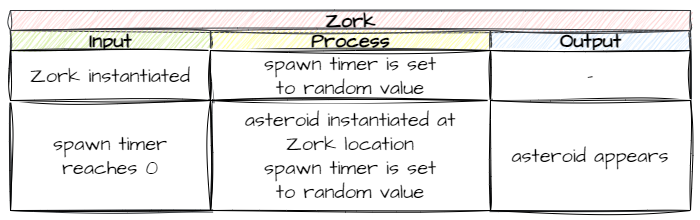
There are two steps to this:
- When Zork is created, start a timer with a random length.
- When the timer reaches
0, it calls a method that spawns an asteroid, then starts the timer again.
Start the timer
Open Objects/Zork.py and add the highlighted code below. Starting the timer needs to happen when Zork is created, so it goes in __init__.
Code explanation
- line 2 → imports the
Asteroidclass, so Zork can create asteroids. - line 24 → chooses a random number of ticks between 15 and 150 (half a second to five seconds).
- line 25 → starts a timer for that many ticks, and tells it to call
self.spawn_asteroidwhen it reaches0.
Passing a method as an argument
When we pass a method as an argument (like we do to the timer), we only use its name: self.spawn_asteroid. We leave off the ().
If we included the (), the method would run straight away, and the timer would get whatever it returns instead of the method itself.
Spawn an asteroid
The timer calls self.spawn_asteroid, which doesn't exist yet, so let's create it. Add the highlighted code below to the bottom of the Zork class, then save the file.
Code explanation
- line 40 → defines the
spawn_asteroidmethod, which the timer calls. - lines 41–43 → a docstring that explains what the method does.
- line 45 → creates a new asteroid in Zork's Room, at Zork's
xand halfway down Zork's height. - line 46 → adds the new asteroid to the Room.
- lines 49–50 → chooses a new random time and starts the timer again, so asteroids keep spawning.
PRIMM
- Predict what you'll see when the game starts.
- Run MainController.py and press space.
- Investigate: change
15and150on lines 24 and 49 to5and20. What happens? Change them back when you're done.
Zork should move up and down, spawning asteroids like this:
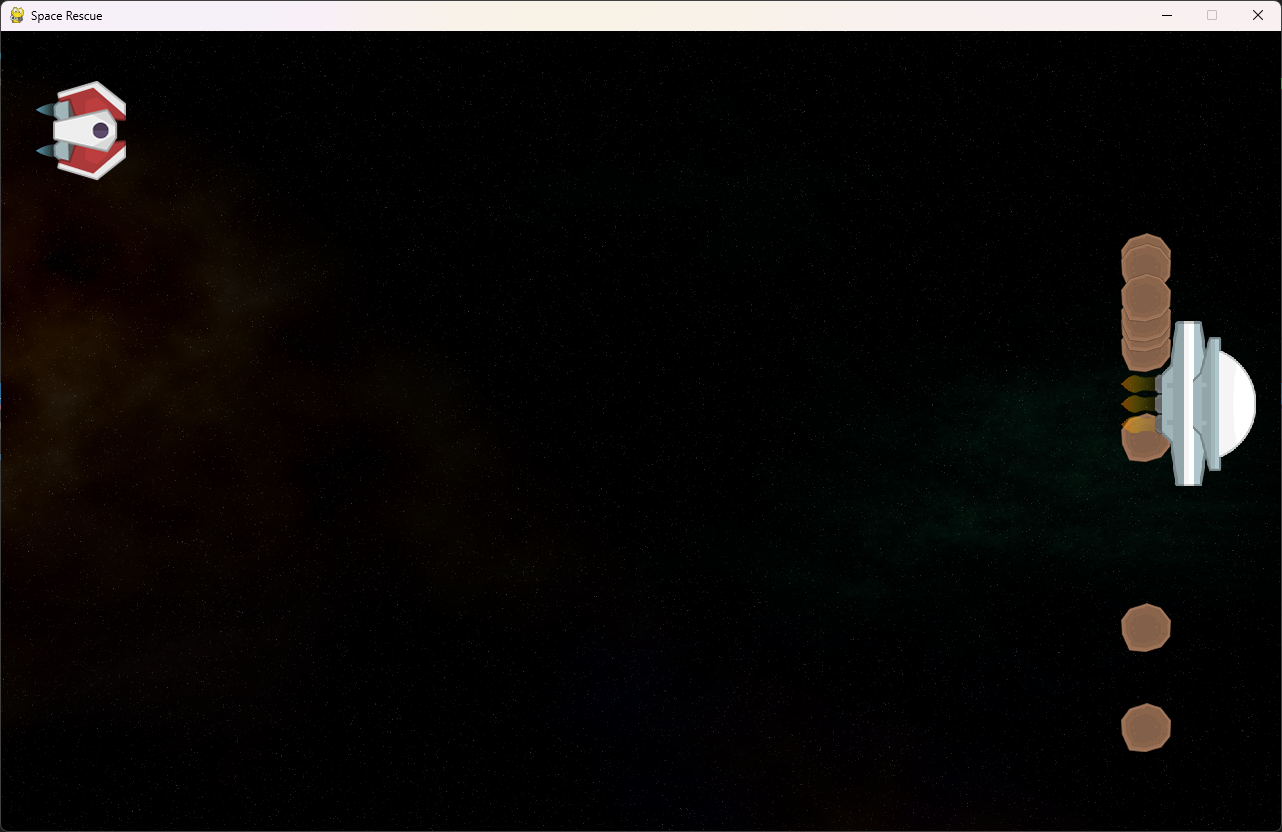
The next thing to do is make the asteroids move. We'll do that in the next lesson.
Commit and push
- In GitHub Desktop, type Spawned asteroids in the Summary box.
- Click Commit to main.
- Click Push origin.