5. Keeping the Ship in the Room
In this lesson we will learn
- how screen coordinates and object coordinates work together
- what a game clock is and how to run code on every tick
- how to plan an algorithm with an IPO table
- how to keep an object inside the Room
Terminology
- game clock – a timer that makes every run of the game loop take the same amount of time, so the game runs at the same speed on any computer.
- game loop – the loop that runs over and over while a game is playing, handling inputs, updating the game and redrawing the screen.
- tick – one beat of the game clock, which in GameFrame happens every 1/30 of a second.
By now you've probably noticed that the ship can fly off the top and bottom of the screen. Let's stop that from happening.
Planning
Before we can stop the ship flying off the screen, we need a way for the program to tell when it's happening. In plain English it's quite simple:
- if the top of the ship is above the screen → move it back inside the screen
- if the bottom of the ship is below the screen → move it back inside the screen
We need to turn these ideas into Python:
- top of the ship
- bottom of the ship
- above the screen
- below the screen
Let's look at the screen to see how we can describe each one.
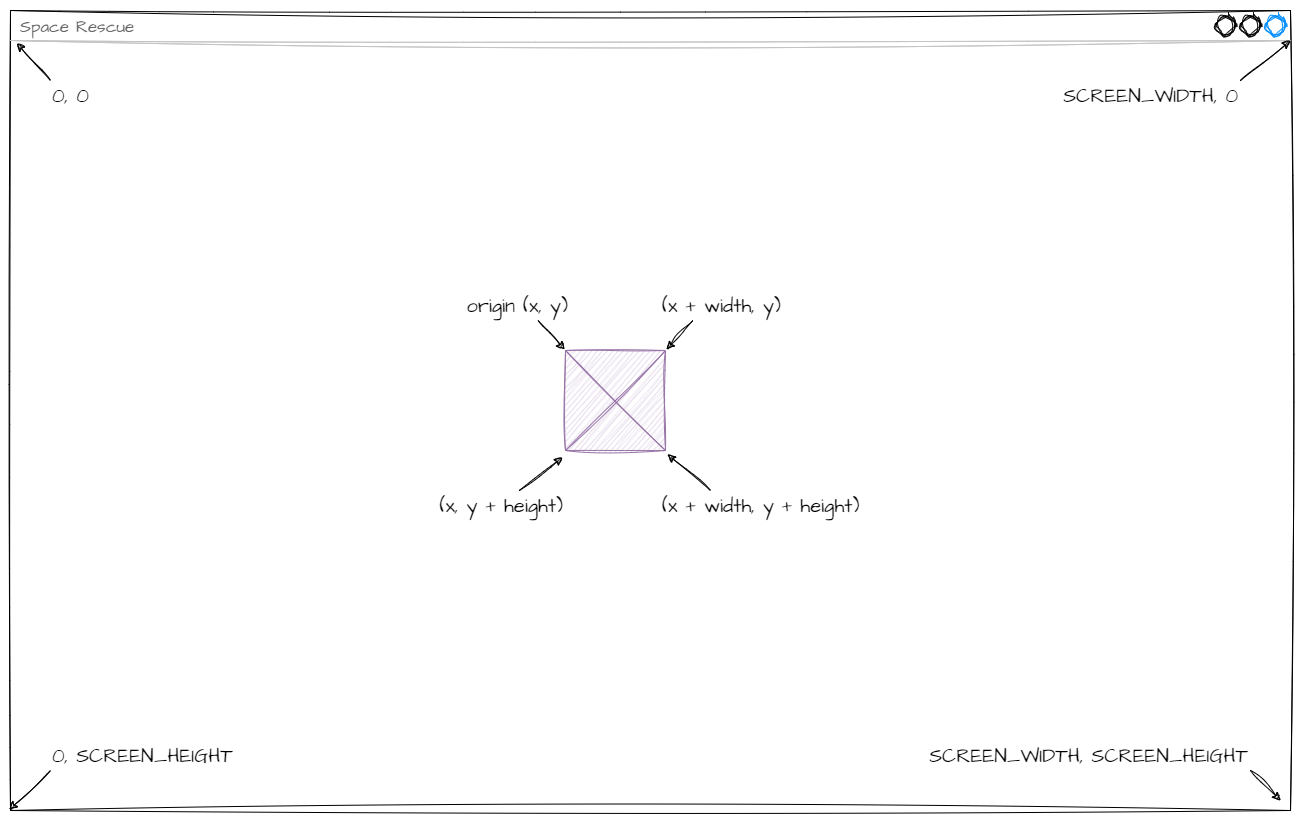
Each idea matches a value in our program:
- top of the ship → the origin's y value →
self.y - bottom of the ship → the origin's y value + the ship's height →
self.y + self.height - above the screen → a y value less than zero →
< 0 - below the screen → a y value greater than the screen height →
> Globals.SCREEN_HEIGHT
So we need to keep checking that:
self.yisn't less than0self.y + self.heightisn't greater thanGlobals.SCREEN_HEIGHT
Now we need a way to check these regularly. Remember, the game logic lives in the objects, so let's look at the RoomObject methods. Notice the step method? The API says GameFrame runs it for the object on every tick of the game clock.
Game clocks
In the early days of computers, games ran as fast as the hardware would let them, so the same game ran faster or slower depending on the computer. When computers rapidly got faster, older games became unplayable. The game clock was created to fix this.
A game clock makes every run of the game loop take the same amount of time. In each run, the game loop handles inputs, updates the game state and redraws the screen. If it finishes early, the computer waits for the next tick of the clock.
In GameFrame, the game clock is the same as the frame rate, so there's a tick every 1/30 of a second.
Now we know the mechanism and the values, we can plan our code.
First, what output do we want?
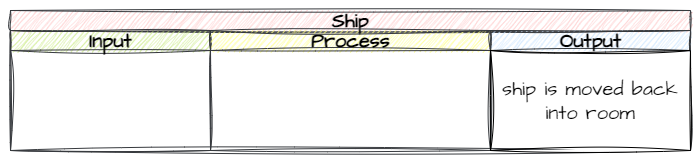
Next, what input will trigger it?
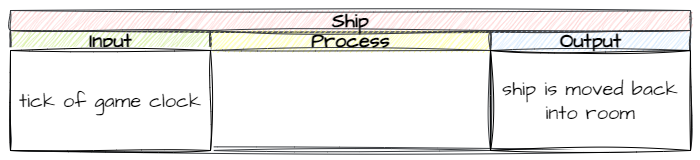
Finally, what process gets us from the input to the output?
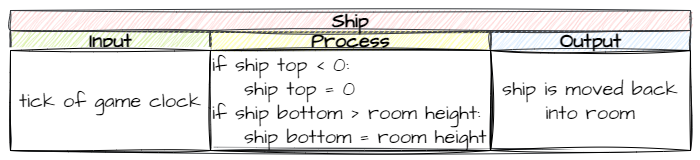
In summary: on every tick of the game clock, we check if the ship is outside the screen, and if it is, we move it back in.
Coding
All this code goes in the Ship class, so open Objects/Ship.py.
Now, where in the class? We could put it all in the step method and it would work. But what if we want the ship to do other things on every tick? step would get messy quickly.
To keep our code maintainable, we'll keep step as small as possible. We'll put each piece of game logic in its own method, then call those methods from step.
keep_in_room
Let's put this game logic in a method called keep_in_room. Add the code below to the bottom of the Ship class.
| Objects/Ship.py | |
|---|---|
Code explanation
- line 32 → defines the
keep_in_roommethod. - lines 33–35 → a docstring that explains what the method does.
- line 36 → checks if the top of the ship (
self.y) is above the top of the screen (0)… - line 37 → …and moves the ship's origin to the top of the screen.
- line 38 → otherwise, checks if the bottom of the ship (
self.y + self.height) is below the bottom of the screen (Globals.SCREEN_HEIGHT)… - line 39 → …and moves the ship up so its bottom sits on the bottom of the screen.
Notice the squiggly line under Globals? That's VS Code telling us it can't find it, because we haven't imported it. At the top of Objects/Ship.py, change the highlighted code below.
Code explanation
- line 1 → imports
Globalsas well asRoomObject, so we can useGlobals.SCREEN_HEIGHT.
step
Now we need to call keep_in_room from the step method. Add the code below to the bottom of the Ship class, then save the file.
| Objects/Ship.py | |
|---|---|
Code explanation
- line 41 → defines the
stepmethod, which GameFrame runs on every tick of the game clock. - lines 42–44 → a docstring that explains what the method does.
- line 45 → calls
keep_in_roomon every tick, so the ship is checked 30 times a second.
PRIMM
- Predict what will happen when the ship reaches the top or bottom of the screen now.
- Run MainController.py and fly the ship up and down.
- Investigate: what would happen if we forgot line 45? Why?
Here's the whole of Objects/Ship.py so far, so you can check your code:
Commit and push
- In GitHub Desktop, type Kept ship on screen in the Summary box.
- Click Commit to main.
- Click Push origin.