Skip to content

Bonus Pickups

In this lesson we will learn

  • how random rewards keep players hopeful
  • how to put two related classes in one file
  • how to call a method on the other object in a collision
  • how to choose a random class from a list and create an object from it
  • how to use a timer to turn a power-up off again

Terminology

  • pickup – an item in a game that the player collects to get a reward or bonus.
  • power-up – a pickup that gives the player a special ability or advantage, often for a limited time.

In Game Design we learnt that random bonus rewards add excitement and give players hope when things look desperate. Let's have Zork drop two kinds of bonus pickups:

Pickup Image What it does
Repair kit Repair kit adds one life, up to 5
Shield Shield protects the ship from asteroids for a random time

Planning

Both pickups behave a lot like astronauts: Zork spawns them, they move left across the screen, they're deleted when they leave the screen, and something happens when they touch the ship.

Event Input Process Output
Spawn a pickup Zork's bonus timer reaches 0 choose a repair kit or a shield at random, create it at Zork, restart the timer a pickup moves across the screen
Repair kit the ship touches a repair kit delete the kit, play a sound, add a life if the player has fewer than 5 the lives HUD shows one more heart
Shield on the ship touches a shield delete the shield, play a sound, turn on the ship's shield and start a timer the ship glows blue
Asteroid hits shielded ship an asteroid touches the ship while its shield is on delete the asteroid, no life lost the asteroid disappears
Shield off the shield timer reaches 0 turn off the ship's shield the ship looks normal again

The shield is the interesting one. The Shield pickup detects the collision, but the Ship is the object that changes. So the Shield will call a method on the other object: other.shield_on().


Create the pickups

The two pickups are closely related, so we'll keep both classes in one file, like we did with the HUD. Create a new file in the Objects folder, add the code below and save it as Bonus.py.

Objects/Bonus.py
from GameFrame import RoomObject, Globals

class RepairKit(RoomObject):
    """
    A bonus that gives the ship an extra life
    """
    def __init__(self, room, x, y):
        """
        Initialise the repair kit
        """
        RoomObject.__init__(self, room, x, y)

        # set image
        image = self.load_image("Repair_kit.png")
        self.set_image(image, 42, 42)

        # set travel direction
        self.set_direction(180, 6)

        # handle events
        self.register_collision_object("Ship")

    def step(self):
        """
        Removes the repair kit once it has left the room
        """
        if self.x + self.width < 0:
            self.room.delete_object(self)

    def handle_collision(self, other, other_type):
        """
        Gives the ship an extra life, up to 5 lives
        """
        if other_type == "Ship":
            self.room.delete_object(self)
            self.room.life_gained.play()
            if Globals.LIVES < 5:
                Globals.LIVES += 1
                self.room.lives.update_image()
Code explanation
  • line 1 → imports RoomObject and Globals.
  • line 3 → defines the RepairKit class as a subclass of RoomObject.
  • lines 4–6 → a docstring that explains what the class is for.
  • line 7 → defines the __init__ method.
  • lines 8–10 → a docstring that explains what the method does.
  • line 11 → runs RoomObject's __init__ method.
  • lines 14–15 → load Repair_kit.png and give it to the repair kit at 42 × 42 pixels.
  • line 18 → starts it moving left at 6 pixels per frame.
  • line 21 → registers collisions with the Ship.
  • line 23 → defines the step method.
  • lines 24–26 → a docstring that explains what the method does.
  • line 27 → checks if the repair kit has gone past the left edge of the screen…
  • line 28 → …and deletes it. This time the check is straight in step, because it's the only thing step does.
  • line 30 → defines handle_collision.
  • lines 31–33 → a docstring that explains what the method does.
  • line 34 → checks if the repair kit touched the ship…
  • line 35 → …deletes the repair kit…
  • line 36 → …plays the life sound…
  • line 37 → …and if the player has fewer than 5 lives (we only have images for up to 5 hearts)…
  • line 38 → …adds a life…
  • line 39 → …and updates the hearts on the screen.

Now add the Shield class. Go back to Objects/Bonus.py, add the highlighted code below to the bottom and save it.

Objects/Bonus.py
                self.room.lives.update_image()

class Shield(RoomObject):
    """
    A bonus that protects the ship from asteroids for a while
    """
    def __init__(self, room, x, y):
        """
        Initialise the shield
        """
        RoomObject.__init__(self, room, x, y)

        # set image
        image = self.load_image("Shield_frames/Shield_0.png")
        self.set_image(image, 46, 46)

        # set travel direction
        self.set_direction(180, 6)

        # handle events
        self.register_collision_object("Ship")

    def step(self):
        """
        Removes the shield once it has left the room
        """
        if self.x + self.width < 0:
            self.room.delete_object(self)

    def handle_collision(self, other, other_type):
        """
        Turns on the ship's shield
        """
        if other_type == "Ship":
            self.room.delete_object(self)
            self.room.shield_up.play()
            other.shield_on()
Code explanation
  • line 41 → defines the Shield class as a subclass of RoomObject.
  • lines 42–44 → a docstring that explains what the class is for.
  • line 45 → defines the __init__ method.
  • lines 46–48 → a docstring that explains what the method does.
  • line 49 → runs RoomObject's __init__ method.
  • lines 52–53 → load the shield image and give it to the shield at 46 × 46 pixels.
  • line 56 → starts it moving left at 6 pixels per frame.
  • line 59 → registers collisions with the Ship.
  • line 61 → defines the step method.
  • lines 62–64 → a docstring that explains what the method does.
  • lines 65–66 → delete the shield once it has left the screen.
  • line 68 → defines handle_collision.
  • lines 69–71 → a docstring that explains what the method does.
  • line 72 → checks if the shield touched the ship…
  • line 73 → …deletes the shield pickup…
  • line 74 → …plays the shield sound…
  • line 75 → …and calls shield_on on the other object, which is the Ship. We'll write that method soon.

Open Objects/__init__.py, add the highlighted code below and save it.

Objects/__init__.py
1
2
3
4
5
6
7
8
9
from Objects.Title import Title
from Objects.Ship import Ship
from Objects.Zork import Zork
from Objects.Asteroid import Asteroid
from Objects.Laser import Laser
from Objects.Astronaut import Astronaut
from Objects.Hud import Score, Lives, Rescued
from Objects.DifficultyMenu import DifficultyMenu
from Objects.Bonus import RepairKit, Shield
Code explanation
  • line 9 → imports both pickup classes from Bonus.py.

Open Rooms/GamePlay.py, add the highlighted code below and save it.

Rooms/GamePlay.py
        # load sound files
        self.shoot_laser = self.load_sound("Laser_shot.ogg")
        self.asteroid_shot = self.load_sound("Asteroid_shot.wav")
        self.astronaut_saved = self.load_sound("Astronaut_saved.ogg")
        self.asteroid_collision = self.load_sound("Ship_damage.ogg")
        self.astronaut_shot = self.load_sound("Astronaut_hit.ogg")
        self.goal_reached = self.load_sound("Bonus_score.mp3")
        self.life_gained = self.load_sound("Life_increase.ogg")
        self.shield_up = self.load_sound("Shields.ogg")
Code explanation
  • line 34 → loads the sound for gaining a life.
  • line 35 → loads the sound for the shield turning on.

Shield the ship

Now the Ship needs a way to turn its shield on and off. Open Objects/Ship.py, add the highlighted code below and save it.

Objects/Ship.py
from GameFrame import RoomObject, Globals
from Objects.Laser import Laser
import pygame
import random

class Ship(RoomObject):
    """
    A class for the player's avatar (the Ship)
    """

    def __init__(self, room, x, y):
        """
        Initialise the Ship object
        """
        RoomObject.__init__(self, room, x, y)

        # set image
        image = self.load_image("Ship.png")
        self.set_image(image,100,100)

        # register events
        self.handle_key_events = True

        self.can_shoot = True

        # the shield starts off
        self.shielded = False

    def key_pressed(self, key):
        """
        Respond to keypress up and down
        """

        if key[pygame.K_w]:
            self.y_speed = -10
        elif key[pygame.K_s]:
            self.y_speed = 10
        if key[pygame.K_SPACE]:
            self.shoot_laser()

    def keep_in_room(self):
        """
        Keeps the ship inside the room
        """
        if self.y < 0:
            self.y = 0
        elif self.y + self.height > Globals.SCREEN_HEIGHT:
            self.y = Globals.SCREEN_HEIGHT - self.height

    def step(self):
        """
        Determine what happens to the Ship on each tick of the game clock
        """
        self.keep_in_room()

    def shoot_laser(self):
        """
        Shoots a laser from the ship
        """
        if self.can_shoot:
            new_laser = Laser(self.room, 
                            self.x + self.width, 
                            self.y + self.height/2 - 4)
            self.room.add_room_object(new_laser)
            self.can_shoot = False
            self.set_timer(10,self.reset_shot)
            self.room.shoot_laser.play()

    def reset_shot(self):
        """
        Allows ship to shoot again
        """
        self.can_shoot = True

    def shield_on(self):
        """
        Protects the ship from asteroids for a random time
        """
        self.shielded = True
        image = self.load_image("Rescue_invinc_frames/Rescue_0.png")
        self.set_image(image,100,100)
        self.set_timer(random.randint(150, 300), self.shield_off)

    def shield_off(self):
        """
        Turns the shield off again
        """
        self.shielded = False
        image = self.load_image("Ship.png")
        self.set_image(image,100,100)
Code explanation
  • line 4 → imports random, for the random shield time.
  • line 27 → creates a shielded flag. The ship isn't shielded when the game starts.
  • line 75 → defines the shield_on method, which the Shield pickup calls.
  • lines 76–78 → a docstring that explains what the method does.
  • line 79 → sets the shielded flag to True.
  • lines 80–81 → change the ship's image to the one with the blue shield, so the player can see it's protected.
  • line 82 → starts a timer of 150 to 300 ticks (5 to 10 seconds) that calls shield_off.
  • line 84 → defines the shield_off method.
  • lines 85–87 → a docstring that explains what the method does.
  • line 88 → sets the shielded flag back to False.
  • lines 89–90 → change the ship back to its normal image.
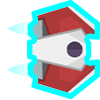
Shielded ship

Now the asteroids need to check the shield. Open Objects/Asteroid.py, change the highlighted code below and save it.

Objects/Asteroid.py
    def handle_collision(self, other, other_type):
        """
        Handles the collision events for the Asteroid
        """

        if other_type == "Ship":
            self.room.delete_object(self)
            if other.shielded:
                self.room.asteroid_shot.play()
            else:
                self.room.asteroid_collision.play()
                Globals.LIVES -= 1
                if Globals.LIVES > 0:
                    self.room.lives.update_image()
                else:
                    self.room.running = False
Code explanation
  • line 60 → checks the other object's shielded flag. other is the Ship this asteroid hit…
  • line 61 → …and if the ship is shielded, plays the asteroid-destroyed sound. The asteroid was already deleted on line 59, so no life is lost.
  • line 62 → …otherwise…
  • lines 63–68 → …the ship loses a life, just like before. These lines are indented one more level so they're inside the else.

Spawn the pickups

Finally, Zork needs to drop the pickups. Open Objects/Zork.py, add the highlighted code below and save it.

Objects/Zork.py
from GameFrame import RoomObject, Globals
from Objects.Asteroid import Asteroid
from Objects.Astronaut import Astronaut
from Objects.Bonus import RepairKit, Shield
import random

class Zork(RoomObject):
    """
    A class for the game's antagonist
    """
    def __init__(self, room, x, y):
        """
        Initialise the Zork object
        """
        # include attributes and methods from RoomObject
        RoomObject.__init__(self, room, x, y)

        # set image
        image = self.load_image("Zork.png")
        self.set_image(image,135,165)

        # set initial movement
        self.y_speed = random.choice([-10, 10])

        # start asteroid timer
        asteroid_spawn_time = random.randint(Globals.asteroid_spawn_min, Globals.asteroid_spawn_max)
        self.set_timer(asteroid_spawn_time, self.spawn_asteroid)

        # start astronaut timer (slower as more astronauts are rescued)
        astronaut_spawn_time = random.randint(30, 200) + Globals.rescued * 20
        self.set_timer(astronaut_spawn_time, self.spawn_astronaut)

        # start bonus timer
        self.set_timer(random.randint(300, 600), self.spawn_bonus)

    def keep_in_room(self):
        """
        Keeps the Zork inside the top and bottom room limits
        """
        if self.y < 0 or self.y > Globals.SCREEN_HEIGHT - self.height:
            self.y_speed *= -1

    def step(self):
        """
        Determine what happens to Zork on each tick of the game clock
        """
        self.keep_in_room()

    def spawn_asteroid(self):
        """
        Randomly spawns a new Asteroid
        """
        # spawn Asteroid and add to room
        new_asteroid = Asteroid(self.room, self.x, self.y + self.height/2)
        self.room.add_room_object(new_asteroid)

        # reset time for next Asteroid spawn
        asteroid_spawn_time = random.randint(Globals.asteroid_spawn_min, Globals.asteroid_spawn_max)
        self.set_timer(asteroid_spawn_time, self.spawn_asteroid)

    def spawn_astronaut(self):
        """
        Randomly spawns a new astronaut
        """
        # spawn astronaut and add to room
        new_astronaut = Astronaut(self.room, self.x, self.y + self.height/2)
        self.room.add_room_object(new_astronaut)

        # reset timer for next astronaut spawn (slower as more are rescued)
        astronaut_spawn_time = random.randint(30, 200) + Globals.rescued * 20
        self.set_timer(astronaut_spawn_time, self.spawn_astronaut)

    def spawn_bonus(self):
        """
        Randomly spawns a repair kit or a shield
        """
        # choose a bonus class, then create one and add it to the room
        bonus_type = random.choice([RepairKit, Shield])
        new_bonus = bonus_type(self.room, self.x, self.y + self.height/2)
        self.room.add_room_object(new_bonus)

        # reset timer for next bonus spawn
        self.set_timer(random.randint(300, 600), self.spawn_bonus)
Code explanation
  • line 4 → imports both pickup classes.
  • line 34 → starts a bonus timer of 300 to 600 ticks (10 to 20 seconds), so pickups are rare.
  • line 73 → defines the spawn_bonus method, which the timer calls.
  • lines 74–76 → a docstring that explains what the method does.
  • line 78 → chooses one of the two classes at random. In Python, a class is a value too, so we can put classes in a list.
  • line 79 → creates an object from whichever class was chosen, at Zork's position.
  • line 80 → adds the new pickup to the Room.
  • line 83 → restarts the bonus timer.

PRIMM

  1. Predict what will happen when you collect each pickup.
  2. Run MainController.py and collect a repair kit and a shield. Fly into an asteroid while you're shielded.
  3. Investigate: what happens if you collect a second shield while the first one is still on? Why?

Testing rare events

Pickups only appear every 10 to 20 seconds, which makes testing slow. While you test, change the timer on lines 34 and 83 to something like random.randint(30, 60). Just remember to change it back.


Commit and push

  1. In GitHub Desktop, type Added bonus pickups in the Summary box.
  2. Click Commit to main.
  3. Click Push origin.