Sound
On this page we will learn
- how to write notes for tunes
- how to play built-in and custom tunes and tones
- how to make the micro:bit speak and sing
- how to measure sound with the microphone
Terminology
- speaker – an output device that turns electrical signals into sound.
- microphone – an input device that detects sound and measures how loud it is.
- octave – a range of musical notes, numbered from 0 (very low) to 8 (very high), where octave 4 contains middle C.
- duration – how long a note or tone lasts.
- frequency – how many times a sound wave vibrates each second, which sets how high or low a tone sounds.
- hertz – the unit of frequency (Hz), meaning one vibration per second.
- speech synthesiser – software that creates spoken words from text, which makes the micro:bit's voice sound robotic.
- phoneme – a single sound that makes up part of a spoken word, used to tell the micro:bit exactly how to say it.
- pitch – how high or low a sound or voice is.
The micro:bit v2 has a built-in speaker that plays tunes, tones and robotic speech, and a microphone that measures how loud it is.
Possible uses:
- game sound effects
- alarms
- talking projects
- sound-activated lights
Connect it
The speaker and microphone are built into the micro:bit v2, so we don't need to connect anything.
- Each example is a
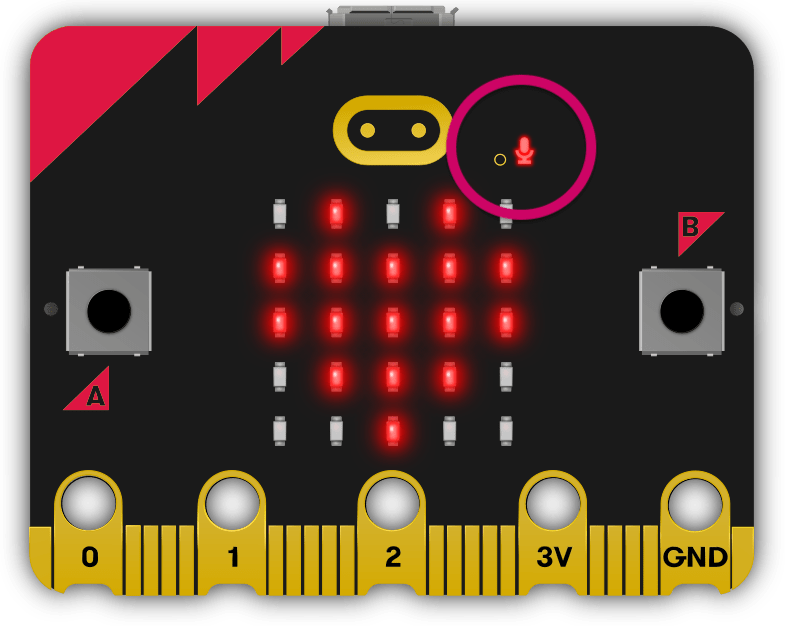
main.pyfile. See Your First Program for how to create, upload and run it. - The microphone is on the front of the board. The LED next to it lights up while the microphone is in use.
Set it up
Volume and the microphone are part of the microbit library. Music and speech each need their own module:
Only import the modules your program uses.
Writing notes
Custom tunes are lists of notes written as strings: NOTE[octave][:duration]
- note →
CtoB. Add#for sharp orbfor flat.Ris a rest (silence). - octave →
0(very low) to8(very high). Octave4contains middle C. - duration → a higher number lasts longer.
4lasts twice as long as2.
For example, "A1:4" is note A, octave 1, duration 4.
Speech pitch
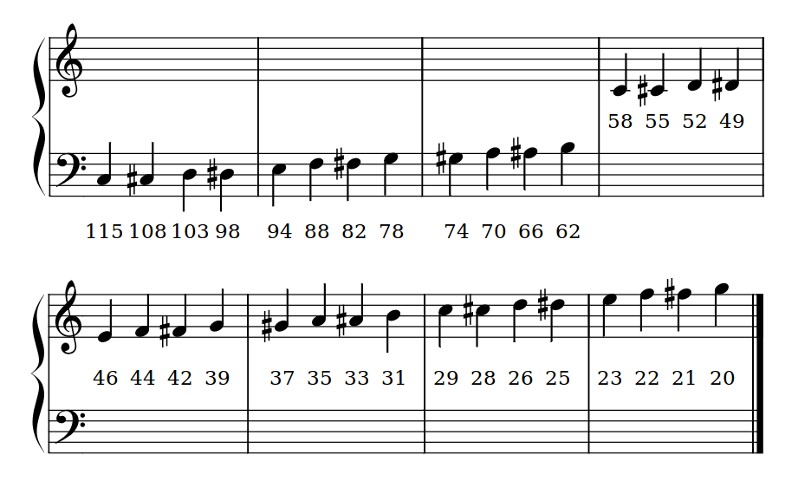
speech.sing() sets the pitch of each sound with # and a pitch number before the phoneme. The chart shows which pitch numbers match which notes.
Methods
| Method | Parameters | Returns | Description |
|---|---|---|---|
set_volume(level) |
level: 0–255 |
none | Sets the speaker volume |
music.play(music) |
music: built-in tune or list of notes |
none | Plays a tune |
music.pitch(frequency, duration) |
frequency: Hzduration: ms |
none | Plays a tone at a frequency |
speech.say(words, pitch=64, speed=72) |
words: English string |
none | Speaks English words |
speech.pronounce(phonemes) |
phonemes: phoneme string |
none | Speaks exact sounds written as phonemes |
speech.sing(phonemes) |
phonemes: phonemes with pitch numbers |
none | Sings phonemes at set pitches |
microphone.current_event() |
none | SoundEvent |
SoundEvent.LOUD or SoundEvent.QUIET |
microphone.sound_level() |
none | int (0–255) | How loud the sound is |
set_volume()
Sets how loud the speaker is, from 0 (silent) to 255 (loudest).
PRIMM
- Predict what you think will happen. Be specific.
- Run the program.
- Time to investigate the code. What does each line do?
Code explanation
- line 1 → imports all the commands from the
microbitlibrary. - line 2 → imports the
musicmodule. - line 5 → sets the volume to
50(out of255). - line 8 → starts an endless loop.
- line 9 → plays the built-in
BA_DINGsound at the new volume. - line 10 → waits 1 second before the loop repeats.
music.play() — built-in tunes
Plays a tune through the speaker.
The micro:bit has many built-in tunes.
PRIMM
- Predict what you think will happen. Be specific.
- Run the program.
- Time to investigate the code. What does each line do?
Code explanation
- line 1 → imports all the commands from the
microbitlibrary. - line 2 → imports the
musicmodule. - line 5 → starts an endless loop.
- line 6 → plays the built-in tune
NYAN.
music.play() — custom tunes
music.play() can also play your own tune, written as a list of notes (see Writing notes).
PRIMM
- Predict what you think will happen. Be specific.
- Run the program.
- Time to investigate the code. What does each line do?
Code explanation
- line 1 → imports all the commands from the
microbitlibrary. - line 2 → imports the
musicmodule. - line 5 → stores four notes, all in octave 4 with duration 4, in a list called
tune. - line 8 → starts an endless loop.
- line 9 → plays the notes in
tune.
music.pitch()
Plays a tone at any frequency, not just musical notes, which is useful for sound effects. 440 Hz is the note A that musicians tune to.
PRIMM
- Predict what you think will happen. Be specific.
- Run the program.
- Time to investigate the code. What does each line do?
Code explanation
- line 1 → imports all the commands from the
microbitlibrary. - line 2 → imports the
musicmodule. - line 5 → starts an endless loop.
- line 6 → plays a 440 Hz tone for 500 milliseconds.
- line 7 → waits 500 milliseconds, so the tone beeps.
speech.say()
Speaks English words through the speaker.
The speech sounds robotic because it uses a simple speech synthesiser. You can change the voice with the pitch and speed parameters: a higher number gives a lower or slower voice.
PRIMM
- Predict what you think will happen. Be specific.
- Run the program.
- Time to investigate the code. What does each line do?
Code explanation
- line 1 → imports all the commands from the
microbitlibrary. - line 2 → imports the
speechmodule. - line 5 → starts an endless loop.
- line 6 → says "Hello world".
- line 7 → waits 1 second before the loop repeats.
speech.pronounce()
Speaks exact sounds, written as phonemes.
When say() doesn't sound right, write the word the way it sounds using phonemes. speech.translate() gives you a starting point to edit.
PRIMM
- Predict what you think will happen. Be specific.
- Run the program.
- Time to investigate the code. What does each line do?
Code explanation
- line 1 → imports all the commands from the
microbitlibrary. - line 2 → imports the
speechmodule. - line 5 → starts an endless loop.
- line 6 → speaks the phonemes for "Moreton Bay Boys' College".
- line 7 → waits 1 second before the loop repeats.
speech.sing()
Sings phonemes at set pitches.
Each note is a pitch number after #, followed by the sound to sing. To make a note last longer, repeat its vowel sounds, for example "DOWWWWWW".
PRIMM
- Predict what you think will happen. Be specific.
- Run the program.
- Time to investigate the code. What does each line do?
Code explanation
- line 1 → imports all the commands from the
microbitlibrary. - line 2 → imports the
speechmodule. - line 5 → starts an endless loop.
- line 6 → sings three notes: "doh" at pitch
115, "re" at pitch103and "mi" at pitch94. - line 7 → waits 1 second before the loop repeats.
microphone.current_event()
Returns SoundEvent.LOUD when the sound has just changed from quiet to loud, or SoundEvent.QUIET when it has just changed from loud to quiet.
PRIMM
- Predict what you think will happen. Be specific.
- Run the program.
- Time to investigate the code. What does each line do?
Code explanation
- line 1 → imports all the commands from the
microbitlibrary. - line 4 → starts an endless loop.
- line 5 → checks if the sound has just changed from quiet to loud.
- line 6 → if it has, shows a big heart.
- line 7 → keeps the big heart on for 200 milliseconds.
- line 8 → if it hasn't…
- line 9 → …shows a small heart.
microphone.sound_level()
Returns how loud the sound around the micro:bit is, from 0 (silent) to 255 (loud).
PRIMM
- Predict what you think will happen. Be specific.
- Run the program.
- Time to investigate the code. What does each line do?
Code explanation
- line 1 → imports all the commands from the
microbitlibrary. - line 4 → starts an endless loop.
- line 5 → gets the sound level and scrolls it across the display.
Documentation
Documentation is the official guide written by the people who made the code library, and we can use it to look up every method and its parameters, including ones that aren't covered on this page.
- BBC micro:bit MicroPython — music
- BBC micro:bit MicroPython — speech
- BBC micro:bit MicroPython — microphone
- BBC micro:bit MicroPython — set_volume
Exercises
PRIMM
Time to modify the code and see what happens.
Starter files are in the sound folder of your tutorial files. Solutions are on the Exercise Solutions page.
Exercise 1
Starter: sound/ex1_my_tune
Can you create a program that plays your own tune?
Exercise 2
Starter: sound/ex2_college_song
Can you create a program that sings the College Song?
Exercise 3
Starter: sound/ex3_sound_meter
Can you light up the display based on how loud the sound is, with more LEDs for louder sounds?