Compass
On this page we will learn
- how to calibrate the compass
- how to find which direction the micro:bit is pointing
- how to measure magnetic field strength
Terminology
- magnetometer – a sensor that measures magnetic fields, used by the micro:bit as a compass.
- magnetic field – the invisible area of magnetic force around a magnet or the Earth.
- calibration – testing and adjusting a sensor or device so its readings or movements are accurate.
- heading – the direction something is facing, measured in degrees.
- nanotesla – a very small unit for measuring the strength of a magnetic field.
The compass (a magnetometer) measures magnetic fields, so it can find which direction the micro:bit is pointing and detect nearby magnets.
Possible uses:
- navigation tools
- treasure hunts
- magnet-triggered switches
Connect it
The compass is built into the micro:bit, so we don't need to connect anything.
- Each example is a
main.pyfile. See Your First Program for how to create, upload and run it. - The compass must be calibrated before it gives headings. Calibration starts automatically the first time a heading is needed: tilt the micro:bit in every direction until all the LEDs are lit.
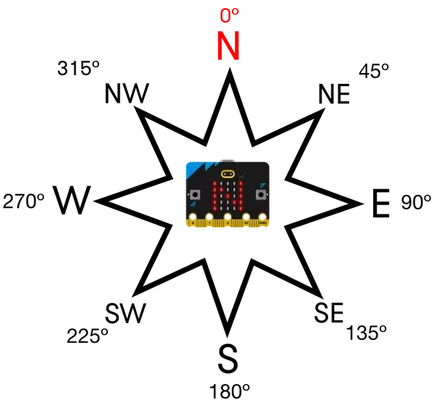
- Headings are measured from the top of the micro:bit (the USB socket end), from
0to359degrees. For example, pointing South-East gives135.
Set it up
The compass is part of the microbit library. We import it at the top of every program:
Methods
| Method | Parameters | Returns | Description |
|---|---|---|---|
compass.calibrate() |
none | none | Starts the calibration game |
compass.is_calibrated() |
none | Boolean | True if the compass has been calibrated |
compass.heading() |
none | int (0–359) | The direction the micro:bit is pointing, in degrees |
compass.get_field_strength() |
none | int (nanotesla) | The strength of the magnetic field around the micro:bit |
compass.calibrate()
Starts the calibration game: tilt the micro:bit until every LED is lit.
PRIMM
- Predict what you think will happen. Be specific.
- Run the program.
- Time to investigate the code. What does each line do?
Code explanation
- line 1 → imports all the commands from the
microbitlibrary. - line 4 → starts calibration. Tilt the micro:bit until every LED is lit.
- line 7 → starts an endless loop.
- line 8 → shows a tick once calibration is finished.
compass.is_calibrated()
Checks whether the compass has been calibrated.
PRIMM
- Predict what you think will happen. Be specific.
- Run the program.
- Time to investigate the code. What does each line do?
Code explanation
- line 1 → imports all the commands from the
microbitlibrary. - line 4 → starts an endless loop.
- line 5 → prints
Truein the Shell if the compass has been calibrated, orFalseif it hasn't. - line 6 → waits 1 second before the loop repeats.
compass.heading()
Returns the direction the top of the micro:bit is pointing, from 0 to 359 degrees.
PRIMM
- Predict what you think will happen. Be specific.
- Run the program.
- Time to investigate the code. What does each line do?
Code explanation
- line 1 → imports all the commands from the
microbitlibrary. - line 4 → starts an endless loop.
- line 5 → gets the compass heading and scrolls it across the display.
compass.get_field_strength()
Returns the strength of the magnetic field around the micro:bit. It goes up when a magnet is nearby.
PRIMM
- Predict what you think will happen. Be specific.
- Run the program.
- Time to investigate the code. What does each line do?
Code explanation
- line 1 → imports all the commands from the
microbitlibrary. - line 4 → starts an endless loop.
- line 5 → gets the magnetic field strength and scrolls it across the display.
Documentation
Documentation is the official guide written by the people who made the code library, and we can use it to look up every method and its parameters, including ones that aren't covered on this page.
Exercises
PRIMM
Time to modify the code and see what happens.
Starter files are in the compass folder of your tutorial files. Solutions are on the Exercise Solutions page.
Exercise 1
Starter: compass/ex1_north
Can you make the micro:bit show N when it is pointing North?
Exercise 2
Starter: compass/ex2_eight_points
Can you make the micro:bit show which of the 8 compass directions in the image above it is pointing (N, NE, E, SE, S, SW, W, NW) when button A is pressed?
Exercise 3
Starter: compass/ex3_microtesla
Can you change the get_field_strength() example to show the reading in microtesla with no decimal places? (1 microtesla = 1000 nanotesla)
Exercise 4
Starter: compass/ex4_magnet
Can you make the micro:bit show a happy face when a magnet is touching its right side, and an angry face otherwise?