Lesson 10: While Loops
In this lesson we will learn
- the difference between definite and indefinite iteration
- how to make Python pick random numbers
- how to use comparison operators
- how to use a
whileloop to repeat until something happens - how to keep asking the user until they give a valid answer
Terminology
- while loop – a loop that keeps repeating its code while its condition is
True. - definite iteration – a loop where we know how many times it will run, usually written as a
forloop. - indefinite iteration – a loop where we don't know how many times it will run, usually written as a
whileloop. - count-controlled loop – a loop that runs a set number of times, like a
forloop. - condition-controlled loop – a loop that runs until a condition changes, like a
whileloop. - comparison operator – a symbol such as
==,!=,>or<that compares two values and gives backTrueorFalse. - infinite loop – a loop whose condition is always
True, so it never stops on its own. - break – a command that exits a loop straight away.
Two types of loops
Python has two types of loops. We've already used the for loop. Now we'll learn about the while loop. They match two different ways of repeating code:
- definite iteration is when we know how many times the loop will run. We use a
forloop, because it runs a set number of times. - indefinite iteration is when we don't know how many times the loop will run. We use a
whileloop, because it keeps going while something isTrue.
Think about dealing cards:
- In Uno, each player gets 7 cards, so we deal 7 times. This is definite iteration.
- In Snap, we keep dealing until the deck is empty, and we don't know how many cards each player will get. This is indefinite iteration.
So:
- a
forloop runs a set number of times (count controlled) - a
whileloop runs until a condition changes (condition controlled)
To see how while loops work, let's build a number guessing game.
Number guessing game
Type the code below into a new file, or open one_guess.py from the lesson_10 folder of the tutorial files. Save it as guessing_game.py.
PRIMM
- Predict what will happen when we run the code.
- Run the code. Did it match your prediction?
- Time to investigate the code. What does each line do?
Code explanation
- line 1 → imports the
randommodule, so we can use its random number tools. - lines 4–10 → define
get_number, which asks a question and returns a whole number, or stops the program. - line 13 → picks a random whole number from 1 to 100 (including both 1 and 100) and stores it in
number. - line 15 → asks the user to guess the number and stores their guess in
guess. - line 17 → checks whether
guessis equal tonumber. - line 18 → if it is, prints
Correct!… - line 19 → …otherwise…
- line 20 → …prints
Incorrect.and shows the number.
The random module
The random module has lots of functions for getting random values. To see them all, visit the W3Schools Python random module page.
== is a comparison operator. It compares two values and gives back True or False.
Comparison operators
| Operator | Meaning |
|---|---|
== |
checks if two values are the same |
!= |
checks if two values are different |
> |
checks if the left value is greater than the right value |
< |
checks if the left value is less than the right value |
>= |
checks if the left value is greater than or equal to the right value |
<= |
checks if the left value is less than or equal to the right value |
A better game
With only one guess, the game isn't much fun. Let's give the player 10 guesses. That means repeating code, which is iteration. We know it will repeat 10 times, so this is definite iteration, and we use a for loop.
Change our code so it matches the code below.
PRIMM
- Predict what will happen when we run the code.
- Run the code. Did it match your prediction?
- Time to investigate the code. What does each line do?
Code explanation
- line 1 → imports the
randommodule. - lines 4–10 → define
get_number, which asks a question and returns a whole number, or stops the program. - line 13 → picks a random whole number from 1 to 100 and stores it in
number. - line 15 → tells the user they have 10 guesses.
- line 17 → starts a
forloop that repeats 10 times. - line 18 → asks the user for a guess and stores it in
guess. - line 20 → checks whether
guessis equal tonumber. - line 21 → if it is, prints
Correct!… - line 22 → …otherwise…
- line 23 → …prints
Incorrect. Try again. - line 25 → shows the number after all 10 guesses are finished.
An even better game
This version is better, but players don't learn anything from their earlier guesses. Let's give them hints by telling them if their guess is too high or too low. Change the if … else into an if … elif … else so our code matches the code below.
PRIMM
- Predict what will happen when:
- the guess is too high
- the guess is too low
- the guess is correct
- all 10 guesses are used without finding the number
- Run the code several times until you've seen all four. Did they match your predictions?
- Time to investigate the code. What does each line do?
Code explanation
- line 1 → imports the
randommodule. - lines 4–10 → define
get_number, which asks a question and returns a whole number, or stops the program. - line 13 → picks a random whole number from 1 to 100 and stores it in
number. - line 15 → tells the user they have 10 guesses.
- line 17 → starts a
forloop that repeats 10 times. - line 18 → asks the user for a guess and stores it in
guess. - line 20 → checks whether
guessis greater thannumber… - line 21 → …and if it is, prints
Guess is too high… - line 22 → …otherwise, checks whether
guessis less thannumber… - line 23 → …and if it is, prints
Guess is too low… - line 24 → …otherwise, when the guess is neither too high nor too low…
- line 25 → …prints
Correct!. - line 27 → shows the number after the loop has finished.
Testing tip
To make testing easier, add a line that prints number just after it's chosen. Once you've finished testing, comment that line out so it doesn't spoil the game.
Did you notice the problem? When the user guesses the number, the game says Correct!… and then keeps asking for more guesses. That's because a for loop always runs a set number of times, no matter what.
We want the game to stop as soon as the correct number is guessed. We need a loop that keeps going until something happens: indefinite iteration, using a while loop.
Using a while loop
Make these changes so our code matches the code below:
- replace line 15 with
guess = 0 - change the
forloop on line 17 towhile guess != number:
PRIMM
- Predict what will happen when:
- the guess is too high
- the guess is too low
- the guess is correct
- Run the code. Did it match your predictions?
- Time to investigate the code. What does each line do?
Code explanation
- line 1 → imports the
randommodule. - lines 4–10 → define
get_number, which asks a question and returns a whole number, or stops the program. - line 13 → picks a random whole number from 1 to 100 and stores it in
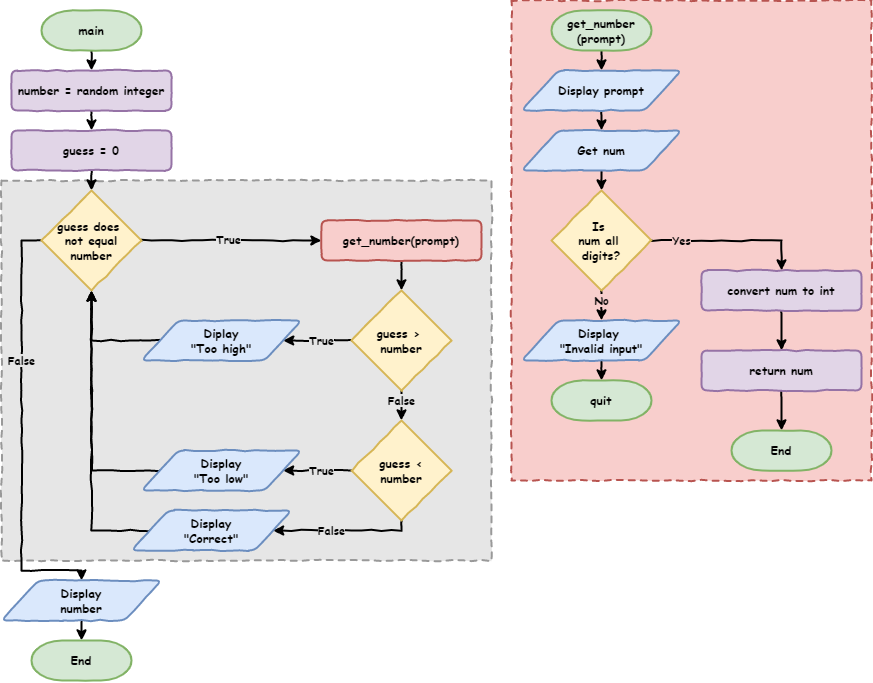
number. - line 15 → gives
guessa starting value of0, so thewhilecondition can be checked before the user has guessed. - line 17 → starts a
whileloop that keeps repeating whileguessis not equal tonumber. - line 18 → asks the user for a guess and stores it in
guess. - lines 20–25 → print
Guess is too high,Guess is too loworCorrect!. - line 27 → shows the number once the loop has finished.
Let's look closely at line 17, while guess != number::
guess != numberis the loop's condition. It'sTruewhen the guess is not the number, andFalsewhen it is.whiletells Python to keep repeating the indented code while the condition isTrue.
And line 15, guess = 0:
- the
whilecondition usesguessbefore the user has entered anything, soguessneeds a starting value, or the program will crash - the starting value must not be the same as the random number, or the loop won't run at all
- the random number is between 1 and 100, so
0guarantees the loop runs at least once
Using while to catch errors
The game is better now, but there's still a problem. If the user types something that isn't a number, the game ends straight away. That's frustrating if they've already made a few guesses.
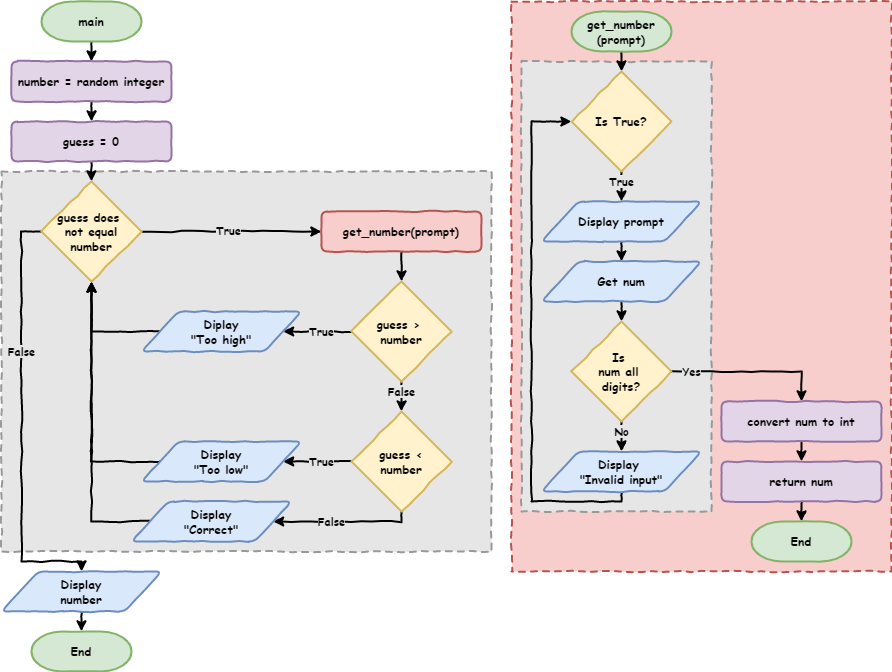
We can fix this with a while loop inside get_number, so it keeps asking until the user types a valid number. Change get_number so our code matches the code below.
PRIMM
- Predict what will happen when we type
dogas a guess. - Run the code. Test a guess that's too high, too low, correct, and not a number. Did it match your predictions?
- Time to investigate the code. What does each line do?
Code explanation
- line 1 → imports the
randommodule. - line 4 → defines
get_numberwith one parameter,prompt. - line 5 → starts a
whileloop whose condition is alwaysTrue, so it repeats until the function returns. - line 6 → shows the question in
promptand stores the user's answer innum. - line 7 → checks whether
numis made up only of digits. - line 8 → if it is, changes
numinto an integer and returns it, which ends the function and the loop… - line 9 → …otherwise…
- line 10 → …tells the user their input is invalid, and the loop asks again.
- line 13 → picks a random whole number from 1 to 100 and stores it in
number. - line 15 → gives
guessa starting value of0. - line 17 → starts a
whileloop that keeps repeating whileguessis not equal tonumber. - line 18 → asks the user for a guess and stores it in
guess. - lines 20–25 → print
Guess is too high,Guess is too loworCorrect!. - line 27 → shows the number once the loop has finished.
while True: is called an infinite loop, because its condition is always True. Usually an infinite loop is a mistake, but here we're using it on purpose. We can leave the loop with:
break, which exits the loopreturn, which exits the function, and so the loop too
The program now keeps asking until the user types a valid number, instead of crashing.
Exercises
In this course, the exercises are the make part of PRIMM. Work through them to make your own code.
Starter files are in the lesson_10 folder of the tutorial files. Solutions are on the Exercise Solutions page.
Exercise 1
Starter: lesson_10/ex1_keep_asking
Can you change the get_number and get_color functions so they keep asking until the user types a valid answer, instead of stopping the program?