Lesson 4: Range
In this lesson we will learn
- how to use
rangeto make a sequence of numbers - how to use
rangein aforloop - how to use loops to draw shapes with less code
Looping through numbers
Loops also work with lists of numbers. Create a new file, type in the code below, and save it as number_list.py.
PRIMM
- Predict what the Shell will show when we run the code.
- Run the code. Did it match your prediction?
- Time to investigate the code. What does each line do?
Code explanation
- line 1 → creates a list of the numbers 1 to 10 and stores it in
number_list. - line 3 → starts a
forloop that goes through each number innumber_list. - line 4 → prints the current number.
Introducing range
What if we want to print all the numbers from 1 to 100? Do we really want to type all of them?
Luckily, Python has the range function. It makes a sequence of numbers for us. Change line 1 so our code matches the code below.
PRIMM
- Predict what the Shell will show when we run the code.
- Run the code. Did it match your prediction?
- Time to investigate the code. What does each line do?
Code explanation
- line 1 → uses
rangeto make the numbers from 1 to 100, and stores them innumber_list. - line 3 → starts a
forloop that goes through each number innumber_list. - line 4 → prints the current number.
Let's look closely at range(1, 101):
1is the first number in the sequence101is the first number not included, so the sequence stops at 100
This might seem confusing, but we will see why it's useful in the next lesson.
We can make our code shorter by using range directly inside the for loop. Change our code so it matches the code below.
PRIMM
- Predict whether the Shell will show anything different this time.
- Run the code. Did it match your prediction?
- Time to investigate the code. What does each line do?
Code explanation
- line 1 → starts a
forloop that goes through each number from 1 to 100. - line 2 → prints the current number.
Loops with turtle
A code block can hold any type of code, including turtle code. Create a new file, type in the code below, and save it as turtle_loop.py.
PRIMM
- Predict what the turtle will draw.
- Run the code. Did it do what you expected?
- Time to investigate the code. Change one thing at a time so you can clearly see what each change does.
Code explanation
- line 1 → imports the turtle module.
- lines 3–4 → create a 500 × 500 pixel window.
- line 6 → creates a turtle called
my_ttl. - line 8 → starts a
forloop that repeats 100 times. - line 9 → moves
my_ttlforward 100 steps. - line 10 → moves
my_ttlback 100 steps to where it started. - line 11 → turns
my_ttl3 degrees to the left, so the next line points in a slightly different direction.
PRIMM
Time to modify the code. Can you make the turtle go all the way around?
A full turn is 360 degrees, so the turns need to add up to 360. For example, we could use:
36repeats of10degrees72repeats of5degrees120repeats of3degrees
Exercises
In this course, the exercises are the make part of PRIMM. Work through them to make your own code.
Starter files are in the lesson_04 folder of the tutorial files. Solutions are on the Exercise Solutions page.
Exercise 1
Starter: lesson_04/ex1_square
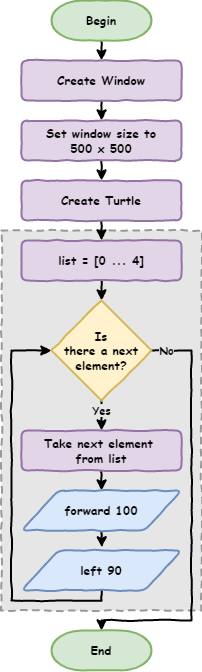
Can you add a for loop to the starter so the turtle draws a square, using only 3 more lines of code? A square has 4 sides, so the loop needs to repeat 4 times.
Hint
This flowchart shows the steps our loop needs.
Exercise 2
Starter: lesson_04/ex2_triangle
Can you add a for loop to the starter so the turtle draws an equilateral triangle, using only 3 more lines of code?
Exercise 3
Starter: lesson_04/ex3_hexagon
Can you add a for loop to the starter so the turtle draws a hexagon, using only 3 more lines of code?
Exercise 4
Starter: lesson_04/ex4_circle
Can you add a for loop to the starter so the turtle draws a circle, using only 3 more lines of code? Each time the loop repeats, the turtle should:
- move forward a small amount
- turn a small angle
Exercise 5
Starter: lesson_04/ex5_your_design
Can you use for loops to draw something interesting? You could try:
- a spiral
- a star
- a shape repeated in a pattern
- shapes that grow bigger each time
Experiment by changing how far the turtle moves, how much it turns and how many times the loop runs.