Lesson 9: Branching
In this lesson we will learn
- how to check whether the user typed a number
- how to make decisions with
if,elseandelif - how to refactor repeated code into a function that returns a value
- how to fill shapes with colour
Terminology
- branching – letting a program choose between different paths depending on what is happening.
- method – a function that belongs to an object or value, written after a dot, such as
name.upper(). - if statement – code that makes a decision by running its indented block only when its condition is
True. - condition – a check that gives back either
TrueorFalse. - else – the part of an
ifstatement that runs when none of the conditions areTrue. - refactoring – changing our code to make it better without changing what it does.
- return – to send a value back from a function to the code that called it, which also ends the function.
- elif – short for else if, a part of an
ifstatement that checks another condition when the conditions before it wereFalse.
Branching
Branching lets our program choose between different paths, depending on what is happening. To see why we need it, let's start with the shape program from Lesson 8. Open draw_poly.py and save it as shape_choices.py, or open shape_input.py from the lesson_09 folder of the tutorial files.
PRIMM
- Predict what will happen if the user types
dogwhen asked for the number of sides. - Run the code and type
dog. Did it match your prediction? - Time to investigate the code. What does each line do?
Code explanation
- line 1 → imports the turtle module.
- lines 4–7 → define
draw_poly, which draws a shape withsidessides that arelengthlong. - lines 11–13 → create a 500 × 500 pixel window.
- lines 16–17 → create a turtle called
my_ttlwith the turtle shape. - line 20 → asks for the number of sides, changes the answer into an integer, and stores it in
sides. - line 21 → asks for the side length, changes the answer into an integer, and stores it in
length. - line 23 → calls
draw_polywith the user's numbers.
The Shell shows this error:
On line 20, the program tries to change the word dog into an integer. But dog isn't a number, so Python doesn't know how to change it, and the program crashes.
To fix this, we need to check that the user has typed a whole number before we change it into an integer.
Checking for numbers
Create a new file, type in the code below, and save it as number_check.py.
PRIMM
- Predict what will happen when we run the code twice: first typing
10, then typingdog. - Run the code twice. Did it match your prediction?
- Time to investigate the code. What does each line do?
Code explanation
- line 1 → asks the user to enter a number and stores their answer, as a string, in
user_value. - line 3 → prints
Trueif every character inuser_valueis a digit, orFalseif it isn't.
Remember, anything we get from input is a string. Strings have built-in tools called methods that help us work with them. The isdigit method checks whether every character in a string is a digit (0 to 9). It gives back True if they are, and False if they aren't.
String methods
Python has lots of useful string methods. The W3Schools Python string methods page is a good place to explore them.
Now we can tell whether the user typed a number. Next, we need to tell the computer what to do with that answer.
The if statement
Change number_check.py so it matches the code below.
PRIMM
- Predict what will happen when we run the code twice: first typing
10, then typingdog. - Run the code twice. Did it match your prediction?
- Time to investigate the code. What does each line do?
Code explanation
- line 1 → asks the user to enter a number and stores their answer in
user_value. - line 3 → checks whether
user_valueis made up only of digits. - line 4 → prints
That's a number, but only if the check on line 3 isTrue.
Line 3 is an if statement:
iftells Python to make a decisionuser_value.isdigit()is the condition: a check that gives back eitherTrueorFalse:tells Python that the indented lines below belong to theifstatement- the indented code only runs if the condition is
True, so10prints the message anddogskips it
Flowcharts use the diamond-shaped decision symbol for the condition in an if statement, the same symbol we used for for loops.
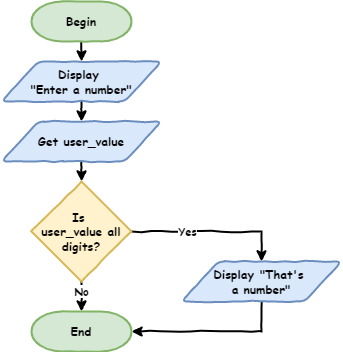
Right now, the program only does something when the input is a number. What about when it isn't?
The if … else statement
Add lines 5 and 6 so our code matches the code below.
PRIMM
- Predict what will happen when we run the code twice: first typing
10, then typingdog. - Run the code twice. Did it match your prediction?
- Time to investigate the code. Use the debugger to step through it twice, once with
10and once withdog. Watch which path the program takes.
Code explanation
- line 1 → asks the user to enter a number and stores their answer in
user_value. - line 3 → checks whether
user_valueis made up only of digits. - line 4 → prints
That's a numberif the check isTrue… - line 5 → …otherwise…
- line 6 → …prints
That's not a number.
else is linked to the if statement above it. It runs when the if condition is False. Here is the flowchart:
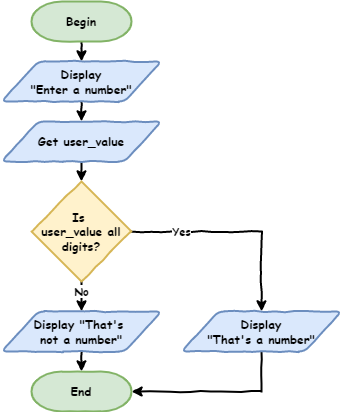
Using if … else to catch errors
Let's use if … else to stop our shape program crashing. Go back to shape_choices.py and change the sides code so our code matches the code below.
PRIMM
- Predict what will happen when we type
dogfor the sides now. - Run the code. Try a number first, then
dog. Did it match your prediction? - Time to investigate the code. What does each line do?
Code explanation
- line 1 → imports the turtle module.
- lines 4–7 → define
draw_poly, which draws a shape withsidessides that arelengthlong. - lines 11–13 → create a 500 × 500 pixel window.
- lines 16–17 → create a turtle called
my_ttlwith the turtle shape. - line 20 → asks for the number of sides and stores the answer, as a string, in
sides. - line 21 → checks whether
sidesis made up only of digits. - line 22 → if it is, changes
sidesinto an integer… - line 23 → …otherwise…
- line 24 → …tells the user their input is invalid…
- line 25 → …and stops the program.
- line 27 → asks for the side length, changes it into an integer, and stores it in
length. - line 29 → calls
draw_polywith the user's numbers.
Now do the same for length, so our code matches the code below.
PRIMM
- Predict what will happen in each of these situations:
- a valid number of sides and a valid length
- a valid number of sides and an invalid length
- an invalid number of sides and a valid length
- an invalid number of sides and an invalid length
- Run the code four times to test each situation. Did it match your predictions?
- Time to investigate the code. What does each line do?
Code explanation
- line 1 → imports the turtle module.
- lines 4–7 → define
draw_poly, which draws a shape withsidessides that arelengthlong. - lines 11–13 → create a 500 × 500 pixel window.
- lines 16–17 → create a turtle called
my_ttlwith the turtle shape. - lines 20–25 → ask for the number of sides, and either change it into an integer or stop the program.
- line 27 → asks for the side length and stores the answer, as a string, in
length. - line 28 → checks whether
lengthis made up only of digits. - line 29 → if it is, changes
lengthinto an integer… - line 30 → …otherwise…
- line 31 → …tells the user their input is invalid…
- line 32 → …and stops the program.
- line 34 → calls
draw_polywith the user's numbers.
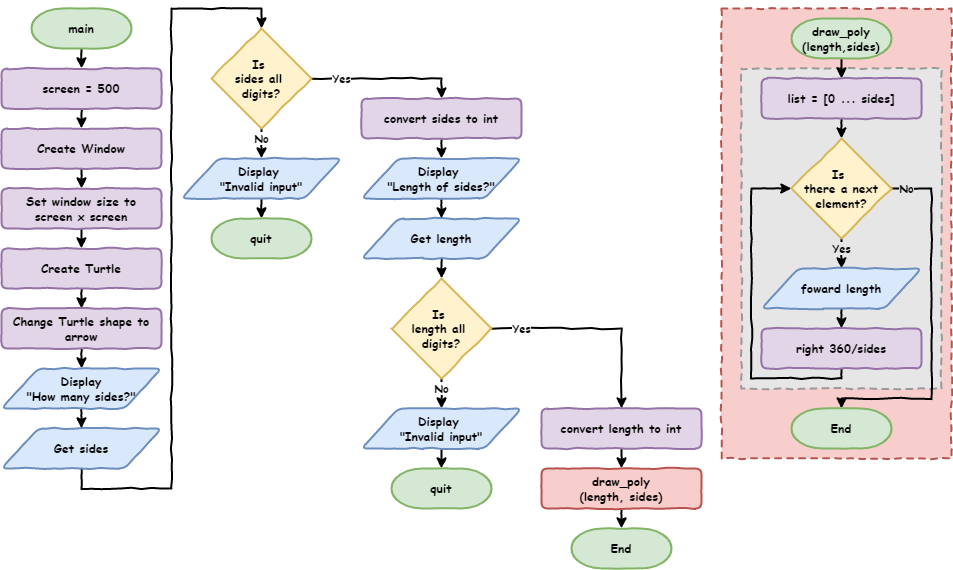
Testing branches
When we test code with branches, we need to test every possible path. Test each if statement with a True condition and with a False condition. This program has four possible paths, so we need four tests.
Refactoring our code
Our code doesn't pass the DRY test. Lines 20–25 and lines 27–32 do the same three things:
- ask the user for input
- check whether the input is only digits
- either change it into an integer or stop the program
The only differences are the question shown to the user and the variable name. This is a good chance to refactor our code by using a function.
What is refactoring?
Refactoring means changing our code without changing what it does. We do it to make our code better, for example easier to read, fix and improve later.
Add a get_number function under draw_poly, then replace the # get user input code with two calls to it. Our code should match the code below.
PRIMM
- Predict whether the program will work any differently.
- Run the code. When we refactor, the program should work exactly the same, so test all four situations again.
- Time to investigate the code. What does each line do?
Code explanation
- line 1 → imports the turtle module.
- lines 4–7 → define
draw_poly, which draws a shape withsidessides that arelengthlong. - line 10 → defines a function called
get_numberwith one parameter,prompt: the question to show the user. - line 11 → shows the question in
promptand stores the user's answer innum. - line 12 → checks whether
numis made up only of digits. - line 13 → if it is, changes
numinto an integer and returns it: sends it back to the code that called the function, and ends the function… - line 14 → …otherwise…
- line 15 → …tells the user their input is invalid…
- line 16 → …and stops the program.
- lines 20–22 → create a 500 × 500 pixel window.
- lines 25–26 → create a turtle called
my_ttlwith the turtle shape. - line 29 → calls
get_numberwith the questionHow many sides?>, and stores the number it returns insides. - line 30 → calls
get_numberwith the questionHow long are the sides?>, and stores the number it returns inlength. - line 32 → calls
draw_polywith the user's numbers.
return is new. It sends a value back to the code that called the function, then ends the function. Here is the flowchart:
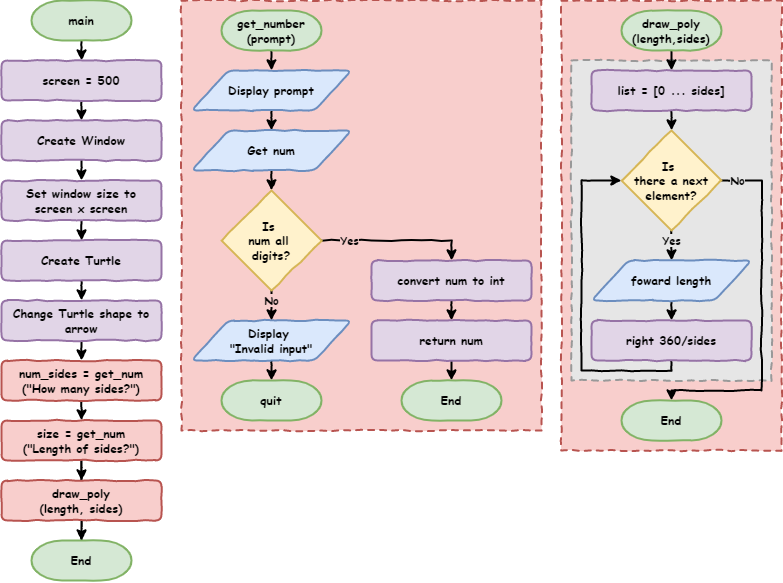
Playing with colour
Let's add a new feature: colour. The turtle's color method takes two values: the colour of the line, then the colour used to fill the shape.
Colour or color?
Python uses US spelling for its built-in commands, so we must write color. If we use Australian spelling (colour), our program will crash. For our own variables and functions we can choose either spelling, but it's best to stay consistent.
Change draw_poly and the last line so our code matches the code below.
PRIMM
- Predict what the turtle will draw.
- Run the code. Did it match your prediction?
- Time to investigate the code. What does each line do?
Code explanation
- line 1 → imports the turtle module.
- line 4 → defines
draw_polywith a third parameter,color. - line 5 → sets the line colour to black and the fill colour to the value in
color. - line 6 → tells the turtle to start filling the shape it draws.
- lines 7–9 → draw the shape.
- line 10 → tells the turtle to stop drawing the shape and fill it in.
- lines 13–19 → define
get_number, which asks a question and returns a whole number, or stops the program. - lines 23–25 → create a 500 × 500 pixel window.
- lines 28–29 → create a turtle called
my_ttlwith the turtle shape. - lines 32–33 → ask for the number of sides and the side length.
- line 35 → draws the shape, filled in red.
Turtle colours
Turtle knows lots of colour names. Here is a list of the named colours we can use.
Now let's let the user choose the fill colour: red, blue or green. If they type anything else, we need to catch the error.
if … else only gives us two paths: one for True and one for False. Here we need more than two. For that, we use elif.
The if … elif … else statement
elif is short for "else if". It lets our program choose between many options, not just two.
Add a get_color function and change the # get user input code and the last line so our code matches the code below.
PRIMM
- Predict what will happen when we type
Blue, then when we typepurple. - Run the code with each colour. Did it match your predictions?
- Time to investigate the code. What does each line do?
Code explanation
- line 1 → imports the turtle module.
- lines 4–10 → define
draw_poly, which draws a filled shape. - lines 13–19 → define
get_number, which asks a question and returns a whole number, or stops the program. - line 22 → defines a function called
get_color. - line 23 → asks the user for a fill colour, changes their answer to lowercase with the
lowermethod, and stores it incolor. SoRed,REDandrEdall becomered. - line 24 → checks whether
coloris"red".==means "is equal to". - line 25 → if it is, returns
colorand ends the function… - line 26 → …otherwise, checks whether
coloris"blue"… - line 27 → …and if it is, returns
color… - line 28 → …otherwise, checks whether
coloris"green"… - line 29 → …and if it is, returns
color… - line 30 → …otherwise, when none of the checks were
True… - line 31 → …tells the user their input is invalid…
- line 32 → …and stops the program.
- lines 36–38 → create a 500 × 500 pixel window.
- lines 41–42 → create a turtle called
my_ttlwith the turtle shape. - lines 45–46 → ask for the number of sides and the side length.
- line 47 → calls
get_colorand stores the colour it returns infill. - line 49 → draws the shape, filled with the chosen colour.
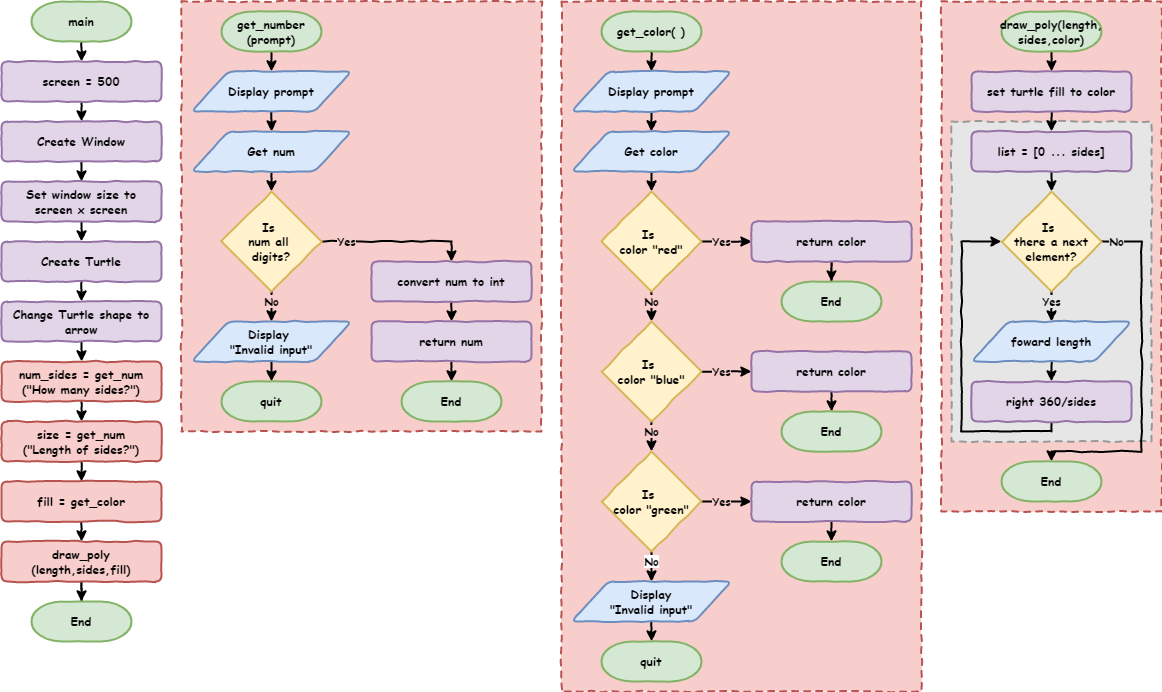
How if … elif … else works
if- always comes first
- is required, and there can only be one
- checks the first condition
elif- comes after the
ifand before theelse - is optional, and there can be as many as we need
- is only checked if all the conditions before it were
False
- comes after the
else- always comes last
- is optional, and there can only be one
- runs if none of the conditions were
True
Exercises
In this course, the exercises are the make part of PRIMM. Work through them to make your own code.
Starter files are in the lesson_09 folder of the tutorial files. Solutions are on the Exercise Solutions page.
Exercise 1
Starter: lesson_09/ex1_security_guard
Amy needs a security guard for her party. Can you write a program that asks for a person's name, then:
- lets them in if their name is
Amy - politely tells everyone else to go away
Exercise 2
Starter: lesson_09/ex2_friends
Amy's friend Bruce is coming too. Can you change your security guard program so it lets in Amy, lets in her friend (stored in the friend variable), and politely tells everyone else to go away?
Exercise 3
Starter: lesson_09/ex3_shape_position
Can you finish the move_pen function so the user can choose where the shape is drawn? It should:
- ask the user for the
xandyposition usingget_number - lift the pen, move to that position and put the pen down
Negative numbers
In this starter, get_number uses num.lstrip("-").isdigit(). lstrip("-") removes a minus sign from the start of the string before checking it, so the user can type negative positions like -100.