Lesson 5: Variables
In this lesson we will learn
- the most common way to use
range - why magic numbers make code hard to read and change
- how to store values in variables
- how to let Python do calculations for us
- how to name variables and constants
Terminology
- loop variable – the variable in a
forloop that stores the item or number the loop is currently using. - magic number – a number written straight into our code with no name to explain what it means.
- variable – a named place, like a labelled box, that stores a value our program can use and change.
- case sensitive – treating capital and lowercase letters as different, so
ageandAgeare two different names. - single point of truth – keeping each value in one place, so changing it there changes it everywhere it is used.
- constant – a variable whose value never changes while the program runs, written in capital letters in Python.
- naming convention – an agreed habit for naming things that makes code easier to read, but doesn't cause an error if we break it.
- snake case – writing names in lowercase letters with
_instead of spaces, likeside_length.
Conventional range
Before we start on variables, let's learn the most common way to use range. Earlier, we used code like this to print four numbers. Create a new file, type in the code below, and save it as counting.py.
PRIMM
- Predict what the Shell will show when we run the code.
- Run the code. Did it match your prediction?
- Time to investigate the code. What does each line do?
Code explanation
- line 1 → starts a
forloop that counts from 1 to 4, storing the current number inindex. - line 2 → prints the current number.
What is index?
We can give the loop variable any name, but when it's just counting it's common to call it index.
If we only care about how many times the loop repeats, we can count from 0 instead. Change line 1 so our code matches the code below.
PRIMM
- Predict what the Shell will show now.
- Run the code. Did it match your prediction?
- Time to investigate the code. What does each line do?
Code explanation
- line 1 → starts a
forloop that counts from 0 to 3. - line 2 → prints the current number.
The loop still runs four times. The only difference is that it starts counting from 0.
If we don't tell range where to start, it starts at 0. So we can leave the 0 out. Change line 1 so our code matches the code below.
PRIMM
- Predict whether the Shell will show anything different.
- Run the code. Did it match your prediction?
- Time to investigate the code. What does each line do?
Code explanation
- line 1 → starts a
forloop that repeats 4 times, counting from 0 to 3. - line 2 → prints the current number.
This is the most common way to use range in Python: range(4) means "repeat 4 times".
Replace magic numbers
Here is one solution to Lesson 4 Exercise 1, using range(4). There are many correct answers. Create a new file, type in the code below, and save it as shapes.py.
PRIMM
- Predict what the turtle will draw.
- Run the code. Did it match your prediction?
- Time to investigate the code. What does each line do?
Code explanation
- line 1 → imports the turtle module.
- lines 3–4 → create a 500 × 500 pixel window.
- line 5 → creates a turtle called
my_ttl. - line 7 → starts a
forloop that repeats 4 times. - line 8 → moves
my_ttlforward 100 steps. - line 9 → turns
my_ttl90 degrees to the left.
What do we need to change so the turtle draws a triangle with sides that are 200 long? Try to work it out before looking at the code below. Then change our code so it matches.
PRIMM
- Predict what the turtle will draw.
- Run the code. Did it match your prediction?
- Time to investigate the code. Which numbers did we change, and what does each one mean?
Code explanation
- line 1 → imports the turtle module.
- lines 3–4 → create a 500 × 500 pixel window.
- line 5 → creates a turtle called
my_ttl. - line 7 → starts a
forloop that repeats 3 times, once for each side. - line 8 → moves
my_ttlforward 200 steps, the length of each side. - line 9 → turns
my_ttl120 degrees to the left.
We changed three numbers:
4→3is the number of sides100→200is the length of each side90→120is how many degrees the turtle turns
Numbers written straight into our code like this are called magic numbers. They're not a good idea:
- someone reading our code won't know what
3,200or120are for without working it out - if our program drew 1,000 squares and we wanted triangles instead, we would have to change 3,000 numbers
To write better code, we replace magic numbers with variables. A variable is like a labelled box where we store a value. Change our code so it matches the code below.
PRIMM
- Predict what the turtle will draw.
- Run the code. Did it match your prediction?
- Time to investigate the code. What does each line do?
Code explanation
- line 1 → imports the turtle module.
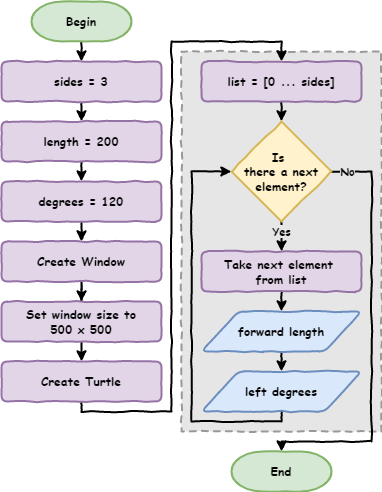
- line 3 → creates a variable called
sidesand stores3in it. - line 4 → creates a variable called
lengthand stores200in it. - line 5 → creates a variable called
degreesand stores120in it. - lines 7–8 → create a 500 × 500 pixel window.
- line 9 → creates a turtle called
my_ttl. - line 11 → starts a
forloop that uses the value insides, so it works the same asrange(3). - line 12 → moves
my_ttlforward by the value inlength, so it works the same asforward(200). - line 13 → turns
my_ttlleft by the value indegrees, so it works the same asleft(120).
Here is the flowchart for our program:
Naming rules
Python has some rules for naming variables:
- names can only use letters, numbers and
_(underscore) - names can't have spaces
- names can't start with a number
- names are case sensitive, so
ageandAgeare different variables
Single point of truth
Now that we're using variables, the values for sides, length and degrees always come from one place: the start of our program. If we change the value of sides, it changes everywhere sides is used. This is called a single point of truth.
Change our code so it draws a hexagon with sides that are 100 long.
PRIMM
- Predict what the turtle will draw.
- Run the code. Did it match your prediction?
- Time to investigate the code. What does each line do?
Code explanation
- line 1 → imports the turtle module.
- lines 3–5 → store the number of sides, the side length and the turning angle for a hexagon.
- lines 7–9 → create the window and the turtle.
- lines 11–13 → draw the shape using the values stored in the variables.
No "meat space" calculations
How did we know the turtle needed to turn 60 degrees for a hexagon? We might have worked it out in our head or used a calculator. Both have problems: we might make a mistake in our head, and a calculator takes extra time. (Meat space is a joke name for the real world, outside the computer.)
Instead, we can get Python to do the calculation. The turning angle is 360 divided by the number of sides. Change line 5 so our code matches the code below.
PRIMM
- Predict whether the turtle will draw anything different.
- Run the code. Did it match your prediction?
- Time to investigate the code. What does each line do?
Code explanation
- line 1 → imports the turtle module.
- line 3 → stores
6insides. - line 4 → stores
100inlength. - line 5 → divides
360by the value insidesand stores the answer (60.0) indegrees. - lines 7–9 → create the window and the turtle.
- lines 11–13 → draw the shape using the values stored in the variables.
Python calculations
Python can do lots of maths for us. / means divide, * means multiply, + means add and - means subtract. To see them all, check out the W3Schools Python arithmetic operators page.
Remove unnecessary variables
Another good habit is to remove variables we don't really need. Do we need degrees, or could we do the calculation inside the for loop?
Delete line 5, then change the last line of the loop to my_ttl.left(360 / sides). Our code should now match the code below.
PRIMM
- Predict whether the turtle will draw anything different.
- Run the code. Did it match your prediction?
- Time to investigate the code. What does each line do?
Code explanation
- line 1 → imports the turtle module.
- lines 3–4 → store the number of sides and the side length.
- lines 6–8 → create the window and the turtle.
- line 10 → starts a
forloop that repeats once for each side. - line 11 → moves
my_ttlforward by the value inlength. - line 12 → works out the turning angle (
360divided bysides) and turnsmy_ttlleft by that amount.
Constants
Are there any more magic numbers in our code? Look carefully before reading on.
There are two: the 500 for the window size, and the 360 in our calculation. Change our code so it matches the code below.
PRIMM
- Predict whether the turtle will draw anything different.
- Run the code. Did it match your prediction?
- Time to investigate the code. What does each line do?
Code explanation
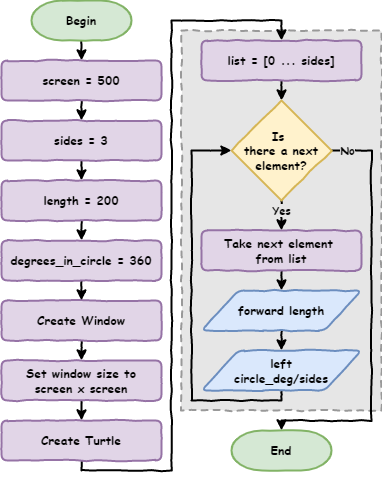
- line 1 → imports the turtle module.
- line 3 → stores the window size,
500, inscreen. - lines 4–5 → store the number of sides and the side length.
- line 6 → stores
360, the number of degrees in a full turn, in the constantCIRCLE_DEG. - lines 8–9 → create a window that is
screenpixels wide andscreenpixels high. - line 10 → creates a turtle called
my_ttl. - line 12 → starts a
forloop that repeats once for each side. - line 13 → moves
my_ttlforward by the value inlength. - line 14 → turns
my_ttlleft byCIRCLE_DEGdivided bysides.
We named CIRCLE_DEG in capital letters because its value never changes, no matter what shape we draw. Variables like this are called constants, and in Python we write their names in capital letters.
The flowchart for this code now looks like this:
Naming conventions
Python has naming rules and naming conventions, and they're not the same:
- if we break a naming rule, our program crashes with an error
- if we break a naming convention, our program still works, but our code is harder to read
The naming conventions for variables are:
- use clear names that explain what the value is:
d = 30is bad,degrees = 30is better,degrees_celsius = 30is best - use snake case for names with more than one word: lowercase letters with
_instead of spaces, likethis_is_snake_case - use ALL CAPITAL LETTERS for constants
- don't use names Python already uses, like
print,fororrange
Exercises
In this course, the exercises are the make part of PRIMM. Work through them to make your own code.
Starter files are in the lesson_05 folder of the tutorial files. Solutions are on the Exercise Solutions page.
Exercise 1
Starter: lesson_05/ex1_square
Can you change the values of the variables, without changing any other code, so the turtle draws a square?
Exercise 2
Starter: lesson_05/ex2_circle
Can you change the values of the variables, without changing any other code, so the turtle draws a circle?
Exercise 3
Starter: lesson_05/ex3_pentagon
Can you change the values of the variables, without changing any other code, so the turtle draws a pentagon (a shape with five equal sides)?