Lesson 3: Iteration
In this lesson we will learn
- why the order of our code matters (sequence)
- how to draw a program as a flowchart
- how to use a
forloop to repeat code - how lists and code blocks work
- how to step through a loop with Thonny's debugger
Terminology
- sequence – code running one line after the other, from the top of the program to the bottom.
- flowchart – a diagram that uses shapes and arrows to show each step in a program and how it moves from one step to the next.
- input – information that goes into a program, such as a key press, a mouse click or a sensor reading.
- output – information or actions that a program sends out, such as text on the screen, a sound or a motor moving.
- scalable – describes code that still works well as the program gets bigger.
- DRY – short for Don't Repeat Yourself, the principle that we shouldn't write the same code over and over again.
- iteration – repeating the same code again and again, often with a small change each time, also called looping.
- for loop – a loop that repeats its code once for each item in a list or sequence.
- control structure – code that changes the flow of a program, instead of just running from top to bottom.
- list – a collection of items stored in a set order inside
[and], with commas between them. - element – one item in a list.
- indentation – spaces at the start of a line (four in Python) that show which code belongs to a loop or other block.
- debugger – a tool that runs our code one step at a time so we can see what it is doing and find mistakes.
- code block – a group of lines indented by the same amount that belong together and run together.
Sequence
So far, each line of our code runs one after the other. This is called sequence. It's the normal way programs run: the program starts at the top and works its way down, one line at a time.
This movement through the code is called the flow of the program, like water flowing through a pipe.
Introduction to flowcharts
A flowchart is a diagram that shows each step in a program and how the program moves from one step to the next. Different shapes represent different parts of the program:
- rectangles show a process (something the program does)
- parallelograms show input or output (getting or showing information)
- arrows show the flow (the direction the program moves)

If we wanted a program to say hello to six people, the flowchart would look like this:
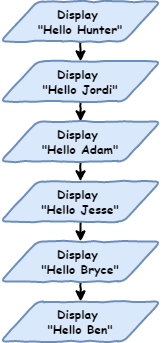
Create a new file, type in the code below, and save it as iteration.py.
PRIMM
- Predict what the Shell will show when we run the code.
- Run the code. Did it match your prediction?
- Time to investigate the code. What does each line do?
Code explanation
- lines 3–8 → print a greeting for each person in the Shell, one line at a time, from top to bottom.
The Shell shows:
Because the program runs in sequence, the order of the lines matters. Change the order of the lines so our code matches the code below.
PRIMM
- Predict what the Shell will show now.
- Run the code. Did the order change?
- Time to investigate the code. What does each line do?
Code explanation
- lines 3–8 → print the same six greetings, but in the new order.
Sequence is fine for small programs, but it becomes a problem with bigger ones. Imagine saying hello to 500 or even 1,000 people. That would take a long time to type. And if we wanted to change Hello to Good morning, we would have to change every single line.
In Digital Technologies, we say this code is not scalable: it doesn't work well as the program gets bigger.
Iteration
Look at lines 3 to 8 again. They're almost the same. The only thing that changes is the name.
This breaks the DRY principle. DRY stands for Don't Repeat Yourself. It means we shouldn't write the same code over and over again.
One way to avoid repeating ourselves is iteration (also called loops). A loop repeats the same code again and again, with a small change each time. This is perfect for our program, because we want to repeat print("Hello", name) with a different name each time.
for loops
The first loop we will use is the for loop. It's the first control structure we've used. A control structure changes how the program flows, instead of just running from top to bottom.
Change our code so it matches the code below.
PRIMM
- Predict what the Shell will show when we run the code.
- Run the code. Did it match your prediction?
- Time to investigate the code. What does each line do?
Code explanation
- line 3 → creates a list of six names and stores it in
names. - line 5 → starts a
forloop that goes through each item innames, storing the current item inname. - line 6 → prints
Hellofollowed by the current name each time the loop repeats.
Line 3 creates a list. A list works like a real-life list:
- it has a number of items, called elements
- the elements are in a set order
[and]show where the list starts and ends- a comma (
,) separates each element - we give the list a name, just like our turtle or window
Line 5 is how we write a for loop in Python:
foris a special word that starts the loopin namestells Python to go through each element in thenameslistnamestores the element the loop is currently using:tells Python that the indented lines below belong to the loop
Line 6 is indented. The indentation shows which code repeats in the loop. Indents should be four spaces. In Thonny, pressing Tab adds four spaces for us.
for loop flowchart
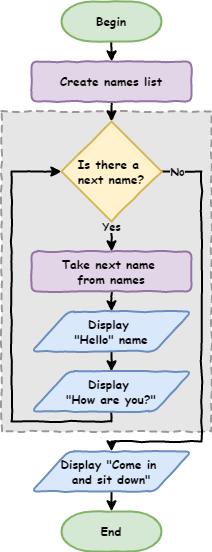
To draw a for loop as a flowchart, we need two more symbols:
- terminators show the start and end of the program
- decisions are questions the program asks. The answer changes the path the program takes.
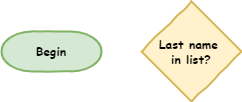
Here is the flowchart for our for loop. The shapes inside the dotted box repeat once for each element in the list.
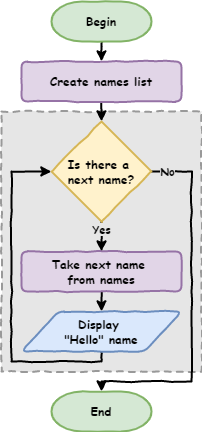
Dotted box
The dotted box helps us see the for loop. It's not a normal flowchart symbol.
Tracing with the debugger
Another way to understand a for loop is to use Thonny's debugger. A debugger lets us run our code one step at a time and see what happens.
Start the debugger by clicking the bug icon next to the Run button.

Keep pressing F7 and Thonny will move through the code one step at a time. Watch the values in the Variables panel as you do this.
Learning more about the debugger
The Debugging with Thonny guide explains the debugger's features in more detail.
Code blocks
Indented lines that belong together are called a code block. Let's see how that works. Add line 7 so our code matches the code below.
PRIMM
- Predict what the Shell will show when we run the code.
- Run the code. Did it match your prediction?
- Time to investigate the code. What does each line do?
Code explanation
- line 3 → creates a list of six names and stores it in
names. - line 5 → starts a
forloop that goes through each name innames. - line 6 → prints
Hellofollowed by the current name. - line 7 → prints
How are you?each time the loop repeats.
The Shell shows:
Hello Hunter
How are you?
Hello Jordi
How are you?
Hello Adam
How are you?
Hello Jesse
How are you?
Hello Bryce
How are you?
Hello Ben
How are you?
All of the code in the code block repeats. Every line in a code block must be indented by the same number of spaces.
What happens if a line isn't indented? Add line 9 so our code matches the code below. Make sure line 9 is not indented.
PRIMM
- Predict what the Shell will show when we run the code.
- Run the code. Did it match your prediction?
- Time to investigate the code. What does each line do?
Code explanation
- line 3 → creates a list of six names and stores it in
names. - line 5 → starts a
forloop that goes through each name innames. - lines 6–7 → print a greeting and
How are you?for each name. - line 9 → prints
Come in and sit downonce, after the loop has finished.
The Shell shows:
Hello Hunter
How are you?
Hello Jordi
How are you?
Hello Adam
How are you?
Hello Jesse
How are you?
Hello Bryce
How are you?
Hello Ben
How are you?
Come in and sit down
Because line 9 isn't indented, it isn't part of the for loop, so it runs after the loop has finished. The flowchart for our updated code looks like this:
Exercises
In this course, the exercises are the make part of PRIMM. Work through them to make your own code.
Starter files are in the lesson_03 folder of the tutorial files. Solutions are on the Exercise Solutions page.
Exercise 1
Starter: lesson_03/ex1_greet_friends
Can you change the program so it says hello to your friends instead? Use a list called friends and a loop variable called friend.
Exercise 2
Starter: lesson_03/ex2_school_greeting
Can you change the program so it greets the class at the start of a lesson? It should:
- print
Good morningand the name of each person - ask each person to get their laptop out
- print
Let's start the lessononce, after everyone has been greeted
Exercise 3
Starter: lesson_03/ex3_indent
What happens if we indent the last line, print("Come in and sit down"), so it lines up with the two print lines inside the loop? Why do you think this happens?