Lesson 8: User Input
In this lesson we will learn
- how to get input from the user with
input() - what data types are and why they matter
- how to change a value from one data type into another
Terminology
- interactive – describes a program that lets the user give it information while it runs, instead of changing the code.
- data type – the kind of value something is, such as a number or text, which tells Python what it can do with that value.
- integer – a whole number written without a decimal point, like
1or25, calledintin Python. - floating point number – a number with a decimal point, like
1.0or3.5, calledfloatin Python. - Boolean – a data type that can only be
TrueorFalse, calledboolin Python.
Drawing any shape
Type the code below into a new file, or open draw_poly.py from the lesson_08 folder of the tutorial files. Save it as draw_poly.py.
PRIMM
- Predict what the turtle will draw.
- Run the code. Did it match your prediction?
- Time to investigate the code. What does each line do?
Code explanation
- line 1 → imports the turtle module.
- line 4 → defines a function called
draw_polywith two parameters,lengthandsides. - line 5 → starts a
forloop that repeats once for each side. - line 6 → moves
my_ttlforward by the value inlength. - line 7 → turns
my_ttlright by360divided bysides. - lines 11–13 → create a 500 × 500 pixel window.
- lines 16–17 → create a turtle called
my_ttlwith the turtle shape. - line 19 → stores
9insides. - line 20 → stores
100inlength. - line 22 → calls
draw_polyto draw a shape with 9 sides that are 100 long.
PRIMM
Time to modify the code. Part of the shape goes off the screen. Can you change the code so the shape fits in the window?
Changing length from 100 to 80 fixes it. That's easy for us, because we know how to code. But what about someone who doesn't? How can we let the user choose the shape without changing the code?
Making our program interactive
The easiest way to make our program interactive is with the input function. It asks the user a question in the Shell and waits for them to type an answer.
Change lines 19 and 20 so our code matches the code below.
PRIMM
- Predict what will happen when we run the code.
- Run the code. When it asks, type
3for the sides and100for the length. Did you expect a question to appear in the Shell? Did you expect an error? - Time to investigate the code. What does each line do?
Code explanation
- line 1 → imports the turtle module.
- lines 4–7 → define
draw_poly, which draws a shape withsidessides that arelengthlong. - lines 11–13 → create a 500 × 500 pixel window.
- lines 16–17 → create a turtle called
my_ttlwith the turtle shape. - line 19 → shows the question
How many sides?>in the Shell, waits for the user to type an answer, and stores the answer insides. - line 20 → asks
How long are the sides?>and stores the answer inlength. - line 22 → calls
draw_polywith the user's answers.
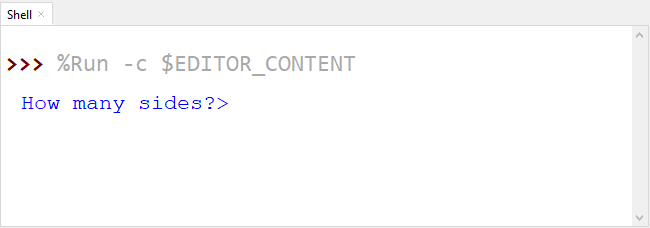
The Shell shows this error:
This is a TypeError. To understand it, we need to learn about data types.
Data types
Values in Python have different types. The four main types we will use are:
- integers (
int) store whole numbers, written without a decimal point, like1or25 - floating point numbers (
float) store numbers with a decimal point, like1.0or3.5.1is an integer, but1.0is a float. - strings (
str) store text: letters, numbers and symbols inside" "or' '. Numbers can be strings, like a phone number"0432 789 367", but we can't do maths with strings. - Booleans (
bool) can only beTrueorFalse
Data types tell Python what it can do with a value. For example, we can do maths with numbers, but not with text.
Let's look at the error again:
- line 4 tells us what went wrong. Always read the last line first. Python expected an integer (
int), but it got a string (str) instead. - line 2 tells us the problem started on line 22 of our program, where we called
draw_poly. - line 3 tells us the error happened on line 5, inside
draw_poly:for index in range(sides):. Therangefunction needs a whole number, butsidesis a string.
Where did sides come from? Line 19: sides = input("How many sides?> "). The user typed 3, which looks like a number. So why is it a string?
Because everything we get from input() is a string, even if it looks like a number. To fix this, we need to change the string into a number.
Converting data types
Python has built-in functions that change a value from one data type to another. If we have a variable called value:
str(value)changes it into a stringint(value)changes it into an integerfloat(value)changes it into a float
There's more to learn about this later, but that's all we need for now.
Let's put the input() inside int(), so the user's answer is changed into an integer. Change lines 19 and 20 so our code matches the code below.
PRIMM
- Predict what will happen when we run the code.
- Run the code. Did it match your prediction?
- Time to investigate the code. Try different values for the sides and length. What values make the turtle draw a circle? What happens if you type a decimal, like
3.5, or a word, likedog?
Code explanation
- line 1 → imports the turtle module.
- lines 4–7 → define
draw_poly, which draws a shape withsidessides that arelengthlong. - lines 11–13 → create a 500 × 500 pixel window.
- lines 16–17 → create a turtle called
my_ttlwith the turtle shape. - line 19 → asks
How many sides?>, changes the answer into an integer, and stores it insides. - line 20 → asks
How long are the sides?>, changes the answer into an integer, and stores it inlength. - line 22 → calls
draw_polywith the user's numbers.
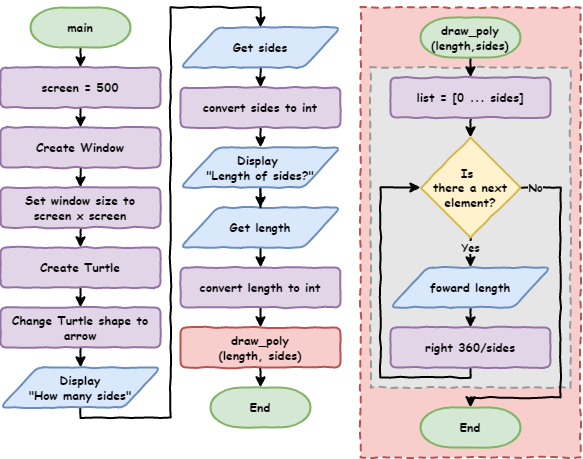
Here is the program as a flowchart. Notice that input and output use the same shape, but with different labels.
PRIMM
Time to modify the code. Can you change the questions so they're clearer for the user?
Exercises
In this course, the exercises are the make part of PRIMM. Work through them to make your own code.
Starter files are in the lesson_08 folder of the tutorial files. Solutions are on the Exercise Solutions page.
Exercise 1
Starter: lesson_08/ex1_count_up
Can you write a program that asks the user for a number, then counts up to that number? For example, if the user types 5, it should print 1, 2, 3, 4 and 5.