Stage 6: Use Items
In this lesson we will learn
- why a list is a good way to store several pieces of data
- how to create and update a list to store and manage items
- how player commands trigger different branches of code
- how to add commands that use a list to decide which actions are allowed
Terminology
- collection – a data type that stores a group of values together, such as a list, tuple, set or dictionary.
- array – a collection that stores lots of values of the same type.
- stack – a collection where the last item put in is the first item taken out.
- nested if statement – an
if statement placed inside another if statement, which creates more paths that each need testing.
Introduction
Our game is coming along well. We can move around, meet different characters and find items in the rooms. Now we want the player to pick up items and use them.
Pseudocode
Stage 6 pseudocode- Make a backpack variable to hold the items we collect
- Add a take command to pick up items
- Add a backpack command to see what we're carrying
- Only allow fighting with items that are in the backpack
Class diagram
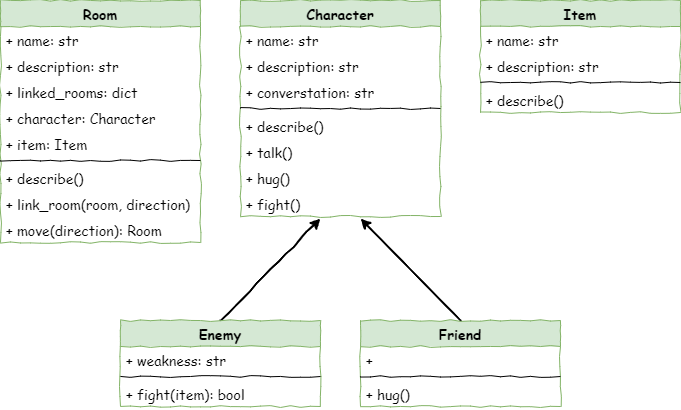
The class diagram hasn't changed. Everything in this stage happens in main.py, so we won't need to edit any classes.
Create a backpack
First, we need a backpack variable to keep the items we pick up. It needs to store more than one thing at a time. In Python, these types are called collections. We've already used one collection type, the dictionary. Now we'll use a list.
Collections in Python
A collection is a way to store a group of things together. Different collection types work in different ways, and choosing the right one makes our code easier to understand and faster to run.
Python's main built-in collection types are:
- lists: store things in order and can hold any type of value. We make them with square brackets
[].
- tuples: like lists, but they can't be changed once they're made. We make them with brackets
().
- sets: store values with no duplicates, in no particular order. We make them with
{} or set().
- dictionaries: store pairs of information using a key and a value. We make them with
{key: value}.
Python also has modules for other collection types, such as arrays (lots of values of the same type), queues (first in, first out) and stacks (last in, first out).
Lists work really well for our backpack:
- they can start empty, and we can use
append() to add items when the player picks them up
- we can check whether the backpack has a certain item using the
in operator
- we can get items by their position
- we can use
pop() or remove() to take an item out
Open main.py and add the highlighted code below.
| # main.py
from room import Room
from character import Enemy, Friend
from item import Item
# create rooms
cavern = Room("Cavern")
cavern.description = ("A room so big that the light of your torch doesn’t reach the walls.")
armoury = Room("Armoury")
armoury.description = ("The walls are lined with racks that once held weapons and armour.")
lab = Room("Laboratory")
lab.description = ("A strange odour hangs in a room filled with unknowable contraptions.")
# link rooms
cavern.link_rooms(armoury,"south")
armoury.link_rooms(cavern,"north")
armoury.link_rooms(lab,"east")
lab.link_rooms(armoury,"west")
# create characters
ugine = Enemy("Ugine")
ugine.description = "a huge troll with rotting teeth."
ugine.weakness = "cheese"
nigel = Friend("Nigel")
nigel.description = "a burly dwarf with golden beads woven through his beard."
nigel.conversation = "Well youngun, what are you doing here?"
# add characters to rooms
armoury.character = ugine
lab.character = nigel
# create items
cheese = Item("Cheese")
cheese.description = "super smelly"
chair = Item("Chair")
chair.description = "designed to be sat on"
elmo = Item("Elmo")
elmo.description = "wanting to be tickled"
# add items to rooms
cavern.item = chair
armoury.item = elmo
lab.item = cheese
'''
# describe the rooms
cavern.describe()
armoury.describe()
lab.describe()
'''
# initialise variables
running = True
current_room = cavern
backpack = []
# ----- MAIN LOOP -----
while running:
current_room.describe()
command = input("> ").lower()
if command in ["north", "south", "east", "west"]:
current_room = current_room.move(command)
elif command == "talk":
if current_room.character is not None:
current_room.character.talk()
else:
print("There is no one here to talk to")
elif command == "hug":
if current_room.character is not None:
current_room.character.hug()
else:
print("There is no one here to hug")
elif command == "fight":
if current_room.character is not None:
weapon = input("What will you fight with? > ").lower()
if current_room.character.fight(weapon):
if isinstance(current_room.character, Enemy):
current_room.character = None
else:
running = False
else:
print("There is no one here to fight")
elif command == "quit":
running = False
else:
print("I don't understand.")
|
Code explanation
- line 61 → creates an empty list called
backpack.
Add the take command
Now we need a command that lets the player pick up an item from the room and put it in the backpack. We'll call it take.
Still in main.py, add the highlighted code below.
| # main.py
from room import Room
from character import Enemy, Friend
from item import Item
# create rooms
cavern = Room("Cavern")
cavern.description = ("A room so big that the light of your torch doesn’t reach the walls.")
armoury = Room("Armoury")
armoury.description = ("The walls are lined with racks that once held weapons and armour.")
lab = Room("Laboratory")
lab.description = ("A strange odour hangs in a room filled with unknowable contraptions.")
# link rooms
cavern.link_rooms(armoury,"south")
armoury.link_rooms(cavern,"north")
armoury.link_rooms(lab,"east")
lab.link_rooms(armoury,"west")
# create characters
ugine = Enemy("Ugine")
ugine.description = "a huge troll with rotting teeth."
ugine.weakness = "cheese"
nigel = Friend("Nigel")
nigel.description = "a burly dwarf with golden beads woven through his beard."
nigel.conversation = "Well youngun, what are you doing here?"
# add characters to rooms
armoury.character = ugine
lab.character = nigel
# create items
cheese = Item("Cheese")
cheese.description = "super smelly"
chair = Item("Chair")
chair.description = "designed to be sat on"
elmo = Item("Elmo")
elmo.description = "wanting to be tickled"
# add items to rooms
cavern.item = chair
armoury.item = elmo
lab.item = cheese
'''
# describe the rooms
cavern.describe()
armoury.describe()
lab.describe()
'''
# initialise variables
running = True
current_room = cavern
backpack = []
# ----- MAIN LOOP -----
while running:
current_room.describe()
command = input("> ").lower()
if command in ["north", "south", "east", "west"]:
current_room = current_room.move(command)
elif command == "talk":
if current_room.character is not None:
current_room.character.talk()
else:
print("There is no one here to talk to")
elif command == "hug":
if current_room.character is not None:
current_room.character.hug()
else:
print("There is no one here to hug")
elif command == "fight":
if current_room.character is not None:
weapon = input("What will you fight with? > ").lower()
if current_room.character.fight(weapon):
if isinstance(current_room.character, Enemy):
current_room.character = None
else:
running = False
else:
print("There is no one here to fight")
elif command == "take":
if current_room.item is not None:
backpack.append(current_room.item)
print(f"You put {current_room.item.name} into your backpack")
current_room.item = None
else:
print("There is nothing here to take")
elif command == "quit":
running = False
else:
print("I don't understand.")
|
PRIMM
- Predict what you think will happen. Be specific. What happens to the room description after we take an item?
- Run the program.
- Time to investigate the code. What does each line do?
Code explanation
- line 91 → checks whether the player's command was
take.
- line 92 → checks whether there is an item in the current room.
- line 93 → adds the room's item to the
backpack list.
- line 94 → tells the player which item they picked up.
- line 95 → removes the item from the room by setting
item to None.
- lines 96–97 → otherwise tells the player there's nothing to take.
Add the backpack command
Now we need a way for the player to check what they're carrying. Let's add a backpack command that shows every item in the backpack.
Still in main.py, add the highlighted code below.
| # main.py
from room import Room
from character import Enemy, Friend
from item import Item
# create rooms
cavern = Room("Cavern")
cavern.description = ("A room so big that the light of your torch doesn’t reach the walls.")
armoury = Room("Armoury")
armoury.description = ("The walls are lined with racks that once held weapons and armour.")
lab = Room("Laboratory")
lab.description = ("A strange odour hangs in a room filled with unknowable contraptions.")
# link rooms
cavern.link_rooms(armoury,"south")
armoury.link_rooms(cavern,"north")
armoury.link_rooms(lab,"east")
lab.link_rooms(armoury,"west")
# create characters
ugine = Enemy("Ugine")
ugine.description = "a huge troll with rotting teeth."
ugine.weakness = "cheese"
nigel = Friend("Nigel")
nigel.description = "a burly dwarf with golden beads woven through his beard."
nigel.conversation = "Well youngun, what are you doing here?"
# add characters to rooms
armoury.character = ugine
lab.character = nigel
# create items
cheese = Item("Cheese")
cheese.description = "super smelly"
chair = Item("Chair")
chair.description = "designed to be sat on"
elmo = Item("Elmo")
elmo.description = "wanting to be tickled"
# add items to rooms
cavern.item = chair
armoury.item = elmo
lab.item = cheese
'''
# describe the rooms
cavern.describe()
armoury.describe()
lab.describe()
'''
# initialise variables
running = True
current_room = cavern
backpack = []
# ----- MAIN LOOP -----
while running:
current_room.describe()
command = input("> ").lower()
if command in ["north", "south", "east", "west"]:
current_room = current_room.move(command)
elif command == "talk":
if current_room.character is not None:
current_room.character.talk()
else:
print("There is no one here to talk to")
elif command == "hug":
if current_room.character is not None:
current_room.character.hug()
else:
print("There is no one here to hug")
elif command == "fight":
if current_room.character is not None:
weapon = input("What will you fight with? > ").lower()
if current_room.character.fight(weapon):
if isinstance(current_room.character, Enemy):
current_room.character = None
else:
running = False
else:
print("There is no one here to fight")
elif command == "take":
if current_room.item is not None:
backpack.append(current_room.item)
print(f"You put {current_room.item.name} into your backpack")
current_room.item = None
else:
print("There is nothing here to take")
elif command == "backpack":
if backpack == []:
print("It is empty")
else:
print("You have:")
for item in backpack:
print(f"- {item.name.capitalize()}")
elif command == "quit":
running = False
else:
print("I don't understand.")
|
PRIMM
- Predict what you think will happen. Be specific.
- Run the program.
- Time to investigate the code. What does each line do?
Code explanation
- line 98 → checks whether the player's command was
backpack.
- line 99 → checks whether the backpack is an empty list…
- line 100 → …and if so, tells the player it's empty.
- line 101 → runs if the backpack has at least one item.
- line 102 → prints a heading before the list of items.
- line 103 → loops through each item in the backpack.
- line 104 → prints each item's name, starting with a capital letter.
This time we need to do some serious testing. We need to make sure that:
- we can pick up every item in every room
- each item is added to the backpack when it's picked up
- each item is removed from the room when it's picked up
Here's an example testing table for the cavern. Make one for each room.
| Room |
Command |
Expected result |
Actual result |
| Cavern |
backpack |
It is empty |
|
| Cavern |
take |
You put chair into your backpack |
|
| Cavern |
backpack |
Chair |
|
| Cavern |
take |
There is nothing here to take |
|
Adjust the fight command
Lastly, let's change the fight command so the player can only use items that are in their backpack.
Still in main.py, change the highlighted code below.
| # main.py
from room import Room
from character import Enemy, Friend
from item import Item
# create rooms
cavern = Room("Cavern")
cavern.description = ("A room so big that the light of your torch doesn’t reach the walls.")
armoury = Room("Armoury")
armoury.description = ("The walls are lined with racks that once held weapons and armour.")
lab = Room("Laboratory")
lab.description = ("A strange odour hangs in a room filled with unknowable contraptions.")
# link rooms
cavern.link_rooms(armoury,"south")
armoury.link_rooms(cavern,"north")
armoury.link_rooms(lab,"east")
lab.link_rooms(armoury,"west")
# create characters
ugine = Enemy("Ugine")
ugine.description = "a huge troll with rotting teeth."
ugine.weakness = "cheese"
nigel = Friend("Nigel")
nigel.description = "a burly dwarf with golden beads woven through his beard."
nigel.conversation = "Well youngun, what are you doing here?"
# add characters to rooms
armoury.character = ugine
lab.character = nigel
# create items
cheese = Item("Cheese")
cheese.description = "super smelly"
chair = Item("Chair")
chair.description = "designed to be sat on"
elmo = Item("Elmo")
elmo.description = "wanting to be tickled"
# add items to rooms
cavern.item = chair
armoury.item = elmo
lab.item = cheese
'''
# describe the rooms
cavern.describe()
armoury.describe()
lab.describe()
'''
# initialise variables
running = True
current_room = cavern
backpack = []
# ----- MAIN LOOP -----
while running:
current_room.describe()
command = input("> ").lower()
if command in ["north", "south", "east", "west"]:
current_room = current_room.move(command)
elif command == "talk":
if current_room.character is not None:
current_room.character.talk()
else:
print("There is no one here to talk to")
elif command == "hug":
if current_room.character is not None:
current_room.character.hug()
else:
print("There is no one here to hug")
elif command== "fight":
if current_room.character is not None:
weapon = input("What will you fight with? > ").lower()
available_weapons = []
for item in backpack:
available_weapons.append(item.name)
if weapon in available_weapons:
if current_room.character.fight(weapon):
if isinstance(current_room.character, Enemy):
current_room.character = None
else:
running = False
else:
print(f"You don't have {weapon}")
print(f"{current_room.character.name} strikes you down.")
running = False
else:
print("There is no one here to fight")
elif command == "take":
if current_room.item is not None:
backpack.append(current_room.item)
print(f"You put {current_room.item.name} into your backpack")
current_room.item = None
else:
print("There is nothing here to take")
elif command == "backpack":
if backpack == []:
print("It is empty")
else:
print("You have:")
for item in backpack:
print(f"- {item.name.capitalize()}")
elif command == "quit":
running = False
else:
print("I don't understand.")
|
Indenting several lines
Lines 88–92 are the same as before, just indented one more level. To indent them quickly, highlight the lines in Thonny and press Tab once.
PRIMM
- Predict what you think will happen. Be specific.
- Run the program.
- Time to investigate the code. What does each line do?
Code explanation
- line 84 → creates an empty list to hold the names of the items in the backpack. The backpack stores
Item objects, but the player types a weapon as a string, so we need a list of names to compare with.
- line 85 → loops through each item in the backpack…
- line 86 → …and adds its name to
available_weapons.
- line 87 → checks whether the player has the weapon they typed.
- lines 88–92 → fight with the weapon, exactly as before.
- line 93 → runs when the weapon isn't in
available_weapons.
- line 94 → tells the player they don't have that item.
- line 95 → tells the player the character strikes them down.
- line 96 → ends the game by stopping the main loop.
Testing
This code has nested if statements, so we need to test every possible path. We'll test with Ugine, because we know his weakness is cheese.
| Collected cheese |
Fought Ugine |
Weapon used |
Expected result |
Actual result |
| Yes |
Yes |
cheese |
You strike Ugine down with cheese. |
|
| Yes |
Yes |
elmo |
You don't have elmo… |
|
| Yes, and elmo |
Yes |
elmo |
Ugine crushes you. Puny adventurer |
|
| No |
Yes |
cheese |
You don't have cheese… |
|
Exercises
Now it's time to make.
Exercise 1
Can you make sure these changes work for the characters you've added? If you've added another enemy, make sure the player can collect its weakness and use it against them. Test each path with a testing table.