Stage 5: Item Creation
In this lesson we will learn
- how to create a new class with attributes and a method that describes its objects
- how to create objects from a class and give them values
- how to link objects of different classes to build a larger system
- how to update the output so new objects appear when the program runs
Introduction
Our dungeon is starting to look like a real game. We can move between rooms and meet different characters, and each type of character behaves in its own way.
Next, we'll make the dungeon feel more alive by adding items. Most dungeon games let players find and use different objects, so we'll do the same.
Pseudocode
Stage 5 pseudocode- Make an Item class
- Create item objects
- Put the items into different rooms
- Update the room descriptions so items show up when we enter a room
Class diagram
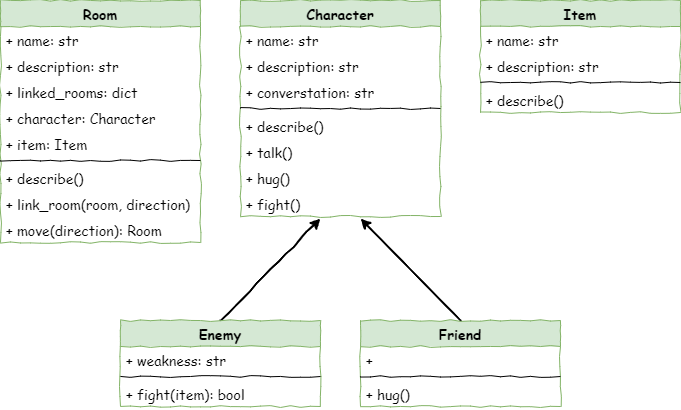
The class diagram shows our new Item class, and the new item attribute in the Room class.
Define the Item class
In Thonny, create a new file and enter the code below. Save it as item.py in the same folder as main.py, character.py and room.py.
| # item.py
class Item():
def __init__(self,name):
# initialise the Item object
self.name = name.lower()
self.description = None
|
Everything in this code should look familiar.
Code explanation
- line 3 → defines the
Item class.
- line 5 → defines the dunder init method, which runs when we create a new item.
- line 7 → stores the item's name, in lower case, in
self.name.
- line 8 → creates the
description attribute, so we can give the item a description later.
Create Item objects
To create the Item objects, go to main.py and add the highlighted code below.
| # main.py
from room import Room
from character import Enemy, Friend
from item import Item
# create rooms
cavern = Room("Cavern")
cavern.description = ("A room so big that the light of your torch doesn’t reach the walls.")
armoury = Room("Armoury")
armoury.description = ("The walls are lined with racks that once held weapons and armour.")
lab = Room("Laboratory")
lab.description = ("A strange odour hangs in a room filled with unknowable contraptions.")
# link rooms
cavern.link_rooms(armoury,"south")
armoury.link_rooms(cavern,"north")
armoury.link_rooms(lab,"east")
lab.link_rooms(armoury,"west")
# create characters
ugine = Enemy("Ugine")
ugine.description = "a huge troll with rotting teeth."
ugine.weakness = "cheese"
nigel = Friend("Nigel")
nigel.description = "a burly dwarf with golden beads woven through his beard."
nigel.conversation = "Well youngun, what are you doing here?"
# add characters to rooms
armoury.character = ugine
lab.character = nigel
# create items
cheese = Item("Cheese")
cheese.description = "super smelly"
chair = Item("Chair")
chair.description = "designed to be sat on"
elmo = Item("Elmo")
elmo.description = "wanting to be tickled"
'''
# describe the rooms
cavern.describe()
armoury.describe()
lab.describe()
'''
# initialise variables
running = True
current_room = cavern
# ----- MAIN LOOP -----
while running:
current_room.describe()
command = input("> ").lower()
if command in ["north", "south", "east", "west"]:
current_room = current_room.move(command)
elif command == "talk":
if current_room.character is not None:
current_room.character.talk()
else:
print("There is no one here to talk to")
elif command == "hug":
if current_room.character is not None:
current_room.character.hug()
else:
print("There is no one here to hug")
elif command== "fight":
if current_room.character is not None:
weapon = input("What will you fight with? > ").lower()
if current_room.character.fight(weapon):
if isinstance(current_room.character, Enemy):
current_room.character = None
else:
running = False
else:
print("There is no one here to fight")
elif command == "quit":
running = False
else:
print("I don't understand.")
|
PRIMM
- Predict what you think will happen. Be specific.
- Run the program.
- Time to investigate the code. What does each line do?
Code explanation
- line 5 → imports the
Item class from item.py.
- lines 37–38 → create a cheese
Item object and give it a description.
- lines 40–41 → create a chair
Item object and give it a description.
- lines 43–44 → create an Elmo
Item object and give it a description.
Add the items to the rooms
To put items in rooms, we first need to update the Room class. Open room.py and add the highlighted code.
| # room.py
class Room():
def __init__(self,room_name):
# initialises the room object
self.name = room_name.lower()
self.description = None
self.linked_rooms = {}
self.character = None
self.item = None
def describe(self):
# sends a description of the room to the terminal
print(f"\nYou are in the {self.name}")
print(self.description)
if self.character is not None:
self.character.describe()
for direction in self.linked_rooms.keys():
print(f"To the {direction} is the {self.linked_rooms[direction].name}")
def link_rooms(self, room_to_link, direction):
# links the provided room, in the provided direction
self.linked_rooms[direction.lower()] = room_to_link
def move(self, direction):
# returns the room linked in the given direction
if direction in self.linked_rooms.keys():
return self.linked_rooms[direction]
else:
print("You can't go that way")
return self
|
Code explanation
- line 11 → creates the
item attribute and sets it to None, because a new room starts with no item.
Save room.py, then return to main.py and add the highlighted code.
| # main.py
from room import Room
from character import Enemy, Friend
from item import Item
# create rooms
cavern = Room("Cavern")
cavern.description = ("A room so big that the light of your torch doesn’t reach the walls.")
armoury = Room("Armoury")
armoury.description = ("The walls are lined with racks that once held weapons and armour.")
lab = Room("Laboratory")
lab.description = ("A strange odour hangs in a room filled with unknowable contraptions.")
# link rooms
cavern.link_rooms(armoury,"south")
armoury.link_rooms(cavern,"north")
armoury.link_rooms(lab,"east")
lab.link_rooms(armoury,"west")
# create characters
ugine = Enemy("Ugine")
ugine.description = "a huge troll with rotting teeth."
ugine.weakness = "cheese"
nigel = Friend("Nigel")
nigel.description = "a burly dwarf with golden beads woven through his beard."
nigel.conversation = "Well youngun, what are you doing here?"
# add characters to rooms
armoury.character = ugine
lab.character = nigel
# create items
cheese = Item("Cheese")
cheese.description = "super smelly"
chair = Item("Chair")
chair.description = "designed to be sat on"
elmo = Item("Elmo")
elmo.description = "wanting to be tickled"
# add items to rooms
cavern.item = chair
armoury.item = elmo
lab.item = cheese
'''
# describe the rooms
cavern.describe()
armoury.describe()
lab.describe()
'''
# initialise variables
running = True
current_room = cavern
# ----- MAIN LOOP -----
while running:
current_room.describe()
command = input("> ").lower()
if command in ["north", "south", "east", "west"]:
current_room = current_room.move(command)
elif command == "talk":
if current_room.character is not None:
current_room.character.talk()
else:
print("There is no one here to talk to")
elif command == "hug":
if current_room.character is not None:
current_room.character.hug()
else:
print("There is no one here to hug")
elif command== "fight":
if current_room.character is not None:
weapon = input("What will you fight with? > ").lower()
if current_room.character.fight(weapon):
if isinstance(current_room.character, Enemy):
current_room.character = None
else:
running = False
else:
print("There is no one here to fight")
elif command == "quit":
running = False
else:
print("I don't understand.")
|
PRIMM
- Predict what you think will happen. Be specific.
- Run the program.
- Time to investigate the code. What does each line do?
Code explanation
- line 47 → puts the chair in the cavern.
- line 48 → puts Elmo in the armoury.
- line 49 → puts the cheese in the lab.
Include the items in the room description
Even with all this new code, the program still looks the same when it runs. That's because we haven't told it to show the items yet. We'll do the same thing we did for characters:
- make a
describe method in the Item class
- make the room's
describe method call the item's describe method
First, go to item.py and add the highlighted code below.
| # item.py
class Item():
def __init__(self,name):
# initialise the Item object
self.name = name.lower()
self.description = None
def describe(self):
# prints description of item to the terminal
print(f"You see {self.name} in the room. It is {self.description}.")
|
Code explanation
- line 10 → defines the
describe method for items.
- line 12 → prints the item's name and description.
Now go to room.py and add the highlighted code.
| # room.py
class Room():
def __init__(self,room_name):
# initialises the room object
self.name = room_name.lower()
self.description = None
self.linked_rooms = {}
self.character = None
self.item = None
def describe(self):
# sends a description of the room to the terminal
print(f"\nYou are in the {self.name}")
print(self.description)
if self.character is not None:
self.character.describe()
if self.item is not None:
self.item.describe()
for direction in self.linked_rooms.keys():
print(f"To the {direction} is the {self.linked_rooms[direction].name}")
def link_rooms(self, room_to_link, direction):
# links the provided room, in the provided direction
self.linked_rooms[direction.lower()] = room_to_link
def move(self, direction):
# returns the room linked in the given direction
if direction in self.linked_rooms.keys():
return self.linked_rooms[direction]
else:
print("You can't go that way")
return self
|
PRIMM
- Predict what you think will happen. Be specific.
- Run the program.
- Time to investigate the code. What does each line do?
Code explanation
- line 19 → checks whether there is an item in the room…
- line 20 → …and if there is, calls the item's
describe method. This works just like the character description on lines 17–18.
Let's test the code by going to each room and checking that the correct item is described.
| Room |
Item expected |
Item described |
| Cavern |
chair |
|
| Armoury |
elmo |
|
| Lab |
cheese |
|
Exercises
Now it's time to make.
Exercise 1
Can you add an item to each room you've added? It should:
- create a new
Item object with a description for each extra room
- put each new item in its room
- be tested by visiting each room and checking the item is described