Skip to content

Stage 4: Character Types

In this lesson we will learn

  • what inheritance is and how child classes get attributes and methods from a parent class
  • what polymorphism is and how different classes can use the same method in different ways
  • how to refactor code to use child classes without changing its behaviour
  • the three types of programming errors: syntax, runtime and logic errors
  • how to test and troubleshoot code by comparing expected and actual results

Terminology

  • child class – a class based on another class that inherits all of its attributes and methods, also called a subclass or derived class.
  • inheritance – the OOP principle of making a new class based on an existing one, so the new class gets the existing class's attributes and methods.
  • parent class – the existing class that a child class is based on, also called a superclass or base class.
  • override – to replace an inherited method by writing a method with the same name in the child class.
  • DRY – short for Don't Repeat Yourself, the rule that we should write code once in one place rather than copying it.
  • refactoring – changing how code is written without changing what it does.
  • polymorphism – the OOP principle that different classes can have a method with the same name that does different things.
  • truthy – describes a value that acts like True in an if statement, such as a non-empty string, a non-zero number or a list with items in it.
  • falsy – describes a value that acts like False in an if statement, such as None, 0, an empty string or an empty list.
  • logic error – a mistake where the program runs without crashing but doesn't do what we meant, so Python gives no warning.
  • syntax error – a mistake that breaks the rules of Python, so the program won't run at all.
  • runtime error – a mistake that happens while the program is running, when Python tries to do something it can't and crashes with an error message.

Introduction

So far we've created a dungeon with several rooms that the player can move between, and filled it with characters the player can interact with. In this stage we'll refine our characters.

Pseudocode

Stage 4 pseudocode
- Define two character types:
    - Friend
    - Enemy
- Change our current characters to one of these types
- Adjust our interactions to allow for the different types

Class diagram

The class diagram now shows two new classes: Enemy and Friend.
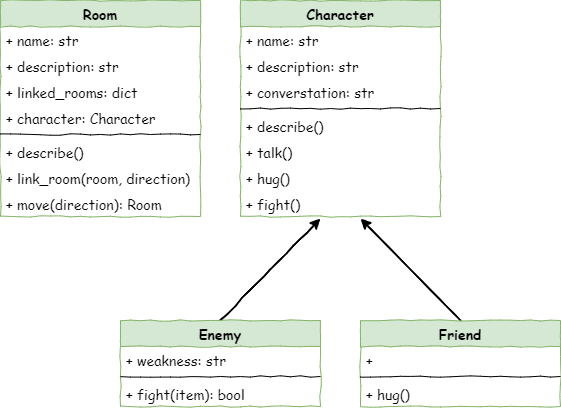
The Stage 4 class diagram with the Friend and Enemy child classes

Both classes have arrows pointing to Character because they are child classes. This means they inherit everything the Character class has. They can also add new features, or replace methods they inherited.

Inheritance

Inheritance in OOP means making a new class that is based on an existing one. It's like a family tree: a child class gets traits from its parent class.

This helps us avoid rewriting the same code, and makes it easier to organise different types of things by what they share and what makes them different.

Enemy class

The Enemy class:

  • inherits the name, description and conversation attributes and the describe, talk and hug methods from the Character class
  • adds the weakness attribute
  • overrides the Character fight method with its own fight method

Friend class

The Friend class:

  • inherits the name, description and conversation attributes and the describe, talk and fight methods from the Character class
  • overrides the Character hug method with its own hug method

Why use inheritance?

The two child classes end up working like the classes shown in these diagrams.
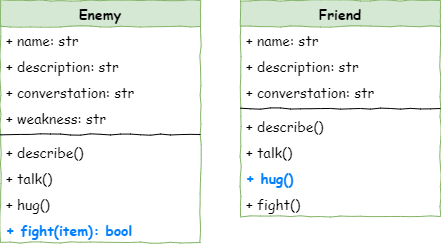
The Friend and Enemy classes with all their inherited attributes and methods

So why not just make two completely separate classes? Because of the DRY rule: Don't Repeat Yourself.

Both classes use the same describe method, so it's better to write it once in the Character class. Then Friend and Enemy automatically get it. If we ever change describe or talk, we only change it in one place, and both child classes get the updated version.

OOP terminology

Different books and websites sometimes use different words for the same idea:

  • a parent class can also be called a superclass or base class
  • a child class can also be called a subclass or derived class

Define the character types

Create the Friend class

Open character.py and add the highlighted code below to create the Friend class.

# character.py

class Character():

    def __init__(self, name):
        # initialises the character object
        self.name = name
        self.description = None
        self.conversation = None

    def describe(self):
        # sends a description of the character to the terminal
        print(f"{self.name} is here, {self.description}")

    def talk(self):
        # send conversation to the terminal
        if self.conversation is not None:
            print(f"{self.name}: {self.conversation}")
        else:
            print(f"{self.name} doesn't want to talk to you")

    def hug(self):
        # the character responds to a hug
        print(f"{self.name} doesn't want to hug you")

    def fight(self):
        # the character response to a threat
        print(f"{self.name} doesn't want to fight you")

class Friend(Character):

    def __init__(self, name):
        # initialise the Friend object by calling the character initialise
        super().__init__(name)
Code explanation
  • line 30 → defines a new class called Friend. The (Character) shows that Friend is a child of the Character class.
  • line 32 → defines the dunder init method, which runs whenever we make a new Friend object.
  • line 34 → runs the parent class's __init__ method first, so a Friend gets all the attributes that a Character has. Character needs a name, so we pass the name through.

Create the Enemy class

To create the Enemy class, add the highlighted code.

# character.py

class Character():

    def __init__(self, name):
        # initialises the character object
        self.name = name
        self.description = None
        self.conversation = None

    def describe(self):
        # sends a description of the character to the terminal
        print(f"{self.name} is here, {self.description}")

    def talk(self):
        # send conversation to the terminal
        if self.conversation is not None:
            print(f"{self.name}: {self.conversation}")
        else:
            print(f"{self.name} doesn't want to talk to you")

    def hug(self):
        # the character responds to a hug
        print(f"{self.name} doesn't want to hug you")

    def fight(self):
        # the character response to a threat
        print(f"{self.name} doesn't want to fight you")

class Friend(Character):

    def __init__(self, name):
        # initialise the Friend object by calling the character initialise
        super().__init__(name)

class Enemy(Character):

    def __init__(self,name):
        # initialise the Enemy object by calling the character initialise
        super().__init__(name)
        self.weakness = None
Code explanation
  • line 36 → defines the Enemy class as a child of the Character class.
  • line 38 → defines the dunder init method, which runs whenever we make a new Enemy object.
  • line 40 → runs the parent class's __init__ method, so an Enemy gets all the usual character attributes.
  • line 41 → adds a new weakness attribute that every enemy has.

Now that we have two character types, we need to change the characters we've created.

Change the character types

Return to main.py and change the highlighted code.

# main.py

from room import Room
from character import Friend, Enemy

# create rooms
cavern = Room("Cavern")
cavern.description = ("A room so big that the light of your torch doesn’t reach the walls.")

armoury = Room("Armoury")
armoury.description = ("The walls are lined with racks that once held weapons and armour.")

lab = Room("Laboratory")
lab.description = ("A strange odour hangs in a room filled with unknowable contraptions.")

# link rooms
cavern.link_rooms(armoury,"south")
armoury.link_rooms(cavern,"north")
armoury.link_rooms(lab,"east")
lab.link_rooms(armoury,"west")


# create characters
ugine = Enemy("Ugine")
ugine.description = "a huge troll with rotting teeth."
ugine.weakness = "cheese"

nigel = Friend("Nigel")
nigel.description = "a burly dwarf with golden beads woven through his beard."
nigel.conversation = "Well youngun, what are you doing here?"

# add characters to rooms
armoury.character = ugine
lab.character = nigel

'''
# describe the rooms
cavern.describe()
armoury.describe()
lab.describe()
'''

# initialise variables
running = True
current_room = cavern

# ----- MAIN LOOP -----
while running:
    current_room.describe()

    command = input("> ").lower()

    if command in ["north", "south", "east", "west"]:
        current_room = current_room.move(command)
    elif command == "talk":
        if current_room.character is not None:
            current_room.character.talk()
        else:
            print("There is no one here to talk to")
    elif command == "hug":
        if current_room.character is not None:
            current_room.character.hug()
        else:
            print("There is no one here to hug")
    elif command== "fight":
        if current_room.character is not None:
            current_room.character.fight()
        else:
            print("There is no one here to fight")
    elif command == "quit":
        running = False
    else:
        print("I don't understand.")
Code explanation
  • line 4 → imports the Friend and Enemy classes instead of Character, because we now create characters as one of these types.
  • line 24 → creates Ugine as an Enemy.
  • line 26 → sets Ugine's weakness, because every enemy has a weakness attribute.
  • line 28 → creates Nigel as a Friend.

Testing the refactor

We've changed how the code is written, but not what it should do. This is called refactoring. Now we need to make sure our changes didn't break anything.

Check that Ugine and Nigel still behave the same as before by filling in this testing table.

Character Interaction Expected result Actual result
Ugine talk
Ugine hug
Ugine fight
Nigel talk
Nigel hug
Nigel fight

If every expected result matches the actual result, there are no problems. Otherwise, we need to find and fix our mistakes.

Adjust the interactions

We want the game to react differently depending on the type of character. We shouldn't hug an enemy, and we shouldn't fight a friend. When different classes respond to the same method in different ways, this is called polymorphism.

Polymorphism

Polymorphism in OOP means different classes can have the same method but do different things with it. It's like asking different people to "work": they all do it, but the way they work depends on their job.

This lets our code treat different objects in the same way, even if they aren't the same type. It makes our programs easier to write, easier to update, and more flexible when things change.

Adjust the hug method

Right now, the hug method comes from the Character class, and it always says the character doesn't want to hug us. That's fine for enemies, so we'll leave them. But friends should hug us back, so we need to change the Friend class.

Return to character.py and add the highlighted code.

# character.py

class Character():

    def __init__(self, name):
        # initialises the character object
        self.name = name
        self.description = None
        self.conversation = None

    def describe(self):
        # sends a description of the character to the terminal
        print(f"{self.name} is here, {self.description}")

    def talk(self):
        # send conversation to the terminal
        if self.conversation is not None:
            print(f"{self.name}: {self.conversation}")
        else:
            print(f"{self.name} doesn't want to talk to you")

    def hug(self):
        # the character responds to a hug
        print(f"{self.name} doesn't want to hug you")

    def fight(self):
        # the character response to a threat
        print(f"{self.name} doesn't want to fight you")

class Friend(Character):

    def __init__(self, name):
        # initialise the Friend object by calling the character initialise
        super().__init__(name)

    def hug(self):
        # the friend responds to a hug
        print(f"{self.name} hugs you back.")

class Enemy(Character):

    def __init__(self,name):
        # initialise the Enemy object by calling the character initialise
        super().__init__(name)
        self.weakness = None
Code explanation
  • line 36 → defines a hug method for the Friend class. It has the same name as the one in Character, so it overrides the old version for all friends.
  • line 38 → prints a message using the friend's name.

Adjust the fight method

Now let's update the fight method for the Enemy class. The fighting system is simple: every enemy has a weakness. If we fight them with their weakness, we win. If we use anything else, we lose.

The highlighted code below creates this mechanic.

# character.py

class Character():

    def __init__(self, name):
        # initialises the character object
        self.name = name
        self.description = None
        self.conversation = None

    def describe(self):
        # sends a description of the character to the terminal
        print(f"{self.name} is here, {self.description}")

    def talk(self):
        # send conversation to the terminal
        if self.conversation is not None:
            print(f"{self.name}: {self.conversation}")
        else:
            print(f"{self.name} doesn't want to talk to you")

    def hug(self):
        # the character responds to a hug
        print(f"{self.name} doesn't want to hug you")

    def fight(self):
        # the character response to a threat
        print(f"{self.name} doesn't want to fight you")

class Friend(Character):

    def __init__(self, name):
        # initialise the Friend object by calling the character initialise
        super().__init__(name)

    def hug(self):
        # the friend responds to a hug
        print(f"{self.name} hugs you back.")

class Enemy(Character):

    def __init__(self,name):
        # initialise the Enemy object by calling the character initialise
        super().__init__(name)
        self.weakness = None

    def fight(self, item):
        # fights enemy with provided item and returns if player survives
        if item == self.weakness:
            print(f"You strike {self.name} down with {item}.")
            return True
        else:
            print(f"{self.name} crushes you. Puny adventurer")
            return False
Code explanation
  • line 47 → defines the fight method for enemies. item is the weapon the player chooses.
  • line 49 → checks whether the weapon matches the enemy's weakness.
  • line 50 → if it does, prints a winning message…
  • line 51 → …and returns True to tell main.py the player won.
  • lines 52–53 → otherwise prints the losing message…
  • line 54 → …and returns False to tell main.py the player lost.

Now we need to update the fight section in main.py so the game uses the new system. Replace that part of the code with the highlighted version below.

# main.py

from room import Room
from character import Enemy, Friend

# create rooms
cavern = Room("Cavern")
cavern.description = ("A room so big that the light of your torch doesn’t reach the walls.")

armoury = Room("Armoury")
armoury.description = ("The walls are lined with racks that once held weapons and armour.")

lab = Room("Laboratory")
lab.description = ("A strange odour hangs in a room filled with unknowable contraptions.")

# link rooms
cavern.link_rooms(armoury,"south")
armoury.link_rooms(cavern,"north")
armoury.link_rooms(lab,"east")
lab.link_rooms(armoury,"west")


# create characters
ugine = Enemy("Ugine")
ugine.description = "a huge troll with rotting teeth."
ugine.weakness = "cheese"

nigel = Friend("Nigel")
nigel.description = "a burly dwarf with golden beads woven through his beard."
nigel.conversation = "Well youngun, what are you doing here?"

# add characters to rooms
armoury.character = ugine
lab.character = nigel

'''
# describe the rooms
cavern.describe()
armoury.describe()
lab.describe()
'''

# initialise variables
running = True
current_room = cavern

# ----- MAIN LOOP -----
while running:
    current_room.describe()

    command = input("> ").lower()

    if command in ["north", "south", "east", "west"]:
        current_room = current_room.move(command)
    elif command == "talk":
        if current_room.character is not None:
            current_room.character.talk()
        else:
            print("There is no one here to talk to")
    elif command == "hug":
        if current_room.character is not None:
            current_room.character.hug()
        else:
            print("There is no one here to hug")
    elif command== "fight":
        if current_room.character is not None:
            weapon = input("What will you fight with? > ").lower()
            if current_room.character.fight(weapon):
                current_room.character = None
            else:
                running = False
        else:
            print("There is no one here to fight")
    elif command == "quit":
        running = False
    else:
        print("I don't understand.")

PRIMM

  1. Predict what you think will happen. Be specific.
  2. Run the program.
  3. Time to investigate the code. What does each line do?
Code explanation
  • line 67 → asks the player which weapon they want to use.
  • line 68 → calls the character's fight method, which prints the fight message and returns True for a win or False for a loss. We don't need == True, because the if statement checks whether the value is truthy or falsy.
  • line 69 → if the player wins, removes the character from the room…
  • lines 70–71 → …otherwise stops the main loop, which ends the game.

Truthy and falsy values

In Python, some values act like True and some act like False in an if statement, even though they aren't True or False. These are called truthy and falsy values.

Truthy values include non-empty strings, non-zero numbers and lists with items in them. Falsy values include None, 0, empty strings, empty lists and False itself.

This matters because when we write something like if current_room.character:, Python checks whether that value is truthy (it exists or has content) or falsy (it's empty or None), and runs the code based on that.

Testing

We've changed both the hug and fight methods, so it's time to test. Again, we'll use a testing table and focus on the code we changed.

Character Interaction Weapon Expected result Actual result
Ugine fight cheese
Ugine fight not cheese
Ugine hug -
Nigel fight -
Nigel hug -

Friend fight error

Did you get the following error?

1
2
3
4
5
Traceback (most recent call last):
  File "C:\deepest_dungeon\main.py", line 68, in <module>
    if current_room.character.fight(weapon):
       ^^^^^^^^^^^^^^^^^^^^^^^^^^^^^^^^^^^^^
TypeError: Character.fight() takes 1 positional argument but 2 were given

Why did we get this error? Let's read the error message:

  • line 2 → the error is on line 68 of main.py.
  • line 3 → shows the line of code: if current_room.character.fight(weapon):.
  • line 4 → points to the call to fight as the problem.
  • line 5 → fight only expects one argument (self), but it was given two (self and weapon).

Let's think about this:

  1. We have two fight methods. Which one caused the problem?
  2. Fighting Ugine worked, but fighting Nigel didn't, so it must be the fight method that friends use.
  3. That method is in character.py, so let's look at it.
# character.py

class Character():

    def __init__(self, name):
        # initialises the character object
        self.name = name
        self.description = None
        self.conversation = None

    def describe(self):
        # sends a description of the character to the terminal
        print(f"{self.name} is here, {self.description}")

    def talk(self):
        # send conversation to the terminal
        if self.conversation is not None:
            print(f"{self.name}: {self.conversation}")
        else:
            print(f"{self.name} doesn't want to talk to you")

    def hug(self):
        # the character responds to a hug
        print(f"{self.name} doesn't want to hug you")

    def fight(self):
        # the character response to a threat
        print(f"{self.name} doesn't want to fight you")

class Friend(Character):

    def __init__(self, name):
        # initialise the Friend object by calling the character initialise
        super().__init__(name)

    def hug(self):
        # the friend responds to a hug
        print(f"{self.name} hugs you back.")

class Enemy(Character):

    def __init__(self,name):
        # initialise the Enemy object by calling the character initialise
        super().__init__(name)
        self.weakness = None

    def fight(self, item):
        # fights enemy with provided item and returns if player survives
        if item == self.weakness:
            print(f"You strike {self.name} down with {item}.")
            return True
        else:
            print(f"{self.name} crushes you. Puny adventurer")
            return False

Looking closely at the code:

  • lines 30–38 → the Friend class doesn't have a fight method, so it uses the fight method it inherits from Character on line 26.
  • line 26 → the Character fight method only accepts one argument: self.
  • line 47 → the Enemy fight method accepts two arguments: self and item.

We've found the problem, but we need to decide what to fix. We changed main.py so that fighting always uses a weapon, so the simplest fix is to make the Character fight method accept the extra argument too.

Make the highlighted change to character.py.

# character.py

class Character():

    def __init__(self, name):
        # initialises the character object
        self.name = name
        self.description = None
        self.conversation = None

    def describe(self):
        # sends a description of the character to the terminal
        print(f"{self.name} is here, {self.description}")

    def talk(self):
        # send conversation to the terminal
        if self.conversation is not None:
            print(f"{self.name}: {self.conversation}")
        else:
            print(f"{self.name} doesn't want to talk to you")

    def hug(self):
        # the character responds to a hug
        print(f"{self.name} doesn't want to hug you")

    def fight(self, item):
        # the character response to a threat
        print(f"{self.name} doesn't want to fight you")

class Friend(Character):

    def __init__(self, name):
        # initialise the Friend object by calling the character initialise
        super().__init__(name)

    def hug(self):
        # the friend responds to a hug
        print(f"{self.name} hugs you back.")

class Enemy(Character):

    def __init__(self,name):
        # initialise the Enemy object by calling the character initialise
        super().__init__(name)
        self.weakness = None

    def fight(self, item):
        # fights enemy with provided item and returns if player survives
        if item == self.weakness:
            print(f"You strike {self.name} down with {item}.")
            return True
        else:
            print(f"{self.name} crushes you. Puny adventurer")
            return False
Code explanation
  • line 26 → adds the item argument, so every character's fight method can be called with a weapon.

Test again

Let's run our testing table again.

Character Interaction Weapon Expected result Actual result
Ugine fight cheese
Ugine fight not cheese
Ugine hug -
Nigel fight -
Nigel hug -

There's another problem when we fight Nigel, but this time it's different. There's no error message; the program just stops. This type of mistake is called a logic error.

Types of programming errors

There are three main types of programming errors:

  • Syntax errors happen when we break the rules of Python. The program won't run at all and shows an error straight away.
  • Runtime errors happen while the program is running. Python tries to do something it can't, so it crashes and shows an error. The fight error above was one of these.
  • Logic errors happen when the program runs without crashing, but doesn't do what we meant. Python won't warn us, so these are the hardest to find.

This is what the game showed right before the program stopped:

You are in the laboratory
A strange odour hangs in a room filled with unknowable contraptions.
Nigel is here, a burly dwarf with golden beads woven through his beard.
To the west is the armoury
> fight
What will you fight with? > dog
Nigel doesn't want to fight you

Troubleshooting a logic error

Fixing logic errors is like being a detective. We follow what the program does step by step to spot where things go wrong.

The problem happens when we fight Nigel, so let's start with the part of the main loop in main.py that handles the fight command.

    elif command== "fight":
        if current_room.character is not None:
            weapon = input("What will you fight with? > ").lower()
            if current_room.character.fight(weapon):
                current_room.character = None
            else:
                running = False
        else:
            print("There is no one here to fight")

When we fought Nigel:

  • We saw the message Nigel doesn't want to fight you, so the fight method ran on line 68.
  • Then the game ended, so running must have been set to False, which happens on line 71.
  • Line 71 only runs if the player loses the fight.
  • Line 68 decides whether the player won or lost. It calls the fight method and expects a True or False answer.
  • Nigel is a friend, so we need to look at the fight method friends use, which is in the Character class.

Here's the fight method in the Character class in character.py:

    def fight(self, item):
        # the character response to a threat
        print(f"{self.name} doesn't want to fight you")

Here's the issue: main.py expects fight to return True or False, but the Character fight method doesn't return anything.

In Python, a function without a return statement still returns something: the value None. And None is falsy, so the game thinks the player lost the fight and ends the program.

Let's look at the fight handler in main.py again.

    elif command== "fight":
        if current_room.character is not None:
            weapon = input("What will you fight with? > ").lower()
            if current_room.character.fight(weapon):
                current_room.character = None
            else:
                running = False
        else:
            print("There is no one here to fight")

Looking at line 68:

  • When we fight Nigel, current_room.character.fight(weapon) returns None.
  • So the line becomes if None:, which works the same as if False:.
  • The program skips the "win" code and goes to the else on line 70.
  • Line 71 sets running to False, which ends the game.

Now we know what's happening. To fix it, the Character fight method needs to return True, so line 68 treats it as a win.

Update the method in character.py.

# character.py

class Character():

    def __init__(self, name):
        # initialises the character object
        self.name = name
        self.description = None
        self.conversation = None

    def describe(self):
        # sends a description of the character to the terminal
        print(f"{self.name} is here, {self.description}")

    def talk(self):
        # send conversation to the terminal
        if self.conversation is not None:
            print(f"{self.name}: {self.conversation}")
        else:
            print(f"{self.name} doesn't want to talk to you")

    def hug(self):
        # the character responds to a hug
        print(f"{self.name} doesn't want to hug you")

    def fight(self, item):
        # the character response to a threat
        print(f"{self.name} doesn't want to fight you")
        return True

class Friend(Character):

    def __init__(self, name):
        # initialise the Friend object by calling the character initialise
        super().__init__(name)

    def hug(self):
        # the friend responds to a hug
        print(f"{self.name} hugs you back.")

class Enemy(Character):

    def __init__(self,name):
        # initialise the Enemy object by calling the character initialise
        super().__init__(name)
        self.weakness = None

    def fight(self, item):
        # fights enemy with provided item and returns if player survives
        if item == self.weakness:
            print(f"You strike {self.name} down with {item}.")
            return True
        else:
            print(f"{self.name} crushes you. Puny adventurer")
            return False

PRIMM

  1. Predict what you think will happen. Be specific.
  2. Run the program.
  3. Time to investigate the code. What does each line do?
Code explanation
  • line 29 → returns True when we fight a character that isn't an enemy, so line 71 of main.py doesn't run and the game keeps going.

Third time lucky?

Let's make sure the logic error is solved. Complete the testing table again.

Character Interaction Weapon Expected result Actual result
Ugine fight cheese
Ugine fight not cheese
Ugine hug -
Nigel fight -
Nigel hug -

Could you hug Nigel after fighting him? Probably not. The game treated the fight as a win, so it removed Nigel from the room. Friends shouldn't disappear when we "fight" them.

In main.py, change the highlighted code below.

    elif command== "fight":
        if current_room.character is not None:
            weapon = input("What will you fight with? > ").lower()
            if current_room.character.fight(weapon):
                if isinstance(current_room.character, Enemy):
                    current_room.character = None
            else:
                running = False
        else:
            print("There is no one here to fight")

PRIMM

  1. Predict what you think will happen. Be specific.
  2. Run the program. Check that we can fight Nigel and still hug him afterwards.
  3. Time to investigate the code. What does each line do?
Code explanation
  • line 69 → checks whether the character in the room is an Enemy. isinstance is True only when the object was created from the Enemy class (or one of its child classes)…
  • line 70 → …and only then removes the character from the room.

Exercises

Now it's time to make.

Exercise 1

Can you turn each character you've added into a Friend or an Enemy? If they're an enemy, don't forget to give them a weakness. Test each one with a testing table.