Stage 6 - Use Items
Introduction
Our game is coming along well. You can move around, meet different characters, and find items in the rooms.
Now we want the player to pick up items and actually use them.
To do this we will:
Pseudocode
make a backpack variable to hold the items you collect
add a take command so you can pick up items
add a backpack command so you can see what you’re carrying
make sure you can only fight using items that are actually in your backpack
Class Diagram
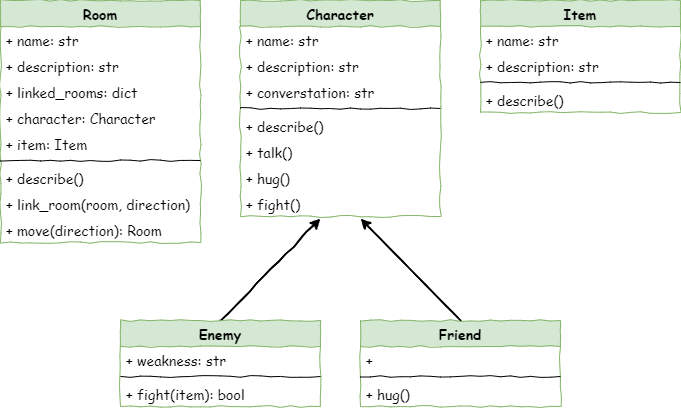
When you check the class diagram, nothing new has been added. Everything in this part of the lesson will be changed only in main.py, and you won’t need to edit any classes.
Creating a backpack
First, we need to make a backpack variable so we can keep the items we pick up. To do that, we need a type of variable that can store more than one thing at a time. In Python, these are called collections. This is the second type of collection you’ve used — the first was dictionaries. Now we’ll use a list, which is another collection type you already know.
Collections in Python
In Python, a collection is just a way to store a bunch of things together. You’ve already used some of these before. Different collection types work in different ways, and choosing the right one makes your code easier to understand and faster to run.
Here are the main built-in collection types:
Lists: store things in order and can hold any type of value. You make them with square brackets
[].Tuples: like lists, but you can’t change them once they’re made. You create them with parentheses
().Sets: store values with no duplicates and don’t keep any order. You make them with
{}orset().Dictionaries: store pairs of information using a key and a value. You make them with
{key: value}.
Python also has extra modules for other collection types:
Arrays: store lots of values of the same type.
Queues: store items so the first thing in is the first thing out (FIFO).
Stacks: store items so the last thing in is the first thing out (LIFO).
Lists work really well for what we need:
They can start empty, and we can use
append()to add items when the player picks them up.We can also check whether the backpack has a certain item using the
inoperator.Lists let us access items by their position
We can use
pop()to remove an item from the backpack.
Open main.py and add the highlighted code below:
 1# main.py
 2
 3from room import Room
 4from character import Enemy, Friend
 5from item import Item
 6
 7# create rooms
 8cavern = Room("Cavern")
 9cavern.description = ("A room so big that the light of your torch doesn’t reach the walls.")
10
11armoury = Room("Armoury")
12armoury.description = ("The walls are lined with racks that once held weapons and armour.")
13
14lab = Room("Laboratory")
15lab.description = ("A strange odour hangs in a room filled with unknownable contraptions.")
16
17# link rooms
18cavern.link_rooms(armoury,"south")
19armoury.link_rooms(cavern,"north")
20armoury.link_rooms(lab,"east")
21lab.link_rooms(armoury,"west")
22
23# create characters
24ugine = Enemy("Ugine")
25ugine.description = "a huge troll with rotting teeth."
26ugine.weakness = "cheese"
27
28nigel = Friend("Nigel")
29nigel.description = "a burly dwarf with golden bead in woven through his beard."
30nigel.conversation = "Well youngan, what are you doing here?"
31
32# add characters to rooms
33armoury.character = ugine
34lab.character = nigel
35
36# create items
37cheese = Item("Cheese")
38cheese.description = "super smelly"
39
40chair = Item("Chair")
41chair.description = "designed to be sat on"
42
43elmo = Item("Elmo")
44elmo.description = "wanting to be tickled"
45
46# add items to rooms
47cavern.item = chair
48armoury.item = elmo
49lab.item = cheese
50
51'''
52# describe the rooms
53cavern.describe()
54armoury.describe()
55lab.describe()
56'''
57
58# initialise variables
59running = True
60current_room = cavern
61backpack = []
62
63# ----- MAIN LOOP -----
64while running:
65    current_room.describe()
66
67    command = input("> ").lower()
68
69    if command in ["north", "south", "east", "west"]:
70        current_room = current_room.move(command)
71    elif command == "talk":
72        if current_room.character is not None:
73            current_room.character.talk()
74        else:
75            print("There is no one here to talk to")
76    elif command == "hug":
77        if current_room.character is not None:
78            current_room.character.hug()
79        else:
80            print("There is no one here to hug")
81    elif command == "fight":
82        if current_room.character is not None:
83            weapon = input("What will you fight with? > ").lower()
84            if current_room.character.fight(weapon):
85                current_room.character = None
86            else:
87                running = False
88        else:
89            print("There is no one here to fight")
90    elif command == "quit":
91        running = False
92    else:
93        print("I don't understand.")
Investigating this line of code.
Code Explanation
backpack = []→ creates an empty list and assigns it the namebackpack
Add take command
Now that we’ve made a backpack, we need a command that lets the player pick up items from the room and put them into it. We’ll use take as that command.
Still working in main.py add the take command using the highlighted code below:
  1# main.py
  2
  3from room import Room
  4from character import Enemy, Friend
  5from item import Item
  6
  7# create rooms
  8cavern = Room("Cavern")
  9cavern.description = ("A room so big that the light of your torch doesn’t reach the walls.")
 10
 11armoury = Room("Armoury")
 12armoury.description = ("The walls are lined with racks that once held weapons and armour.")
 13
 14lab = Room("Laboratory")
 15lab.description = ("A strange odour hangs in a room filled with unknownable contraptions.")
 16
 17# link rooms
 18cavern.link_rooms(armoury,"south")
 19armoury.link_rooms(cavern,"north")
 20armoury.link_rooms(lab,"east")
 21lab.link_rooms(armoury,"west")
 22
 23# create characters
 24ugine = Enemy("Ugine")
 25ugine.description = "a huge troll with rotting teeth."
 26ugine.weakness = "cheese"
 27
 28nigel = Friend("Nigel")
 29nigel.description = "a burly dwarf with golden bead in woven through his beard."
 30nigel.conversation = "Well youngan, what are you doing here?"
 31
 32# add characters to rooms
 33armoury.character = ugine
 34lab.character = nigel
 35
 36# create items
 37cheese = Item("Cheese")
 38cheese.description = "super smelly"
 39
 40chair = Item("Chair")
 41chair.description = "designed to be sat on"
 42
 43elmo = Item("Elmo")
 44elmo.description = "wanting to be tickled"
 45
 46# add items to rooms
 47cavern.item = chair
 48armoury.item = elmo
 49lab.item = cheese
 50
 51'''
 52# describe the rooms
 53cavern.describe()
 54armoury.describe()
 55lab.describe()
 56'''
 57
 58# initialise variables
 59running = True
 60current_room = cavern
 61backpack = []
 62
 63# ----- MAIN LOOP -----
 64while running:
 65    current_room.describe()
 66
 67    command = input("> ").lower()
 68
 69    if command in ["north", "south", "east", "west"]:
 70        current_room = current_room.move(command)
 71    elif command == "talk":
 72        if current_room.character is not None:
 73            current_room.character.talk()
 74        else:
 75            print("There is no one here to talk to")
 76    elif command == "hug":
 77        if current_room.character is not None:
 78            current_room.character.hug()
 79        else:
 80            print("There is no one here to hug")
 81    elif command == "fight":
 82        if current_room.character is not None:
 83            weapon = input("What will you fight with? > ").lower()
 84            if current_room.character.fight(weapon):
 85                current_room.character = None
 86            else:
 87                running = False
 88        else:
 89            print("There is no one here to fight")
 90    elif command == "take":
 91        if current_room.item is not None:
 92            backpack.append(current_room.item)
 93            print(f"You put {current_room.item.name} into your backpack")
 94            current_room.item = None
 95        else:
 96            print("There is nothing here to take")
 97    elif command == "quit":
 98        running = False
 99    else:
100        print("I don't understand.")
Save main.py predict what you think will happen and then run the code. What happens to the room description after you take an item?
In investigating this code, most of it should be familiar from our previous command event handlers. The different code is:
Code Explanation
backpack.append(current_room.item)→ puts the item from the room into the backpack list.print(f"You put {current_room.item.name} into your backpack")→ tells the player what item they picked up.current_room.item = None→ clears the item from the room so it’s no longer there.
Add backpack command
Now that we can collect items, we need a way for the player to check what they’re carrying. We’ll add a new backpack command that shows all the items currently inside it.
Still working in main.py, add the code below:
  1# main.py
  2
  3from room import Room
  4from character import Enemy, Friend
  5from item import Item
  6
  7# create rooms
  8cavern = Room("Cavern")
  9cavern.description = ("A room so big that the light of your torch doesn’t reach the walls.")
 10
 11armoury = Room("Armoury")
 12armoury.description = ("The walls are lined with racks that once held weapons and armour.")
 13
 14lab = Room("Laboratory")
 15lab.description = ("A strange odour hangs in a room filled with unknownable contraptions.")
 16
 17# link rooms
 18cavern.link_rooms(armoury,"south")
 19armoury.link_rooms(cavern,"north")
 20armoury.link_rooms(lab,"east")
 21lab.link_rooms(armoury,"west")
 22
 23# create characters
 24ugine = Enemy("Ugine")
 25ugine.description = "a huge troll with rotting teeth."
 26ugine.weakness = "cheese"
 27
 28nigel = Friend("Nigel")
 29nigel.description = "a burly dwarf with golden bead in woven through his beard."
 30nigel.conversation = "Well youngan, what are you doing here?"
 31
 32# add characters to rooms
 33armoury.character = ugine
 34lab.character = nigel
 35
 36# create items
 37cheese = Item("Cheese")
 38cheese.description = "super smelly"
 39
 40chair = Item("Chair")
 41chair.description = "designed to be sat on"
 42
 43elmo = Item("Elmo")
 44elmo.description = "wanting to be tickled"
 45
 46# add items to rooms
 47cavern.item = chair
 48armoury.item = elmo
 49lab.item = cheese
 50
 51'''
 52# describe the rooms
 53cavern.describe()
 54armoury.describe()
 55lab.describe()
 56'''
 57
 58# initialise variables
 59running = True
 60current_room = cavern
 61backpack = []
 62
 63# ----- MAIN LOOP -----
 64while running:
 65    current_room.describe()
 66
 67    command = input("> ").lower()
 68
 69    if command in ["north", "south", "east", "west"]:
 70        current_room = current_room.move(command)
 71    elif command == "talk":
 72        if current_room.character is not None:
 73            current_room.character.talk()
 74        else:
 75            print("There is no one here to talk to")
 76    elif command == "hug":
 77        if current_room.character is not None:
 78            current_room.character.hug()
 79        else:
 80            print("There is no one here to hug")
 81    elif command == "fight":
 82        if current_room.character is not None:
 83            weapon = input("What will you fight with? > ").lower()
 84            if current_room.character.fight(weapon):
 85                current_room.character = None
 86            else:
 87                running = False
 88        else:
 89            print("There is no one here to fight")
 90    elif command == "take":
 91        if current_room.item is not None:
 92            backpack.append(current_room.item)
 93            print(f"You put {current_room.item.name} into your backpack")
 94            current_room.item = None
 95        else:
 96            print("There is nothing here to take")
 97    elif command == "backpack":
 98        if backpack == []:
 99            print("It is empty")
100        else:
101            print("You have:")
102            for item in backpack:
103                print(f"- {item.name.capitalize()}")
104    elif command == "quit":
105        running = False
106    else:
107        print("I don't understand.")
Save the main.py file, predict and then run your code. This time we should do some serious testing.
We need to make sure that:
we can pick up all the items in all the rooms
the items are added to the backpack when they are picked up
the items are removed from the room when they are picked up
Here is an example for the Cavern testing table. Make sure you also make one for each room.
Room |
Command |
Expected result |
Actual results |
|---|---|---|---|
Cavern |
Backpack |
It is empty |
|
Cavern |
Take |
You put chair into your backpack |
|
Cavern |
Backpack |
Chair |
|
Cavern |
Take |
There is nothing here to take |
If your testing all works out, then it’s time to investigate the code.
Code Explanation
elif command == "backpack":→ this runs when the player types backpack.if backpack == []:→ checks whether the backpack has nothing in it.print("It is empty")→ tells the player the backpack is empty.else:→ runs if the backpack has at least one item.print("You have:")→ shows a heading before listing the items.for item in backpack:→ goes through each item in the backpack, one at a time.print(f"- {item.name.capitalize()}")→ prints the name of each item, with a capital letter at the start.
Adjusting the fight command
Lastly, we need to change the fight command so the player can only use items that are actually in their backpack.
Still working in main.py, add the code below.
  1# main.py
  2
  3from room import Room
  4from character import Enemy, Friend
  5from item import Item
  6
  7# create rooms
  8cavern = Room("Cavern")
  9cavern.description = ("A room so big that the light of your torch doesn’t reach the walls.")
 10
 11armoury = Room("Armoury")
 12armoury.description = ("The walls are lined with racks that once held weapons and armour.")
 13
 14lab = Room("Laboratory")
 15lab.description = ("A strange odour hangs in a room filled with unknownable contraptions.")
 16
 17# link rooms
 18cavern.link_rooms(armoury,"south")
 19armoury.link_rooms(cavern,"north")
 20armoury.link_rooms(lab,"east")
 21lab.link_rooms(armoury,"west")
 22
 23# create characters
 24ugine = Enemy("Ugine")
 25ugine.description = "a huge troll with rotting teeth."
 26ugine.weakness = "cheese"
 27
 28nigel = Friend("Nigel")
 29nigel.description = "a burly dwarf with golden bead in woven through his beard."
 30nigel.conversation = "Well youngan, what are you doing here?"
 31
 32# add characters to rooms
 33armoury.character = ugine
 34lab.character = nigel
 35
 36# create items
 37cheese = Item("Cheese")
 38cheese.description = "super smelly"
 39
 40chair = Item("Chair")
 41chair.description = "designed to be sat on"
 42
 43elmo = Item("Elmo")
 44elmo.description = "wanting to be tickled"
 45
 46# add items to rooms
 47cavern.item = chair
 48armoury.item = elmo
 49lab.item = cheese
 50
 51'''
 52# describe the rooms
 53cavern.describe()
 54armoury.describe()
 55lab.describe()
 56'''
 57
 58# initialise variables
 59running = True
 60current_room = cavern
 61backpack = []
 62
 63# ----- MAIN LOOP -----
 64while running:
 65    current_room.describe()
 66
 67    command = input("> ").lower()
 68
 69    if command in ["north", "south", "east", "west"]:
 70        current_room = current_room.move(command)
 71    elif command == "talk":
 72        if current_room.character is not None:
 73            current_room.character.talk()
 74        else:
 75            print("There is no one here to talk to")
 76    elif command == "hug":
 77        if current_room.character is not None:
 78            current_room.character.hug()
 79        else:
 80            print("There is no one here to hug")
 81    elif command== "fight":
 82        if current_room.character is not None:
 83            weapon = input("What will you fight with? > ").lower()
 84            available_weapons = []
 85            for item in backpack:
 86                available_weapons.append(item.name)
 87            if weapon in available_weapons:
 88                if current_room.character.fight(weapon):
 89                    if isinstance(current_room.character, Enemy):
 90                        current_room.character = None
 91                else:
 92                    running = False
 93            else:
 94                print(f"You don't have {weapon}")
 95                print(f"{current_room.character.name} strikes you down.")
 96                running = False
 97        else:
 98            print("There is no one here to fight")
 99    elif command == "take":
100        if current_room.item is not None:
101            backpack.append(current_room.item)
102            print(f"You put {current_room.item.name} into your backpack")
103            current_room.item = None
104        else:
105            print("There is nothing here to take")
106    elif command == "backpack":
107        if backpack == []:
108            print("It is empty")
109        else:
110            print("You have:")
111            for item in backpack:
112                print(f"- {item.name.capitalize()}")
113    elif command == "quit":
114        running = False
115    else:
116        print("I don't understand.")
Save main.py. Predict what you think will happen, and then run the code.
Let’s investigate that code, but be aware that there are a number of different sections to that code.
Code Explanation
First, we need to make sure the player actually has the weapon they typed.
available_weapons = []→ makes a new list to hold the names of all items in the backpack.the backpack stores
Itemobjectsthe player types a weapon as a string
so we need a list of item names, not item objects
for item in backpack:→ goes through each item in the backpackavailable_weapons.append(item.name)→ adds the name of each item to theavailable_weaponslistif weapon in available_weapons:→ checks if the player really has that weapon
If the player does have the weapon, we fight using it. Those lines are the same as before, just moved in one tab:
To indent those lines quickly:
highlight lines 88–91
press Tab once
If the player doesn’t have the weapon, we tell them and they lose the fight:
else:→ runs when the weapon isn’t inavailable_weaponsprint(f"You don't have {weapon}")→ tells the player they don’t have that itemprint(f"{current_room.character.name} strikes you down.")→ the enemy defeats themrunning = False→ ends the game by stopping the main loop
Testing
We now need to test our code. This code now has nested branches of if statements so we have to be aware of testing all the possible options. We will test with Ugine as we know his weakness is cheese.
Collected Cheese |
Fought Ugine |
Weapon Used |
Expected Result |
Actual Result |
|---|---|---|---|---|
Yes |
Yes |
Cheese |
You strike Ugine down with cheese. |
|
Yes |
Yes |
Elmo |
Ugine crushes you. Puny adventurer |
|
No |
Yes |
Cheese |
You don’t have cheese… |
If your code passes all the tests, it’s time to make some code in the stage 6 task.
Stage 6 task
Make
You need to apply the changes we made to your other characters. Especially if you have another enemy. Make sure that the user can collect their weakness and use it against them.