Stage 3 - Character Creation
Introduction
Now that the user has a dungeon that they can move around, we need to make it interesting. At this stage we will populate our dungeon with characters that the user can interact with.
To achieve this we will:
Pseudocode
Define a character class
Create characters
Add characters to the rooms
Include characters in the room descriptions
Create character interactions
talk method
hug method
fight method
Add interactions to the main loop
Class Diagram
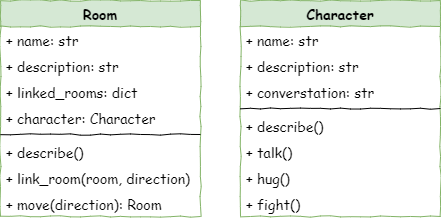
The Character class is a new class, so it will require a second class diagram.
We also need to add a character attribute to the Room class so we can record who is in each room.
Define the Character class
In Thonny create a new file and enter the code below. Then save it as character.py in the same folder as main.py and room.py (remember capitalisation).
1# character.py
2
3class Character():
4
5    def __init__(self, name):
6        # initialises the character object
7        self.name = name
8        self.description = None
9        self.conversation = None
Let’s investigate this code:
Code Explanation
# character.py→ a note to remind us which file this code belongs toclass Character():→ creates a new type of object calledCharacterdef __init__(self, name):→ this special method runs every time you make a new Character# initialises the character object→ a note explaining what the method is forself.name = name→ saves the character’s name inside the objectself.description = None→ sets up a description for the character, but leaves it empty for nowself.conversation = None→ sets up something the character might say, but also leaves it empty for now
Create characters
Now that we have a Character class, we can go to main.py and create Character objects.
Open main.py and add the highlighted code below.
 1# main
 2
 3from room import Room
 4from character import Character
 5
 6# create rooms
 7cavern = Room("Cavern")
 8cavern.description = ("A room so big that the light of your torch doesn’t reach the walls.")
 9
10armoury = Room("Armoury")
11armoury.description = ("The walls are lined with racks that once held weapons and armour.")
12
13lab = Room("Laboratory")
14lab.description = ("A strange odour hangs in a room filled with unknownable contraptions.")
15
16# link rooms
17cavern.link_rooms(armoury,"south")
18armoury.link_rooms(cavern,"north")
19armoury.link_rooms(lab,"east")
20lab.link_rooms(armoury,"west")
21
22# create characters
23ugine = Character("Ugine")
24ugine.description = "a huge troll with rotting teeth."
25
26nigel = Character("Nigel")
27nigel.description = "a burly dwarf with golden bead in woven through his beard."
28nigel.conversation = "Well youngan, what are you doing here?"
29
30'''
31# describe the rooms
32cavern.describe()
33armoury.describe()
34lab.describe()
35'''
Investigating that code:
Code Explanation
from character import Character→ brings the Character class into this file so we can use it# create characters→ a note showing this section is where we make charactersugine = Character("Ugine")→ makes a new Character named Ugine and stores it in the variableugineugine.description = "a huge troll with rotting teeth."→ gives Ugine a descriptionnigel = Character("Nigel")→ makes a new Character named Nigel and stores it in the variablenigelnigel.description = "a burly dwarf with golden bead in woven through his beard."→ gives Nigel a descriptionnigel.conversation = "Well youngan, what are you doing here?"→ gives Nigel something he can sayUgine has no conversation set, so his conversation stays empty (None)
Add Characters to the Rooms
Now we have two classes that work together: Room and Character. We need a way for our code to show which character is in which room. In the Room class diagram, you can see we added a new character attribute. This lets each room store the character that’s inside it.
This is an arbitrary decision. We could easily had added the new attribute to the Character class showing this is the room the character is in. Both are valid. The important thing is to be consistent, and to document your decision for others to understand. That’s why the class diagram is so important.
Add character attribute to Room class in room.py
Return to room.py and add the highlighted line below.
 1# room.py
 2
 3class Room():
 4
 5    def __init__(self,room_name):
 6        # initialises the room object
 7        self.name = room_name.lower()
 8        self.description = None
 9        self.linked_rooms = {}
10        self.character = None
11
12    def describe(self):
13        # sends a description of the room to the terminal
14        print(f"\nYou are in the {self.name}")
15        print(self.description)
16        for direction in self.linked_rooms.keys():
17            print(f"To the {direction} is the {self.linked_rooms[direction].name}")
18
19    def link_rooms(self, room_to_link, direction):
20        # links the provided room, in the provided direction
21        self.linked_rooms[direction.lower()] = room_to_link
22
23    def move(self, direction):
24        # returns the room linked in the given direction
25        if direction in self.linked_rooms.keys():
26            return self.linked_rooms[direction]
27        else:
28            print("You can't go that way")
29            return self
Investigating that code:
Code Explanation
self.character = None→ creates a new attribute calledcharacterand assignsNoneto it.
Add characters to the rooms in main.py
The return to main.py and add characters to our rooms using the highlighted code below.
 1# main.py
 2
 3from room import Room
 4from character import Character
 5
 6# create rooms
 7cavern = Room("Cavern")
 8cavern.description = ("A room so big that the light of your torch doesn’t reach the walls.")
 9
10armoury = Room("Armoury")
11armoury.description = ("The walls are lined with racks that once held weapons and armour.")
12
13lab = Room("Laboratory")
14lab.description = ("A strange odour hangs in a room filled with unknownable contraptions.")
15
16# link rooms
17cavern.link_rooms(armoury,"south")
18armoury.link_rooms(cavern,"north")
19armoury.link_rooms(lab,"east")
20lab.link_rooms(armoury,"west")
21
22
23# create characters
24ugine = Character("Ugine")
25ugine.description = "a huge troll with rotting teeth."
26
27nigel = Character("Nigel")
28nigel.description = "a burly dwarf with golden bead in woven through his beard."
29nigel.conversation = "Well youngan, what are you doing here?"
30
31# add characters to rooms
32armoury.character = ugine
33lab.character = nigel
34
35'''
36# describe the rooms
37cavern.describe()
38armoury.describe()
39lab.describe()
40'''
41
42# initialise variables
43running = True
44current_room = cavern
45
46# ----- MAIN LOOP -----
47while running:
48    current_room.describe()
49
50    command = input("> ").lower()
51
52    if command in ["north", "south", "east", "west"]:
53        current_room = current_room.move(command)
54    elif command == "quit":
55        running = False
56    else:
57        print("I don't understand.")
Investigating the code:
Code Explanation
armoury.character = ugine→ puts the character Ugine into the armoury roomlab.character = nigel→ puts the character Nigel into the lab room
Let’s do some testing. Predict what you think will happen and then Run the program. It should do nothing new, unless there is an error. That’s because we haven’t adjusted the room descriptions to include the characters. Let’s do that now.
Include characters in room description
To add the characters to the room description is a two step method:
Create a
describemethod in theCharacterclassmodify the
describemethod in theRoomclass so it calls thecharacter.describemethod
Add describe method to Character class
Go to character.py and add the highlighted code below to create the describe method
 1# character.py
 2
 3class Character():
 4
 5    def __init__(self, name):
 6        # initialises the character object
 7        self.name = name
 8        self.description = None
 9        self.conversation = None
10
11    def describe(self):
12        # sends a description of the character to the terminal
13        print(f"{self.name} is here, {self.description}")
Investigating the new code:
Code Explanation
def describe(self):→ creates a describe method for characterseven though we already have a describe method, it’s fine because that one belongs to the Room class
they’re in different “namespaces,” which just means they belong to different objects
so
character.describe()androom.describe()are completely separate
# sends a description of the character to the terminal→ a note explaining what the method doesprint(f"{self.name} is here, {self.description}")→ prints the character’s name and what they look like
Name spaces
Imagine your wardrobe at home. You have different spots for different things — shelves for shirts, drawers for socks, hangers for jackets. When you need something, you go to the right spot and grab it.
Namespaces in programming work the same way. They’re like labelled sections that keep code organised. Each namespace stores its own variables and functions, just like each part of your wardrobe stores its own type of clothes.
For example, a “math” namespace might hold maths-related functions, while a “game” namespace might hold game-related functions. They are kept separate so nothing gets mixed up.
Using namespaces keeps your code tidy and makes it easy to find exactly what you need.
Modify the Room class describe method
Before we change the describe method, we need to fix a small issue. We have three rooms but only two characters, which means one room (the cavern) has no character in it. We don’t want the game to talk about a character unless one is actually there.
Because we set character to None when a room is empty, the cavern still has cavern.character = None. So, when we describe a room, we should only show the character’s description if the character value is not None.
Return to room.py and modify the describe method as highlighted below.
 1# room.py
 2
 3class Room():
 4
 5    def __init__(self,room_name):
 6        # initialises the room object
 7        self.name = room_name.lower()
 8        self.description = None
 9        self.linked_rooms = {}
10        self.character = None
11
12    def describe(self):
13        # sends a description of the room to the terminal
14        print(f"\nYou are in the {self.name}")
15        print(self.description)
16        if self.character is not None:
17            self.character.describe()
18        for direction in self.linked_rooms.keys():
19            print(f"To the {direction} is the {self.linked_rooms[direction].name}")
20
21    def link_rooms(self, room_to_link, direction):
22        # links the provided room, in the provided direction
23        self.linked_rooms[direction.lower()] = room_to_link
24
25    def move(self, direction):
26        # returns the room linked in the given direction
27        if direction in self.linked_rooms.keys():
28            return self.linked_rooms[direction]
29        else:
30            print("You can't go that way")
31            return self
Let’s investigate that code:
Code Explanation
if self.character is not None:→ checks if this room actually has a character in itthe
iskeyword is used to check if something is equal toNone
if there is a character, the code runs the character’s
describemethod to show their details
Testing
Predict what you think will happen and the Run the code.
Test to make sure that you get character descriptions, but only when you enter a room that has a character in it.
Create character interactions
We want to add three interactions with our characters:
talk
hug
fight
If we look once again at our class diagram, we will see that in the character class, there is a method for each of these interactions.
Add new methods to Character class
Return to the character.py file. First lets add the talk method by adding code highlighted below.
 1# character.py
 2
 3class Character():
 4
 5    def __init__(self, name):
 6        # initialises the character object
 7        self.name = name
 8        self.description = None
 9        self.conversation = None
10
11    def describe(self):
12        # sends a description of the character to the terminal
13        print(f"{self.name} is here, {self.description}")
14
15    def talk(self):
16        # send conversation to the terminal
17        if self.conversation is not None:
18            print(f"{self.name}: {self.conversation}")
19        else:
20            print(f"{self.name} doesn't want to talk to you")
Let’s investigate this code:
Code Explanation
def talk(self):→ this creates the talk method for this character# send conversation to the terminal→ a note explaining what the method doesif self.conversation is not None:→ checks if the character actually has something to sayin main.py, Nigel has a conversation, but Ugine doesn’t
the method needs to handle both situations
print(f"{self.name}: {self.conversation}")→ if the character has a conversation, print their name and what they sayelse:→ runs when the character has no conversation setprint(f"{self.name} doesn't want to talk to you")→ shows a message for characters who won’t talk
Now let’s add both the hug and fight methods with the highlighted code below:
 1# character.py
 2
 3class Character():
 4
 5    def __init__(self, name):
 6        # initialises the character object
 7        self.name = name
 8        self.description = None
 9        self.conversation = None
10
11    def describe(self):
12        # sends a description of the character to the terminal
13        print(f"{self.name} is here, {self.description}")
14
15    def talk(self):
16        # send conversation to the terminal
17        if self.conversation is not None:
18            print(f"{self.name}: {self.conversation}")
19        else:
20            print(f"{self.name} doesn't want to talk to you")
21
22    def hug(self):
23        # the character responds to a hug
24        print(f"{self.name} doesn't want to hug you")
25
26    def fight(self):
27        # the character response to a threat
28        print(f"{self.name} doesn't want to fight you")
By this stage the code for both methods should look familiar:
define the method with
selfas the first argumentprovide a comment describing what the method does
display a message that uses one of the character’s attributes
Add the interactions to the main loop
Now that the player can interact with our characters, we need to add the three options (talk, hug, fight) to our event handler in the main loop.
Return to main.py, and add the highlighted code:
 1# main.py
 2
 3from room import Room
 4from character import Character
 5
 6# create rooms
 7cavern = Room("Cavern")
 8cavern.description = ("A room so big that the light of your torch doesn’t reach the walls.")
 9
10armoury = Room("Armoury")
11armoury.description = ("The walls are lined with racks that once held weapons and armour.")
12
13lab = Room("Laboratory")
14lab.description = ("A strange odour hangs in a room filled with unknownable contraptions.")
15
16# link rooms
17cavern.link_rooms(armoury,"south")
18armoury.link_rooms(cavern,"north")
19armoury.link_rooms(lab,"east")
20lab.link_rooms(armoury,"west")
21
22
23# create characters
24ugine = Character("Ugine")
25ugine.description = "a huge troll with rotting teeth."
26
27nigel = Character("Nigel")
28nigel.description = "a burly dwarf with golden bead in woven through his beard."
29nigel.conversation = "Well youngan, what are you doing here?"
30
31# add characters to rooms
32armoury.character = ugine
33lab.character = nigel
34
35'''
36# describe the rooms
37cavern.describe()
38armoury.describe()
39lab.describe()
40'''
41
42# initialise variables
43running = True
44current_room = cavern
45
46# ----- MAIN LOOP -----
47while running:
48    current_room.describe()
49
50    command = input("> ").lower()
51
52    if command in ["north", "south", "east", "west"]:
53        current_room = current_room.move(command)
54    elif command == "talk":
55        if current_room.character is not None:
56            current_room.character.talk()
57        else:
58            print("There is no one here to talk to")
59    elif command == "hug":
60        if current_room.character is not None:
61            current_room.character.hug()
62        else:
63            print("There is no one here to hug")
64    elif command== "fight":
65        if current_room.character is not None:
66            current_room.character.fight()
67        else:
68            print("There is no one here to fight")
69    elif command == "quit":
70        running = False
71    else:
72        print("I don't understand.")
Since the event handler for all three interactions is virtually the same, we’ll just investigate the code for the talk method:
Code Explanation
elif command == "talk":→ checks if the user’s command wastalkif current_room.character is not None:→ checks if there is a character in the roomremember that rooms can not have a character (eg. Cavern) so we need to allow for this.
current_room.character.talk()→ if there is a character, the call itstalk()methodelse:→ deals with rooms with no characterprint("There is no one here to talk to")→ message for when there is no character
Stage 3 task
Once again we have only been focusing on the first four stages of the PRIMM model. Now it is time for your to implement the Make phase.
Make
In Stage 1 you created an additional room. So now it is time to populate that room.
Create an additional character for each extra room you’ve added
Add those characters to your additional rooms