Stage 5 - Item Creation
Introduction
Our dungeon is starting to look like a real game. You can now move between rooms and meet different characters, and each type of character behaves in their own way.
Next, we’re going to make the dungeon feel more alive by adding items. Most dungeon-style games let players find and use different objects, so we’ll do the same.
In this stage you will:
Pseudocode
Make an Item class
Create your own item objects
Put those items into different rooms
Update the room descriptions so the items show up when you enter a room
Class Diagram
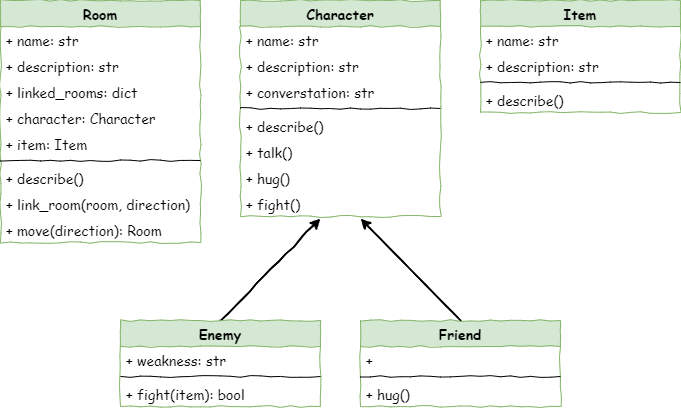
The new class diagram shows our new Items class, as well as the new item attribute in our Room class.
Define the Item class
In Thonny create a new file and enter the code below. Then save it as item.py in the same folder as main.py, character.py and room.py.
1# item.py
2
3class Item():
4
5    def __init__(self,name):
6        # initialise the Item object
7        self.name = name.lower()
8        self.description = None
In investigating the code everything should be familiar:
Code Explanation
We made the Item class.
We wrote the
__init__method that runs when you create a new item.We took the item’s name and stored it in
self.name.We added
self.descriptionso we can give the item a description later.
Create Item objects
To create the Item objects, move to the main.py file and add the code below:
 1# main.py
 2
 3from room import Room
 4from character import Enemy, Friend
 5from item import Item
 6
 7# create rooms
 8cavern = Room("Cavern")
 9cavern.description = ("A room so big that the light of your torch doesn’t reach the walls.")
10
11armoury = Room("Armoury")
12armoury.description = ("The walls are lined with racks that once held weapons and armour.")
13
14lab = Room("Laboratory")
15lab.description = ("A strange odour hangs in a room filled with unknownable contraptions.")
16
17# link rooms
18cavern.link_rooms(armoury,"south")
19armoury.link_rooms(cavern,"north")
20armoury.link_rooms(lab,"east")
21lab.link_rooms(armoury,"west")
22
23# create characters
24ugine = Enemy("Ugine")
25ugine.description = "a huge troll with rotting teeth."
26ugine.weakness = "cheese"
27
28nigel = Friend("Nigel")
29nigel.description = "a burly dwarf with golden bead in woven through his beard."
30nigel.conversation = "Well youngan, what are you doing here?"
31
32# add characters to rooms
33armoury.character = ugine
34lab.character = nigel
35
36# create items
37cheese = Item("Cheese")
38cheese.description = "super smelly"
39
40chair = Item("Chair")
41chair.description = "designed to be sat on"
42
43elmo = Item("Elmo")
44elmo.description = "wanting to be tickled"
45
46'''
47# describe the rooms
48cavern.describe()
49armoury.describe()
50lab.describe()
51'''
52
53# initialise variables
54running = True
55current_room = cavern
56
57# ----- MAIN LOOP -----
58while running:
59    current_room.describe()
60
61    command = input("> ").lower()
62
63    if command in ["north", "south", "east", "west"]:
64        current_room = current_room.move(command)
65    elif command == "talk":
66        if current_room.character is not None:
67            current_room.character.talk()
68        else:
69            print("There is no one here to talk to")
70    elif command == "hug":
71        if current_room.character is not None:
72            current_room.character.hug()
73        else:
74            print("There is no one here to hug")
75    elif command== "fight":
76        if current_room.character is not None:
77            weapon = input("What will you fight with? > ").lower()
78            if current_room.character.fight(weapon):
79                current_room.character = None
80            else:
81                running = False
82        else:
83            print("There is no one here to fight")
84    elif command == "quit":
85        running = False
86    else:
87        print("I don't understand.")
Predict what you think will happen and run the code.
Again, in investigating the code this should all be familiar.
Code Explanation
For each item, we did the following:
Imported the Item class.
Used
Item()to make a new item and stored it in a variable.Gave the item a description by setting its
descriptionattribute.
Add the item object to the the rooms.
To put items into rooms, we first need to update the Room class. Open room.py and add the code shown.
 1# room.py
 2
 3class Room():
 4
 5    def __init__(self,room_name):
 6        # initialises the room object
 7        self.name = room_name.lower()
 8        self.description = None
 9        self.linked_rooms = {}
10        self.character = None
11        self.item = None
12
13    def describe(self):
14        # sends a description of the room to the terminal
15        print(f"\nYou are in the {self.name}")
16        print(self.description)
17        if self.character is not None:
18            self.character.describe()
19        for direction in self.linked_rooms.keys():
20            print(f"To the {direction} is the {self.linked_rooms[direction].name}")
21
22    def link_rooms(self, room_to_link, direction):
23        # links the provided room, in the provided direction
24        self.linked_rooms[direction.lower()] = room_to_link
25
26    def move(self, direction):
27        # returns the room linked in the given direction
28        if direction in self.linked_rooms.keys():
29            return self.linked_rooms[direction]
30        else:
31            print("You can't go that way")
32            return self
Save the room.py file and then return to the main.py file, add the highlighted code:
 1# main.py
 2
 3from room import Room
 4from character import Enemy, Friend
 5from item import Item
 6
 7# create rooms
 8cavern = Room("Cavern")
 9cavern.description = ("A room so big that the light of your torch doesn’t reach the walls.")
10
11armoury = Room("Armoury")
12armoury.description = ("The walls are lined with racks that once held weapons and armour.")
13
14lab = Room("Laboratory")
15lab.description = ("A strange odour hangs in a room filled with unknownable contraptions.")
16
17# link rooms
18cavern.link_rooms(armoury,"south")
19armoury.link_rooms(cavern,"north")
20armoury.link_rooms(lab,"east")
21lab.link_rooms(armoury,"west")
22
23# create characters
24ugine = Enemy("Ugine")
25ugine.description = "a huge troll with rotting teeth."
26ugine.weakness = "cheese"
27
28nigel = Friend("Nigel")
29nigel.description = "a burly dwarf with golden bead in woven through his beard."
30nigel.conversation = "Well youngan, what are you doing here?"
31
32# add characters to rooms
33armoury.character = ugine
34lab.character = nigel
35
36# create items
37cheese = Item("Cheese")
38cheese.description = "super smelly"
39
40chair = Item("Chair")
41chair.description = "designed to be sat on"
42
43elmo = Item("Elmo")
44elmo.description = "wanting to be tickled"
45
46# add items to rooms
47cavern.item = chair
48armoury.item = elmo
49lab.item = cheese
50
51'''
52# describe the rooms
53cavern.describe()
54armoury.describe()
55lab.describe()
56'''
57
58# initialise variables
59running = True
60current_room = cavern
61
62# ----- MAIN LOOP -----
63while running:
64    current_room.describe()
65
66    command = input("> ").lower()
67
68    if command in ["north", "south", "east", "west"]:
69        current_room = current_room.move(command)
70    elif command == "talk":
71        if current_room.character is not None:
72            current_room.character.talk()
73        else:
74            print("There is no one here to talk to")
75    elif command == "hug":
76        if current_room.character is not None:
77            current_room.character.hug()
78        else:
79            print("There is no one here to hug")
80    elif command== "fight":
81        if current_room.character is not None:
82            weapon = input("What will you fight with? > ").lower()
83            if current_room.character.fight(weapon):
84                current_room.character = None
85            else:
86                running = False
87        else:
88            print("There is no one here to fight")
89    elif command == "quit":
90        running = False
91    else:
92        print("I don't understand.")
Predict what you think will happen and then run the program.
Investigating these two code changes should look familiar to you.
Code Explanation
We added an
itemattribute to the Room class.We made three items:
each item was given a name
each item was given a description
We placed one item into each room.
Include the Item objects in the room description
Even though you’ve added all this new code, the program will still look the same when it runs. That’s because we haven’t told it to show the items yet. To fix this, we’ll do the same thing we did for characters:
Make a
describemethod inside the Item class.Make the Room’s
describemethod call the item’sdescribemethod.
First we need to go to the item.py file and add the code below:
 1# item.py
 2
 3class Item():
 4
 5    def __init__(self,name):
 6        # initialise the Item object
 7        self.name = name.lower()
 8        self.description = None
 9
10    def describe(self):
11        # prints description of item to the terminal
12        print(f"You see {self.name} in the room. It is {self.description}.")
In investing this code, you should already recognise all these elements:
defining method
describing the method in a comment
displaying attributes to the terminal
Now head to room.py and add the following code:
 1# room.py
 2
 3class Room():
 4
 5    def __init__(self,room_name):
 6        # initialises the room object
 7        self.name = room_name.lower()
 8        self.description = None
 9        self.linked_rooms = {}
10        self.character = None
11        self.item = None
12
13    def describe(self):
14        # sends a description of the room to the terminal
15        print(f"\nYou are in the {self.name}")
16        print(self.description)
17        if self.character is not None:
18            self.character.describe()
19        if self.item is not None:
20            self.item.describe()
21        for direction in self.linked_rooms.keys():
22            print(f"To the {direction} is the {self.linked_rooms[direction].name}")
23
24    def link_rooms(self, room_to_link, direction):
25        # links the provided room, in the provided direction
26        self.linked_rooms[direction.lower()] = room_to_link
27
28    def move(self, direction):
29        # returns the room linked in the given direction
30        if direction in self.linked_rooms.keys():
31            return self.linked_rooms[direction]
32        else:
33            print("You can't go that way")
34            return self
Predict and run the code.
Investigate the code and you will notice that it is very similar to the character description:
check if there is an item in the room
when an item is present, call it’s describe method.
Go a step further and test the code by going to each room and checking that the correct item is displayed.
Room |
Item expected |
Item described |
|---|---|---|
Cavern |
chair |
|
Armoury |
elmo |
|
Lab |
cheese |
Stage 5 task
Now it is time for your to implement the Make phase.
Make
You should:
make an additional item for each of your additional rooms
add your additional items to their room.