Extension - Player Class
In this tutorial, you’ll reorganise your code by making a Player class. This will give you a player object that can hold all the player’s features, like health, items, gear, and weapons. The first thing you’ll add is the player’s inventory, which we call the backpack.
Planning
Right now, all the backpack code is written inside main.py. Before we create our new Player class, we need to look at that code and figure out which parts should be moved into the class. So we’ll start by checking the main.py file from the end of the earlier tutorials.
  1# main.py
  2
  3from room import Room
  4from character import Enemy, Friend
  5from item import Item
  6
  7# create rooms
  8cavern = Room("Cavern")
  9cavern.description = ("A room so big that the light of your torch doesn’t reach the walls.")
 10
 11armoury = Room("Armoury")
 12armoury.description = ("The walls are lined with racks that once held weapons and armour.")
 13
 14lab = Room("Laboratory")
 15lab.description = ("A strange odour hangs in a room filled with unknownable contraptions.")
 16
 17# link rooms
 18cavern.link_rooms(armoury,"south")
 19armoury.link_rooms(cavern,"north")
 20armoury.link_rooms(lab,"east")
 21lab.link_rooms(armoury,"west")
 22
 23# create characters
 24ugine = Enemy("Ugine")
 25ugine.description = "a huge troll with rotting teeth."
 26ugine.weakness = "cheese"
 27
 28nigel = Friend("Nigel")
 29nigel.description = "a burly dwarf with golden bead in woven through his beard."
 30nigel.conversation = "Well youngan, what are you doing here?"
 31
 32# add characters to rooms
 33armoury.character = ugine
 34lab.character = nigel
 35
 36# create items
 37cheese = Item("Cheese")
 38cheese.description = "super smelly"
 39
 40chair = Item("Chair")
 41chair.description = "designed to be sat on"
 42
 43elmo = Item("Elmo")
 44elmo.description = "wanting to be tickled"
 45
 46# add items to rooms
 47cavern.item = chair
 48armoury.item = elmo
 49lab.item = cheese
 50
 51# initialise variables
 52running = True
 53current_room = cavern
 54backpack = []
 55
 56# ----- MAIN LOOP -----
 57while running:
 58    current_room.describe()
 59
 60    command = input("> ").lower()
 61
 62    # move
 63    if command in ["north", "south", "east", "west"]:
 64        current_room = current_room.move(command)
 65        print(f"You travel {command}")
 66    # talk
 67    elif command == "talk":
 68        if current_room.character is not None:
 69            current_room.character.talk()
 70        else:
 71            print("There is no one here to talk to")
 72    # hug
 73    elif command == "hug":
 74        if current_room.character is not None:
 75            current_room.character.hug()
 76        else:
 77            print("There is no one here to hug")
 78    # fight
 79    elif command== "fight":
 80        if current_room.character is not None:
 81            weapon = input("What will you fight with? > ").lower()
 82            available_weapons = []
 83            for item in backpack:
 84                available_weapons.append(item.name)
 85            if weapon in available_weapons:
 86                if current_room.character.fight(weapon):
 87                    current_room.character = None
 88                    if Enemy.num_of_enemy == 0:
 89                        print("You have slain the enemy. You are victorious!")
 90                        running = False
 91                else:
 92                    running = False
 93            else:
 94                print(f"You don't have {weapon}")
 95                print(f"{current_room.character.name} strikes you down.")
 96                running = False
 97        else:
 98            print("There is no one here to fight")
 99    # take
100    elif command == "take":
101        if current_room.item is not None:
102            backpack.append(current_room.item)
103            print(f"You put {current_room.item.name} into your backpack")
104            current_room.item = None
105        else:
106            print("There is nothing here to take")
107    # backpack
108    elif command == "backpack":
109        if backpack == []:
110            print("It is empty")
111        else:
112            print("You have:")
113            for item in backpack:
114                print(f"- {item.name.capitalize()}")
115    # help
116    elif command == "help":
117        print("Type which direction you wish to move,")
118        print("or use one of these commands:")
119        print("- Talk")
120        print("- Fight")
121        print("- Hug")
122        print("- Take")
123        print("- Backpack")
124    # quit
125    elif command == "quit":
126        running = False
127    # incorrect command
128    else:
129        print("Enter 'help' for list of commands")
130    input("\nPress <Enter> to continue")
131
132print("Thank you for playing Darkest Dungeon")
You will notice that there are four places that main.py interacts with the player’s backpack.
line 54 → defines the backpack variable as an empty list
lines 82 - 85 → checks if chosen weapon is in the backpack
lines 101 - 106 → adds item to backpack
lines 109-114 → displays the contents of the backpack
If we were to move these features to a Player class, we need to consider the nature of the four features:
the backpack describes part of the player → attribute
checking for weapon in backpack is an action → method
adding an item to backpack is an action → method
displaying the contents of the backpack is an actions → method
Therefore the class diagram would look like this:
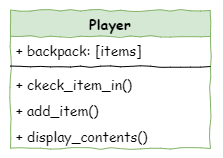
Now that we have a plan. Lets implement it in our code.
Coding
We’re going to update this code in small steps. This makes it easier to test as we go and check that we haven’t accidentally created any new bugs.
Create Player class
First, we need to make the Player class.
Create a new file called player.py in the same folder as your other files.
Add the Player class and its
__init__method using the code shown below.
1# player.py
2
3class Player():
4
5    def __init__(self):
6        self.backpack = []
Replace references to backpack
Now in main.py, we’re going to make a player object so we can use the Player class in our program.
Import the Player class using the code shown below.
3from room import Room
4from character import Enemy, Friend
5from item import Item
6from player import Player
Create a player object before the initialization of variables
47# add items to rooms
48cavern.item = chair
49armoury.item = elmo
50lab.item = cheese
51
52# create player
53player = Player()
Delete the
backpackvariable on line 58.
55# initialise variables
56running = True
57current_room = cavern
58
59# ----- MAIN LOOP -----
Change the
backpackin the fight command so it usesplayer.backpackinstead.
 81    # fight
 82    elif command== "fight":
 83        if current_room.character is not None:
 84            weapon = input("What will you fight with? > ").lower()
 85            available_weapons = []
 86            for item in player.backpack:
 87                available_weapons.append(item.name)
 88            if weapon in available_weapons:
 89                if current_room.character.fight(weapon):
 90                    current_room.character = None
 91                    if Enemy.num_of_enemy == 0:
 92                        print("You have slain the enemy. You are victorious!")
 93                        running = False
 94                else:
 95                    running = False
 96            else:
 97                print(f"You don't have {weapon}")
 98                print(f"{current_room.character.name} strikes you down.")
 99                running = False
100        else:
101            print("There is no one here to fight")
Change the
backpackin the take command so it usesplayer.backpackinstead.
102    # take
103    elif command == "take":
104        if current_room.item is not None:
105            player.backpack.append(current_room.item)
106            print(f"You put {current_room.item.name} into your backpack")
107            current_room.item = None
108        else:
109            print("There is nothing here to take")
Change the
backpackin the backpack command so it usesplayer.backpackinstead.
110    # backpack
111    elif command == "backpack":
112        if player.backpack == []:
113            print("It is empty")
114        else:
115            print("You have:")
116            for item in player.backpack:
117                print(f"- {item.name.capitalize()}")
Test backpack replacement
That’s the first section of our code changes done. Now test your program to make sure everything still works.
add_item method
To make our code cleaner, we should move all the backpack code into the Player class. We’ll start by adding the add_item method, which puts items into the backpack.
In player.py, create the
add_itemmethod using the code below.
 1# player.py
 2
 3class Player():
 4
 5    def __init__(self):
 6        self.backpack = []
 7
 8    def add_item(self, item):
 9        self.backpack.append(item)
10        print(f"You put {item.name} into your backpack")
Now we need to take that code out of main.py and replace it with a call to the add_item method.
Remove the highlighted code in main.py shown below:
102    # take
103    elif command == "take":
104        if current_room.item is not None:
105            player.backpack.append(current_room.item)
106            print(f"You put {current_room.item.name} into your backpack")
107            current_room.item = None
108        else:
109            print("There is nothing here to take")
And replace it with this highlighted code:
102    # take
103    elif command == "take":
104        if current_room.item is not None:
105            player.add_item(current_room.item)
106            current_room.item = None
107        else:
108            print("There is nothing here to take")
Test add_item method
Now test your program to make sure you can still add items to your backpack.
display_contents method
Next, we’ll update the code that shows what’s inside the backpack.
Go back to the player.py file.
Add the code below to the Player class.
 1# player.py
 2
 3class Player():
 4
 5    def __init__(self):
 6        self.backpack = []
 7
 8    def add_item(self, item):
 9        self.backpack.append(item)
10        print(f"You put {item.name} into your backpack")
11
12    def display_contents(self):
13        if self.backpack == []:
14            print("It is empty")
15        else:
16            print("You have:")
17            for item in self.backpack:
18                print(f"- {item.name.capitalize()}")
Go back to main.py
Remove the highlighted code shown below:
109    # backpack
110    elif command == "backpack":
111        if player.backpack == []:
112            print("It is empty")
113        else:
114            print("You have:")
115            for item in player.backpack:
116                print(f"- {item.name.capitalize()}")
And replace it with this highlighted code:
109    # backpack
110    elif command == "backpack":
111        player.display_contents()
Test display_contents method
Run your program and check that you can still see everything inside your backpack.
check_item_in method
Finally, we need to change how the fight command uses the backpack, and this time it’s more than a simple swap. We’re going to update the fight code so the backpack gives us the whole item, not just item.name. This will make it easier later to add things like weapon damage and health points for players and characters.
In player.py add the code below:
 1# player.py
 2
 3class Player():
 4
 5    def __init__(self):
 6        self.backpack = []
 7
 8    def add_item(self, item):
 9        self.backpack.append(item)
10        print(f"You put {item.name} into your backpack")
11
12    def display_contents(self):
13        if self.backpack == []:
14            print("It is empty")
15        else:
16            print("You have:")
17            for item in self.backpack:
18                print(f"- {item.name.capitalize()}")
19
20    def check_item_in(self, item_name):
21        for item in self.backpack:
22            if item.name == item_name:
23                return item
24        return None
This code is different, so lets investigate it:
Code Explanation
def check_item_in(self, item_name):sets up the function and expects you to give it the item’s name as a string.for item in self.backpack:goes through every item object in the backpack.if item.name == item_name:checks if the current item’s name matches the name you typed.return itemsends back that item and ends the function. This only happens when the names match.
return Nonesends backNoneif no item in the backpack has the same name as what you typed.
In main.py, change the fight command so it matches the code shown below. Pay attention to the highlighted lines.
81    # fight
82    elif command== "fight":
83        if current_room.character is not None:
84            choice = input("What will you fight with? > ").lower()
85            weapon = player.check_item_in(choice)
86            if weapon:
87                if current_room.character.fight(weapon.name):
88                    current_room.character = None
89                    if Enemy.num_of_enemy == 0:
90                        print("You have slain the enemy. You are victorious!")
91                        running = False
92                else:
93                    running = False
94            else:
95                print(f"You don't have {choice}")
96                print(f"{current_room.character.name} strikes you down.")
97                running = False
98        else:
99            print("There is no one here to fight")
Lets investigate those lines of code.
Code Explanation
choice = input("What will you fight with? > ").lower()→ we changed the variable name becauseweaponwill now store the actual item object returned fromcheck_item_in.weapon = player.check_item_in(choice)→ if the item is in the backpack,weaponwill hold the item object. If not,weaponwill beNone.if weapon:→ this checks ifweaponis a real item object. If it is, this isTrue. If it’sNone, it’sFalse.if current_room.character.fight(weapon.name):→weaponnow has the whole item object, not just the name, but thefightmethod still needs a string, so we useweapon.name.print(f"You don't have {choice}")→ if the item isn’t in the backpack,weaponisNone, which doesn’t have a name. So instead, we just print whatever the player typed.
check_item_in test
Final test: run your program and check that all the different fight options still work properly.