Stage 4 - Character Types
Introduction
So far we have created a multiple-room dungeon that the user can move between. We have also populated the dungeon with characters that the user can interact with.
During this stage we will refine our characters by:
Pseudocode
define two character types:
friend
enemy
change our current characters to one of these types of characters
adjust our interactions to allow for different types of characters
Class Diagram
The class diagram now shows two new classes: Enemy and Friend.
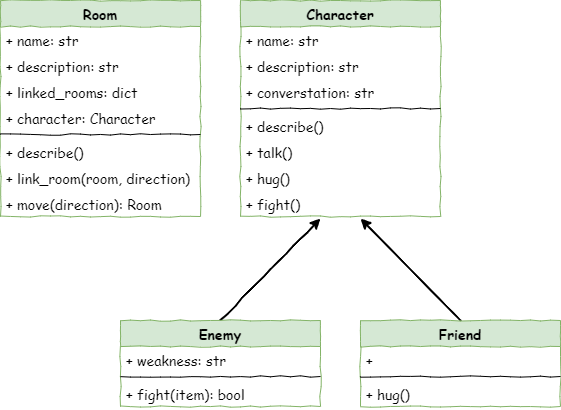
Both classes have arrows pointing to Character because they are child classes. This means they inherit everything the Character class has. They can also add new features or replace methods they inherited.
The diagram shows how these new classes build on top of the original Character class.
Inheritance
Inheritance in OOP means making a new class that is based on an existing one. It’s like a family tree: a child class gets traits from its parent class.
This helps you avoid rewriting the same code and makes it easier to organise different types of things by what they share and what makes them different.
Enemy class
The Enemy class:
inherits from the
Character classthename,description, andconversationattributes as well as thedescribe,talk, andhugmethods.adds the
weaknessattributeoverwrites the
Characterfightmethod with its ownfightmethod
Friend class
inherits from the
Character classthename,description, andconversationattributes as well as thedescribe,talk, andfightmethods.overwrites the
Characterhugmethod with its ownhugmethod
Why use inheritance?
The two child classes end up working a lot like the classes shown in the diagrams.
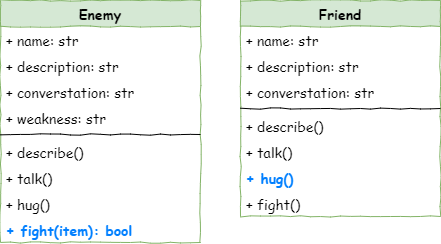
But why not just make two completely separate classes? Because of the DRY rule: Don’t Repeat Yourself.
If both classes use the same describe method, it’s better to write it once in the Character class. Then Friend and Enemy automatically get it. This makes the code easier to fix and update.
If you ever change the describe or talk method, you only change it in one place — the Character class — and both child classes get the updated version.
OOP Terminology
In OOP, different books and websites sometimes use different words for the same idea. Here are the main ones you might see:
parent class can also be called a superclass or base class
child class can also be called a subclass or derived class
Let’s make these changes to the code.
Define different character types
Open your character.py file and add the highlighted code below to create the Friend class:
Create Friend class
 1# character.py
 2
 3class Character():
 4
 5    def __init__(self, name):
 6        # initialises the character object
 7        self.name = name
 8        self.description = None
 9        self.conversation = None
10
11    def describe(self):
12        # sends a description of the character to the terminal
13        print(f"{self.name} is here, {self.description}")
14
15    def talk(self):
16        # send conversation to the terminal
17        if self.conversation is not None:
18            print(f"{self.name}: {self.conversation}")
19        else:
20            print(f"{self.name} doesn't want to talk to you")
21
22    def hug(self):
23        # the character responds to a hug
24        print(f"{self.name} doesn't want to hug you")
25
26    def fight(self):
27        # the character response to a threat
28        print(f"{self.name} doesn't want to fight you")
29
30class Friend(Character):
31
32    def __init__(self, name):
33        # initialise the Friend object by calling the character initialise
34        super().__init__(name)
Investigating that code:
Code Explanation
class Friend(Character):→ creates a new class calledFriend, and the(Character)shows thatFriendcomes from theCharacterparent class.def __init__(self, name):→ is a special method that runs automatically whenever you make a newFriendobject.The comment explains that this sets up the
Friendobject using the parent class.super().__init__(name)→ tells Python to run the parent class’s__init__method first. This givesFriendall the attributes and methods thatCharacterhas. BecauseCharacterneeds aname, we pass thenamethrough.
Create Enemy class
To create the Enemy class, add the highlighted code:
 1# character.py
 2
 3class Character():
 4
 5    def __init__(self, name):
 6        # initialises the character object
 7        self.name = name
 8        self.description = None
 9        self.conversation = None
10
11    def describe(self):
12        # sends a description of the character to the terminal
13        print(f"{self.name} is here, {self.description}")
14
15    def talk(self):
16        # send conversation to the terminal
17        if self.conversation is not None:
18            print(f"{self.name}: {self.conversation}")
19        else:
20            print(f"{self.name} doesn't want to talk to you")
21
22    def hug(self):
23        # the character responds to a hug
24        print(f"{self.name} doesn't want to hug you")
25
26    def fight(self):
27        # the character response to a threat
28        print(f"{self.name} doesn't want to fight you")
29
30class Friend(Character):
31
32    def __init__(self, name):
33        # initialise the Friend object by calling the character initialise
34        super().__init__(name)
35
36class Enemy(Character):
37
38    def __init__(self,name):
39        # initialise the Enemy object by calling the character initialise
40        super().__init__(name)
41        self.weakness = None
Now unpack the code that creates the Enemy class:
Code Explanation
class Enemy(Character):→ creates theEnemyclass and shows it is a child of theCharacterclass.def __init__(self, name):→ runs automatically when you make a newEnemyobject.The comment explains that this sets up the
Enemyby using the parent class first.super().__init__(name)→ runs the parent class’s__init__so theEnemygets all the usual character features.self.weakness = None→ adds a new attribute calledweaknessthat every enemy will have.
Now that we have two character types, we need to change the characters that we have created.
Change character types
Return to main.py, and change the highlighted code:
 1# main.py
 2
 3from room import Room
 4from character import Friend, Enemy
 5
 6# create rooms
 7cavern = Room("Cavern")
 8cavern.description = ("A room so big that the light of your torch doesn’t reach the walls.")
 9
10armoury = Room("Armoury")
11armoury.description = ("The walls are lined with racks that once held weapons and armour.")
12
13lab = Room("Laboratory")
14lab.description = ("A strange odour hangs in a room filled with unknownable contraptions.")
15
16# link rooms
17cavern.link_rooms(armoury,"south")
18armoury.link_rooms(cavern,"north")
19armoury.link_rooms(lab,"east")
20lab.link_rooms(armoury,"west")
21
22
23# create characters
24ugine = Enemy("Ugine")
25ugine.description = "a huge troll with rotting teeth."
26ugine.weakness = "cheese"
27
28nigel = Friend("Nigel")
29nigel.description = "a burly dwarf with golden bead in woven through his beard."
30nigel.conversation = "Well youngan, what are you doing here?"
31
32# add characters to rooms
33armoury.character = ugine
34lab.character = nigel
35
36'''
37# describe the rooms
38cavern.describe()
39armoury.describe()
40lab.describe()
41'''
42
43# initialise variables
44running = True
45current_room = cavern
46
47# ----- MAIN LOOP -----
48while running:
49    current_room.describe()
50
51    command = input("> ").lower()
52
53    if command in ["north", "south", "east", "west"]:
54        current_room = current_room.move(command)
55    elif command == "talk":
56        if current_room.character is not None:
57            current_room.character.talk()
58        else:
59            print("There is no one here to talk to")
60    elif command == "hug":
61        if current_room.character is not None:
62            current_room.character.hug()
63        else:
64            print("There is no one here to hug")
65    elif command== "fight":
66        if current_room.character is not None:
67            current_room.character.fight()
68        else:
69            print("There is no one here to fight")
70    elif command == "quit":
71        running = False
72    else:
73        print("I don't understand.")
Investigating that code:
Code Explanation
from character import Friend, Enemy→ means we’re now creating characters as eitherFriendorEnemy, not as basicCharacterobjects anymore.ugine = Enemy("Ugine")→ creates Ugine as anEnemy.ugine.weakness = "cheese"→ sets Ugine’s weakness, because all enemies have aweaknessattribute.nigel = Friend("Nigel")→ creates Nigel as aFriend.
Refactoring testing
Refactoring connects directly to the code we just changed. You updated your code to use the new Friend and Enemy classes instead of the original Character class. Now you need to make sure those changes didn’t break anything.
Refactoring means you changed how the code is written, not what it should do. So the next job is to test it. Check that Ugine and Nigel still behave the same as before by filling in the testing table.
Character |
Interaction |
Expected Result |
Actual Result |
|---|---|---|---|
Ugine |
talk |
||
Ugine |
hug |
||
Ugine |
fight |
||
Nigel |
talk |
||
Nigel |
hug |
||
Nigel |
fight |
If all your expected results match your actual results then there is no problems, otherwise, you need to troubleshoot where your mistakes.
Adjusting the interactions
We want the game to react differently depending on the type of character. You shouldn’t hug an enemy, and you shouldn’t fight a friend. When different classes respond to the same action in different ways, this is called polymorphism.
Polymorphism
Polymorphism in OOP means different classes can use the same method but do different things with it. It’s like asking different people to “work” — they all do it, but the way they work depends on their job.
This lets your code treat different objects in a similar way, even if they aren’t the same type. It makes your programs easier to write, easier to update, and more flexible when things change.
Adjusting the hug method
Right now, the hug method comes from the Character class, and it always says the character doesn’t want to hug you. That’s okay for enemies, so we’ll leave them as they are. But friends should hug you back, so we need to change the Friend class to make that happen.
Return to the character.py file and add the highlighted code:
 1# character.py
 2
 3class Character():
 4
 5    def __init__(self, name):
 6        # initialises the character object
 7        self.name = name
 8        self.description = None
 9        self.conversation = None
10
11    def describe(self):
12        # sends a description of the character to the terminal
13        print(f"{self.name} is here, {self.description}")
14
15    def talk(self):
16        # send conversation to the terminal
17        if self.conversation is not None:
18            print(f"{self.name}: {self.conversation}")
19        else:
20            print(f"{self.name} doesn't want to talk to you")
21
22    def hug(self):
23        # the character responds to a hug
24        print(f"{self.name} doesn't want to hug you")
25
26    def fight(self):
27        # the character response to a threat
28        print(f"{self.name} doesn't want to fight you")
29
30class Friend(Character):
31
32    def __init__(self, name):
33        # initialise the Friend object by calling the character initialise
34        super().__init__(name)
35
36    def hug(self):
37        # the friend responds to a hug
38        print(f"{self.name} hugs you back.")
39
40class Enemy(Character):
41
42    def __init__(self,name):
43        # initialise the Enemy object by calling the character initialise
44        super().__init__(name)
45        self.weakness = None
Investigating the code:
Code Explanation
def hug(self):→ creates a newhugmethod for theFriendclass. Because it has the same name as the one inCharacter, it replaces the old version for all friends.The comment explains what the method is meant to do.
print(f"{self.name} hugs you back.")→ shows a message using the friend’s name.
Adjusting the fight method
Now we need to update the fight method for the Enemy class. The fighting system is simple: every enemy has a weakness. If you fight them using their weakness, you win. If you use anything else, you lose.
The highlighted code below enacts this mechanic.
 1# character.py
 2
 3class Character():
 4
 5    def __init__(self, name):
 6        # initialises the character object
 7        self.name = name
 8        self.description = None
 9        self.conversation = None
10
11    def describe(self):
12        # sends a description of the character to the terminal
13        print(f"{self.name} is here, {self.description}")
14
15    def talk(self):
16        # send conversation to the terminal
17        if self.conversation is not None:
18            print(f"{self.name}: {self.conversation}")
19        else:
20            print(f"{self.name} doesn't want to talk to you")
21
22    def hug(self):
23        # the character responds to a hug
24        print(f"{self.name} doesn't want to hug you")
25
26    def fight(self):
27        # the character response to a threat
28        print(f"{self.name} doesn't want to fight you")
29
30class Friend(Character):
31
32    def __init__(self, name):
33        # initialise the Friend object by calling the character initialise
34        super().__init__(name)
35
36    def hug(self):
37        # the friend responds to a hug
38        print(f"{self.name} hugs you back.")
39
40class Enemy(Character):
41
42    def __init__(self,name):
43        # initialise the Enemy object by calling the character initialise
44        super().__init__(name)
45        self.weakness = None
46
47    def fight(self, item):
48        # fights enemy with provided item and returns if player survives
49        if item == self.weakness:
50            print(f"You strike {self.name} down with {item}.")
51            return True
52        else:
53            print(f"{self.name} crushes you. Puny adventurer")
54            return False
Investing that code:
Code Explanation
def fight(self, item):→ creates thefightmethod for enemies. Theitemis the weapon the player chooses.The comment explains that this method checks the weapon and returns whether the player survives.
if item == self.weakness:→ checks if the weapon matches the enemy’s weakness.print(f"You strike {self.name} down with {item}.")→ shows a message if you win.return True→ tells main.py that the player won the fight.else:→ runs when the weapon is not the enemy’s weakness.print(f"{self.name} crushes you. Puny adventurer")→ shows the losing message.return False→ tells main.py that the player lost.
Now that the fight method is finished, we need to update the fight section in main.py so the game uses the new system. Replace that part of the code with the updated version shown.
 1# main.py
 2
 3from room import Room
 4from character import Enemy, Friend
 5
 6# create rooms
 7cavern = Room("Cavern")
 8cavern.description = ("A room so big that the light of your torch doesn’t reach the walls.")
 9
10armoury = Room("Armoury")
11armoury.description = ("The walls are lined with racks that once held weapons and armour.")
12
13lab = Room("Laboratory")
14lab.description = ("A strange odour hangs in a room filled with unknownable contraptions.")
15
16# link rooms
17cavern.link_rooms(armoury,"south")
18armoury.link_rooms(cavern,"north")
19armoury.link_rooms(lab,"east")
20lab.link_rooms(armoury,"west")
21
22
23# create characters
24ugine = Enemy("Ugine")
25ugine.description = "a huge troll with rotting teeth."
26ugine.weakness = "cheese"
27
28nigel = Friend("Nigel")
29nigel.description = "a burly dwarf with golden bead in woven through his beard."
30nigel.conversation = "Well youngan, what are you doing here?"
31
32# add characters to rooms
33armoury.character = ugine
34lab.character = nigel
35
36'''
37# describe the rooms
38cavern.describe()
39armoury.describe()
40lab.describe()
41'''
42
43# initialise variables
44running = True
45current_room = cavern
46
47# ----- MAIN LOOP -----
48while running:
49    current_room.describe()
50
51    command = input("> ").lower()
52
53    if command in ["north", "south", "east", "west"]:
54        current_room = current_room.move(command)
55    elif command == "talk":
56        if current_room.character is not None:
57            current_room.character.talk()
58        else:
59            print("There is no one here to talk to")
60    elif command == "hug":
61        if current_room.character is not None:
62            current_room.character.hug()
63        else:
64            print("There is no one here to hug")
65    elif command== "fight":
66        if current_room.character is not None:
67            weapon = input("What will you fight with? > ").lower()
68            if current_room.character.fight(weapon):
69                current_room.character = None
70            else:
71                running = False
72        else:
73            print("There is no one here to fight")
74    elif command == "quit":
75        running = False
76    else:
77        print("I don't understand.")
Investigate the code:
Code Explanation
weapon = input("What will you fight with? > ").lower()→ asks the player to type the weapon they want to use.if current_room.character.fight(weapon):→ checks if the player wins the fight.current_room.character.fight(weapon)→ calls thefightmethod, which also prints the fight message.The
ifworks becausefightreturnsTrueif you win andFalseif you lose.You don’t have to say
== trueor== falsebecause theifstatement checks for truthy or falsy values
current_room.character = None→ removes the character from the room when the player wins.else:→ runs if the player loses the fight.running = False→ stops the main loop, which ends the game.
Truthy and Falsy Values
In Python, some values act like True and some act like False when used in an if statement, even if they aren’t actually the words True or False. These are called truthy and falsy values.
Truthy values include things like non-empty strings, non-zero numbers, and lists with items in them, while falsy values include None, 0, empty strings, empty lists, and False itself.
This matters because when you write something like if current_room.character:, Python checks whether that value is truthy (meaning it exists or has content) or falsy (meaning it’s empty or None), and runs the code based on that.
Testing
Now we changed both the hug and fight methods, time to do some testing. Again we will use our testing table, and focus on the code we have changed.
Character |
Interaction |
Weapon |
Expected Result |
Actual Result |
|---|---|---|---|---|
Ugine |
fight |
cheese |
||
Ugine |
fight |
not cheese |
||
Ugine |
hug |
- |
||
Nigel |
fight |
- |
||
Nigel |
hug |
- |
Friend fight error
Did you get the following error?
1Traceback (most recent call last):
2  File "h:\GIT\python-oop-with-deepest-dungeon\python_files\stage_4\***main.py***", line 66, in <module>
3    if current_room.character.fight(weapon):
4       ^^^^^^^^^^^^^^^^^^^^^^^^^^^^^^^^^^^^^
5TypeError: Character.fight() takes 1 positional argument but 2 were given
Why did we get the error? Let’s read the error message:
line 2 → the error is at line 66 of main.py
line 3 → the error is contained in
if current_room.character.fight(weapon):line 4 → the error is specifically in the call to
fightline 5 →
fightwas only expecting one argument (self), but we gave two (self,weapon)
So let’s think about this:
We have two
fightmethods, which one was causing the problem?Ugine’s fight worked fine, but Nigel didn’t, so it must be the
fightmethod for friends.That method is in our character.py file, so let’s look at it.
 1# character.py
 2
 3class Character():
 4
 5    def __init__(self, name):
 6        # initialises the character object
 7        self.name = name
 8        self.description = None
 9        self.conversation = None
10
11    def describe(self):
12        # sends a description of the character to the terminal
13        print(f"{self.name} is here, {self.description}")
14
15    def talk(self):
16        # send conversation to the terminal
17        if self.conversation is not None:
18            print(f"{self.name}: {self.conversation}")
19        else:
20            print(f"{self.name} doesn't want to talk to you")
21
22    def hug(self):
23        # the character responds to a hug
24        print(f"{self.name} doesn't want to hug you")
25
26    def fight(self):
27        # the character response to a threat
28        print(f"{self.name} doesn't want to fight you")
29
30class Friend(Character):
31
32    def __init__(self, name):
33        # initialise the Friend object by calling the character initialise
34        super().__init__(name)
35
36    def hug(self):
37        # the friend responds to a hug
38        print(f"{self.name} hugs you back.")
39
40class Enemy(Character):
41
42    def __init__(self,name):
43        # initialise the Enemy object by calling the character initialise
44        super().__init__(name)
45        self.weakness = None
46
47    def fight(self, item):
48        # fights enemy with provided item and returns if player survives
49        if item == self.weakness:
50            print(f"You strike {self.name} down with {item}.")
51            return True
52        else:
53            print(f"{self.name} crushes you. Puny adventurer")
54            return False
Looking closely at the code:
lines 30 - 38 → the
Friendclass does not have afightmethod, so it is using the inheritedfightmethod from theCharacterclass in line 26.line 26 → the
Characterfightmethod only accepts one argument(self), but how does this compare to theEnemyfightmethod in line 47?line 47 → the
Enemyfightmethod accepts two arguments(self, item)
We’ve found the problem, but now we need to decide what to fix. Since we updated main.py so that fighting always uses a weapon, the simplest solution is to update the Character class’s fight method so it also accepts the extra argument.
So make the following changes to character.py:
 1# character.py
 2
 3class Character():
 4
 5    def __init__(self, name):
 6        # initialises the character object
 7        self.name = name
 8        self.description = None
 9        self.conversation = None
10
11    def describe(self):
12        # sends a description of the character to the terminal
13        print(f"{self.name} is here, {self.description}")
14
15    def talk(self):
16        # send conversation to the terminal
17        if self.conversation is not None:
18            print(f"{self.name}: {self.conversation}")
19        else:
20            print(f"{self.name} doesn't want to talk to you")
21
22    def hug(self):
23        # the character responds to a hug
24        print(f"{self.name} doesn't want to hug you")
25
26    def fight(self, item):
27        # the character response to a threat
28        print(f"{self.name} doesn't want to fight you")
29
30class Friend(Character):
31
32    def __init__(self, name):
33        # initialise the Friend object by calling the character initialise
34        super().__init__(name)
35
36    def hug(self):
37        # the friend responds to a hug
38        print(f"{self.name} hugs you back.")
39
40class Enemy(Character):
41
42    def __init__(self,name):
43        # initialise the Enemy object by calling the character initialise
44        super().__init__(name)
45        self.weakness = None
46
47    def fight(self, item):
48        # fights enemy with provided item and returns if player survives
49        if item == self.weakness:
50            print(f"You strike {self.name} down with {item}.")
51            return True
52        else:
53            print(f"{self.name} crushes you. Puny adventurer")
54            return False
Test again
Now we changed both the hug and fight methods, time to do some testing. Again we will use our testing table, and focus on the code we have changed.
Character |
Interaction |
Weapon |
Expected Result |
Actual Result |
|---|---|---|---|---|
Ugine |
fight |
cheese |
||
Ugine |
fight |
not cheese |
||
Ugine |
hug |
- |
||
Nigel |
fight |
- |
||
Nigel |
hug |
- |
There’s another problem when you try to fight Nigel, but this time it’s different. You don’t get an error message—the program just stops. This type of mistake is called a logic error.
Types of programming errors
There are three main types of programming errors:
Syntax errors happen when you break the rules of Python. The program won’t run at all and will instantly show an error.
Runtime errors happen while the program is running. Python tries to do something but can’t, so it crashes and shows an error. The earlier fight error was one of these.
Logic errors happen when the program runs without crashing, but it doesn’t do what you meant. Python won’t warn you, so these are the hardest to find.
This is what the game showed right before the program suddenly stopped:
1You are in the laboratory
2A strange odour hangs in a room filled with unknownable contraptions.
3Nigel is here, a burly dwarf with golden bead in woven through his beard.
4To the west is the armoury
5> fight
6What will you fight with? > dog
7Nigel doesn't want to fight you
Troubleshooting a logic error
Fixing logic errors is kind of like being a detective. You have to follow what the program is doing step by step to spot where things go wrong.
We’ll start by checking main.py. Since the issue happens when you try to fight Nigel, the problem is probably in the part of the main loop that handles the fight command, so that’s the section we need to look at closely.
65    elif command== "fight":
66        if current_room.character is not None:
67            weapon = input("What will you fight with? > ").lower()
68            if current_room.character.fight(weapon):
69                current_room.character = None
70            else:
71                running = False
72        else:
73            print("There is no one here to fight")
In the test when we fought Nigel:
We saw the message
Nigel doesn't want to fight you, which means thefightmethod ran and line 68 was used.Then the game ended, so
runningmust have been set toFalse, which happens on line 71.Line 71 only runs if the player loses the fight with Nigel.
Line 68 is where the program checks if the player won or lost, using
if current_room.character.fight(weapon):, which calls thefightmethod and expects aTrueorFalseanswer.Because Nigel is a friend, we now need to look at the
fightmethod that friends use, which is in theCharacterclass.
So zooming into the fight method in the Character class in character.py:
26    def fight(self, item):
27        # the character response to a threat
28        print(f"{self.name} doesn't want to fight you")
Here’s the issue: main.py expects the fight method to return a True or False value, but the Character class’s fight method doesn’t return anything.
In Python, if a function doesn’t have a return statement, it still returns something — the default value None.
The problem is that None counts as False in an if statement, so the game thinks the player lost the fight, which makes the program end.
Let’s zoom back in to the fight handler in main.py to understand.
65    elif command== "fight":
66        if current_room.character is not None:
67            weapon = input("What will you fight with? > ").lower()
68            if current_room.character.fight(weapon):
69                current_room.character = None
70            else:
71                running = False
72        else:
73            print("There is no one here to fight")
Looking at line 4:
When fighting Nigel,
current_room.character.fight(weapon)returnsNone.That means the line becomes
if None:, which works the same asif False:.So the program skips the “win” part and goes straight to the
elseon line 6.Line 7 then runs and sets
runningtoFalse, which ends the game.
So now we know what’s happening. To fix it, the Character class’s fight method needs to return True so line 4 treats it as a win.
Update the method in character.py to solve the logic error.
 1# character.py
 2
 3class Character():
 4
 5    def __init__(self, name):
 6        # initialises the character object
 7        self.name = name
 8        self.description = None
 9        self.conversation = None
10
11    def describe(self):
12        # sends a description of the character to the terminal
13        print(f"{self.name} is here, {self.description}")
14
15    def talk(self):
16        # send conversation to the terminal
17        if self.conversation is not None:
18            print(f"{self.name}: {self.conversation}")
19        else:
20            print(f"{self.name} doesn't want to talk to you")
21
22    def hug(self):
23        # the character responds to a hug
24        print(f"{self.name} doesn't want to hug you")
25
26    def fight(self, item):
27        # the character response to a threat
28        print(f"{self.name} doesn't want to fight you")
29        return True
30
31class Friend(Character):
32
33    def __init__(self, name):
34        # initialise the Friend object by calling the character initialise
35        super().__init__(name)
36
37    def hug(self):
38        # the friend responds to a hug
39        print(f"{self.name} hugs you back.")
40
41class Enemy(Character):
42
43    def __init__(self,name):
44        # initialise the Enemy object by calling the character initialise
45        super().__init__(name)
46        self.weakness = None
47
48    def fight(self, item):
49        # fights enemy with provided item and returns if player survives
50        if item == self.weakness:
51            print(f"You strike {self.name} down with {item}.")
52            return True
53        else:
54            print(f"{self.name} crushes you. Puny adventurer")
55            return False
Code Explanation
line 29 now returns
Truewhen you fight a friend, which means the line 71 of the main.pyrunning == Falsedoes not run.
Third test lucky?
Let’s test and make sure that our logic error has been solved. Again, complete the test table below.
Character |
Interaction |
Weapon |
Expected Result |
Actual Result |
|---|---|---|---|---|
Ugine |
fight |
cheese |
||
Ugine |
fight |
not cheese |
||
Ugine |
hug |
- |
||
Nigel |
fight |
- |
||
Nigel |
hug |
- |
Were you able to hug Nigel after fighting him? Probably not. That’s because the game treated the fight as a win, so it deleted Nigel from the room. We need to fix that so friends don’t disappear when you “fight” them.
In main.py adjust the highlighted code below.
65    elif command== "fight":
66        if current_room.character is not None:
67            weapon = input("What will you fight with? > ").lower()
68            if current_room.character.fight(weapon):
69                if isinstance(current_room.character, Enemy):
70                    current_room.character = None
71            else:
72                running = False
73        else:
74            print("There is no one here to fight")
Code Explanation
if isinstance(current_room.character, Enemy):→ checks whether the character in the room is an Enemy.This is
Trueonly when the character was created using theEnemyclass.
Final test
Finally check that you can attempt to fight Nigel, and then still hug him afterwards.
Stage 4 task
Now it is time for your to implement the Make phase.
Make
Consider the additional character or characters that you have added, and change them into either a Friend, or an Enemy.
Don’t forget their weakness if they are an enemy.