In this section you will...
Learn how to populate a database with a dataset in a CSV file
Assess a dataset in relation to a data structure and the data it contains
Process and display data to the terminal for checking purposes
Write checked data to the database
You will need...
In this section we will learn how to parse a CSV file into a SQLite database. We will populate the f1_driver.db with the data contained in the F1Drivers_Dataset.csv file. We will continue to use the MVC architecture, meaning this code will be placed in the Datastore class and be called from the main.py file.
F1 Database Structure
Before we can start populating our database, you would have needed to both design the database and then created the database by completing:
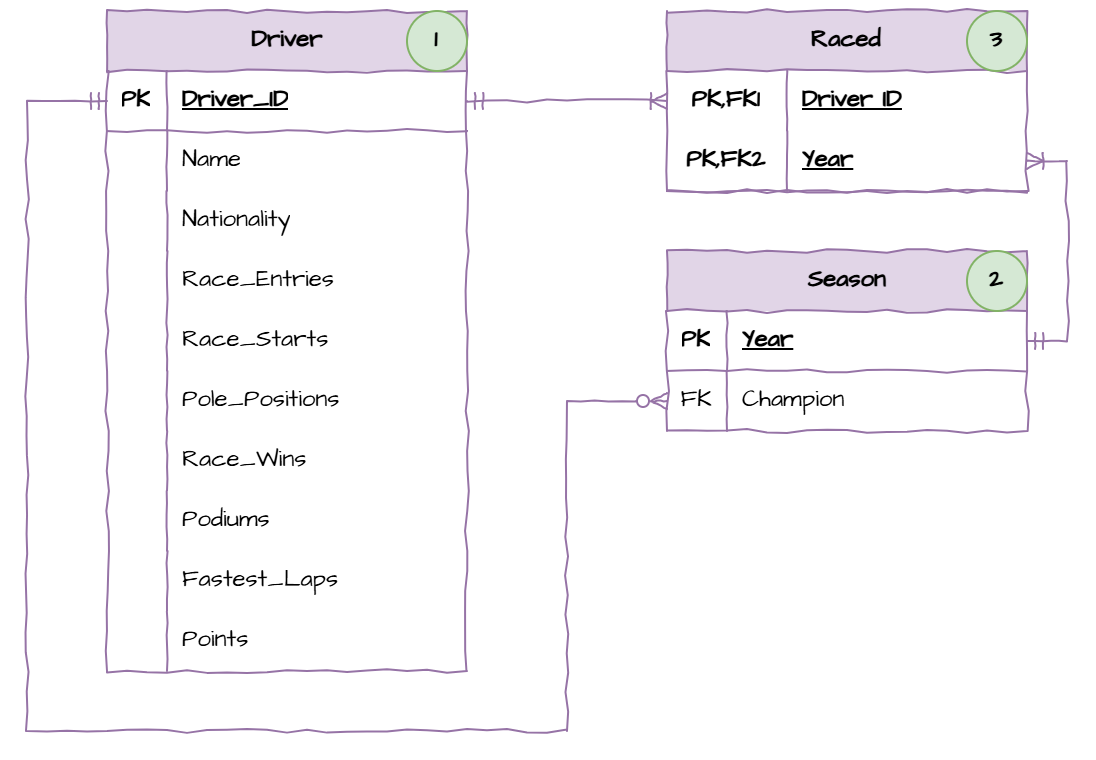
When populating a database, we need to be aware of foreign keys. We cannot write to a table if it contains foreign keys which link to an unpopulated table. Looking at the ERD above and we can observe the populate order should be:
Driver table - there are no foreign keys.
Season table - the only foreign key is Champion, which is linked to the populated Driver_ID field.
Raced table - the two foreign keys link to fields that we have populated.
Explore the Dataset
Whenever you work with a dataset, it is important to explore it first. You need to understand it, in order to ensure the integrity of the data as you parse it into your database structure.
Click on the F1Drivers_Dataset.csv to view it’s content. You will see the raw data below.
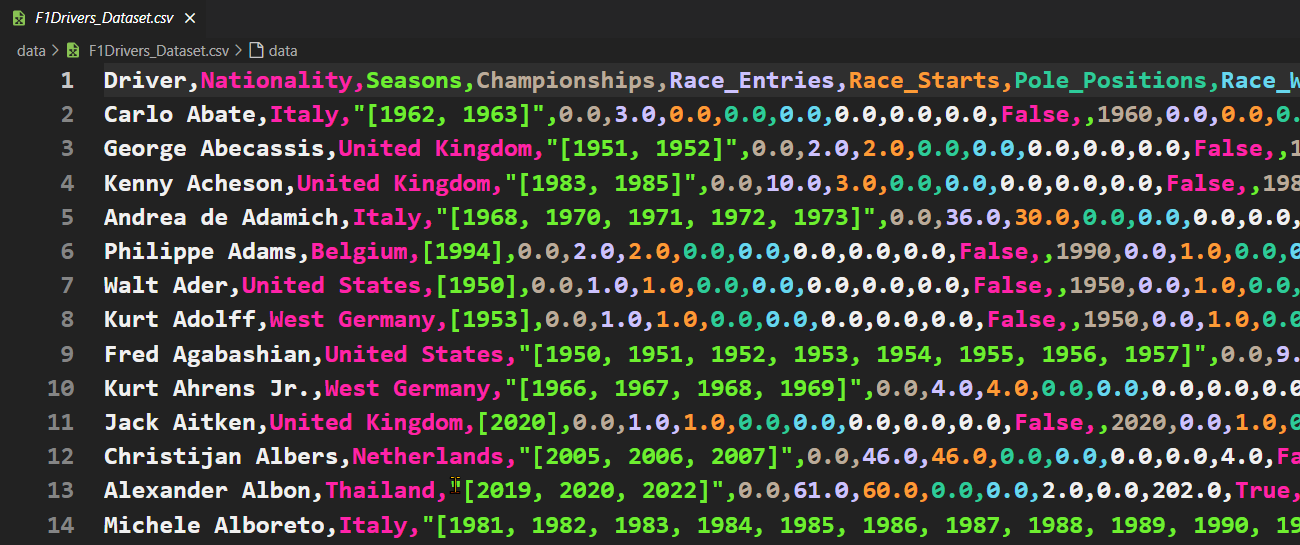
Although the colour helps, the columns are a bit hard to use, so press Ctrl/Cmd + P and then type Convert to table from CSV. This should present the data below.
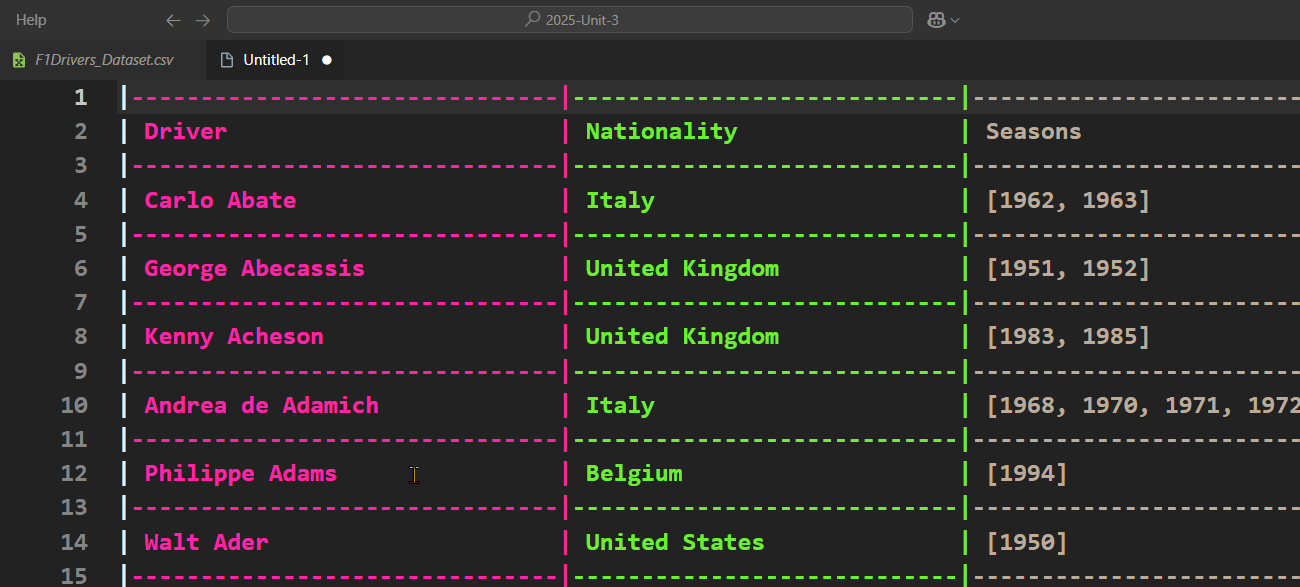
Scrolling through the data we can make some observations about how we will need to process the data:
CSV files are essentially text files. Programming languages use protocols to add functionality, but they are still text files. Therefore, everything read from the text file will be a string. This means that any data that is not a TEXT type, will need to be converted into the appropriate type for processing.
Seasons and Championship Years fields contain lists. These two will be read as a string, and we will need to convert them into lists for processing.
All the numbers that are written as floats (eg. Championships) do not have any decimal value, and are logically integers—you can’t have 0.5 of a championship— so we will need to convert them into integers.
Initial Processing
A common problem with processing data into databases is not knowing the data that is being parsed. To address this, throughout coding the populate solution we will first extract the data from the CSV and print it to terminal. This way we can see the actual data we will write to the database. Once we are confident that the data is correct, we can then send it to the database.
First we will do this for the entire CSV, so we can see what is returned when we read the CSV.
Create datastore.py
In your Unit 3 repo, create a new file called f1_datastore.py, then add the following code:
1 2 3 4 5 6 7 8 9 10 11 12 13 14 15 16 17 18import sqlite3 class Datastore: """ Datastore for the f1 driver database """ def __init__(self, database_file: str, data_file: str): """ initialises the datastore """ self.database_file = database_file self.data_file = data_file self.conn = sqlite3.connect(self.database_file) self.cursor = self.conn.cursor() self.populate_database()
Explanation of Code
lines 3-8 → create a
Datastoreclass which accepts a filenames for the database file and data file.line 12 → stores the database filename.
line 13 → stores the data filename.
line 14 → connects to the database.
line 15 → creates a database cursor for manipulating data.
Now that we have connected to the database, we need to start reading data from the CSV file. To do this we need to import the csv module.
1 2import sqlite3 import csv
We will also modularise all the population code into a separate method. This method needs to be called at the end of the __init__() method.
10 11 12 13 14 15 16 17 18 19def __init__(self, database_file: str, data_file: str): """ initialises the datastore """ self.database_file = database_file self.data_file = data_file self.conn = sqlite3.connect(self.database_file) self.cursor = self.conn.cursor() self.populate_database()
Next we will open and read the CSV file, with each row being converted into a dictionary. This will produce an iterable object (something that can be processed using a for loop) of dictionaries. We’ll then iterate over this object, printing out all the dictionaries.
21 22 23 24 25 26 27 28 29 30def populate_database(self): """ populates the database with data from the csv file """ with open(self.data_file, mode="r", encoding="utf-8") as csvfile: csv_reader = csv.DictReader(csvfile) # process the CSV data for record in csv_reader: print(record)
Explanation of Code
line 21 → creates the populate_database method
line 25 → opens the CSV file
mode = "r"→ opened in reading modeencoding="utf-8"→ allows the reading of non-English charactersas csvfile→ stores the open file in thecsvfilevariable
line 26 → creates a Dictreader object that reads each row of the CSV file as a dictionary, where the keys are the column headers from the first row of the file.
line 29 → starts a loop that goes through each row in the CSV file, as provided by csv_reader, record is a dictionary representing one row from the CSV.
line 30 → prints the current record dictionary
Create the main.py
In order to test our code, we now need to create a main.py file. In this file we need to create an instance of our Datastore object. We use the following code to do this.
1 2 3from f1_datastore import Datastore db = Datastore("f1_driver.db", "data/F1Drivers_Dataset.csv")
Test Initial Processing
Now we can test the initial processing by running main.py
Your terminal should stream a list of dictionaries (868 of the to be exact). This is the data that is being read from the CSV file. Lets have a look at one of these dictionaries. I have formatted the last dictionary to make it easier to read.
{
    'Driver': 'Ricardo Zunino',
    'Nationality': 'Argentina',
    'Seasons': '[1979, 1980, 1981]',
    'Championships': '0.0',
    'Race_Entries': '11.0',
    'Race_Starts': '10.0',
    'Pole_Positions': '0.0',
    'Race_Wins': '0.0',
    'Podiums': '0.0',
    'Fastest_Laps': '0.0',
    'Points': '0.0',
    'Active': 'False',
    'Championship Years': '',
    'Decade': '1980',
    'Pole_Rate': '0.0',
    'Start_Rate': '0.9090909090909091',
    'Win_Rate': '0.0',
    'Podium_Rate': '0.0',
    'FastLap_Rate': '0.0',
    'Points_Per_Entry': '0.0',
    'Years_Active': '3',
    'Champion': 'False'
}
The first thing we can notice is that there is more data in the dictionary, than can be stored in the database. That’s because Pole_Rate, Start_Rate, Win_Rate, Podium_Rate, FastLap_Rate, Points_Per_Entry, Years_Active, and Champion can all be calculated from the other values.
The next thing we can notice is that each value is a string, meaning that we need to covert it into the correct data type for the dictionary.
Finally the Seasons value is a string representing a list. This will need to be converted and then iterated over. For example, processing Ricardo’s seasons will require three entries into the database (one for each year).
Driver Data
Looking at the Data Structure ERD, or viewing the f1_driver.db file, we can see that the Driver table requires the following fields:
driver_id
name
nationality
race_entries
race_starts
pole_positions
race_wins
podiums
fastest_laps
points
Here is the pseudocode for the process we will follow:
1 2 3 4 5 6 7 8 9 10 11 12 13 14FOR record IN csv_reader name = record[Driver] nationality = record[Nationality] race_entries = record[Race_Entries] race_starts = record[Race_Starts] pole_positions = record[Pole_Positions] race_wins = record[Race_Wins] podiums = record[Podiums] fastest_laps = record[Fastest_Laps] points = record[Points] INSERT INTO driver table (driver data) NEXT record ENDFOR
We will do this in two stages:
process the driver data and output them to terminal - this will allow us to check that the data is correct.
change the output to insert the values in the database.
Process Driver Data
Return to our f1_datastore.py file and replace the print statement on line 30 with the code below:
28 29 30 31 32 33 34 35 36 37 38 39 40 41 42 43 44 45 46 47 48 49 50 51 52# process the CSV data for record in csv_reader: # process driver values name = record["Driver"] nationality = record["Nationality"] race_entries = int(float(record["Race_Entries"])) race_starts = int(float(record["Race_Starts"])) pole_positions = int(float(record["Pole_Positions"])) race_wins = int(float(record["Race_Wins"])) podiums = int(float(record["Podiums"])) fastest_laps = int(float(record["Fastest_Laps"])) points = float(record["Points"]) # view the driver data print( name, nationality, race_entries, race_starts, pole_positions, race_wins, podiums, fastest_laps, points, )
Explanation of Code
lines 31 & 32 → taking the string from the record dictionary and assigning it to the variable.
lines 33 - 38 → taking the string from the record dictionary and converts it to a float then to an integer (this is needed as a strait conversion to integer will cause an error because of the decimal value).
line 39 → taking the string from the record dictionary and converts it to a float. The points field actually contains information in the decimal value.
lines 42 - 52 → displays the processed driver data to the terminal.
Save f1_datastore.py.
Test Driver Data
Go back and run main.py to test our code.
Your terminal should display all the data that is read from the CSV file and processed ready to write to the database. The last five lines should look like this:
1 2 3 4 5Emilio Zapico Spain 1 0 0 0 0 0 0.0 Zhou Guanyu China 23 23 0 0 0 2 6.0 Ricardo Zonta Brazil 37 36 0 0 0 0 3.0 Renzo Zorzi Italy 7 7 0 0 0 0 1.0 Ricardo Zunino Argentina 11 10 0 0 0 0 0.0
This step is really important, as it shows us the actual data we will send to the database. Check it to make sure there isn’t a mistake.
Write Driver Data to Database
Now we need to send the driver data to the database rather than the terminal.
Back in f1_datastore.py we need to create a method that writes the data to the driver table. Add the following code under the __init__():
54 55 56 57 58 59 60 61 62 63 64 65 66 67 68 69 70 71 72 73 74 75 76 77 78 79 80 81 82 83 84 85def add_driver( self, name: str, nationality: str, race_entries: int, race_starts: int, pole_positions: int, race_wins: int, podiums: int, fastest_laps: int, points: float, ): """ adds a driver to the database """ self.cursor.execute( """ INSERT INTO Driver (name, nationality, race_entries, race_starts, pole_positions, race_wins, podiums, fastest_laps, points) VALUES (:name, :nationality, :race_entries, :race_starts, :pole_positions, :race_wins, :podiums, :fastest_laps, :points) """, { "name": name, "nationality": nationality, "race_entries": race_entries, "race_starts": race_starts, "pole_positions": pole_positions, "race_wins": race_wins, "podiums": podiums, "fastest_laps": fastest_laps, "points": points, }, )
Explanation of Code
lines 54 - 65 → define the method and list all the data that needs to be provided to the method.
lines 69 - 85 → are the parameterised SQL statement that will be run on the database.
lines 70 - 73 → are the SQL statement template without the data.
lines 74 - 84 → is a dictionary that contains the data to be plugged into the command template.
Parameterized SQL statements
A way of safely and efficiently inserting values into SQL queries without building the query as a string. Instead of directly inserting values into a query (which can lead to errors or security issues), placeholders are used, and values are provided separately.
Parameterized SQL statements are used to:
Prevent SQL Injection by separating code from data.
Improve performance by allowing databases to cache execution plans.
Reduce errors by helping to avoid syntax issues with strings, numbers, dates.
Now we need to call the add_driver method from the populate_database method. Go up to the populate_database method and change the print in line 42, to a add_driver call.
41 42 43 44 45 46 47 48 49 50 51 52# view the driver data self.add_driver( name, nationality, race_entries, race_starts, pole_positions, race_wins, podiums, fastest_laps, points, )
Finally we need to commit the changes we made to the database. We will do this in the __init__. Go to the __init__ method and add the highlighted code to the bottom.
10 11 12 13 14 15 16 17 18 19 20def __init__(self, database_file: str, data_file: str): """ initialises the datastore """ self.database_file = database_file self.data_file = data_file self.conn = sqlite3.connect(self.database_file) self.cursor = self.conn.cursor() self.populate_database() self.conn.commit()
Save f1_datastore.py.
Test Writing Driver Data
Go back to main.py and run it to test our code.
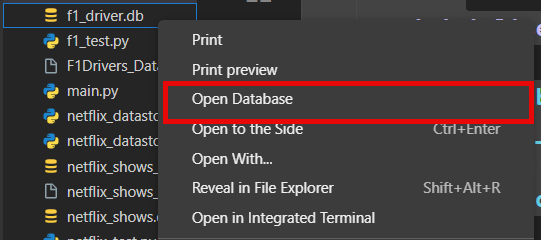
To see if it worked we need to look into the data stored in the driver table. To do this, in the files panel, right-click on f1_driver.db and select Open Database.
Then look to the bottom of the file panel then click:
The dropdown arrow beside SQLITE EXPLORER
The dropdown arrow beside f1_driver.db
The dropdown arrow beside Driver
The solid arrow to the right of Driver
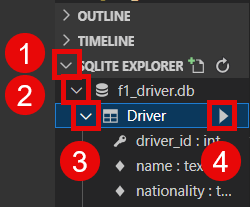
A panel should open to the right of your code showing the content of the Driver table.
Seasons Data
We will take the data for Seasons table from the Championship Years field. In the data this field contains strings that represent a list of integers, so there will need to be more converting of data types.
If we look at the data in the Championship Years column we see that:
it is most frequently blank → we need to check that the field is not blank before writing to the database
when there is data, it is a list → when there is data, we will need write to the database for each year in the field.
The pseudocode for the processing the seasons data is as follows:
1 2 3 4 5 6 7 8 9 10FOR record IN csv_reader IF record[Championship Years] IS NOT NULL THEN years = CONVERT record[Championship Years] INTO LIST FOR year IN years INSERT INTO seasons table (year, driver_id) NEXT year END FOR END IF NEXT record END FOR
Notice the driver_id in line 5, this presents us with a problem. We need to use the driver_id for the current driver we just wrote to the driver table. Fortunately sqlite3 provides a solution.
Get driver_id
We will use a method where the cursor provides the row_id for the last row it wrote to the database. We can simply get add_driver to return that value and then store it in a variable for later use.
Go to the very end of our add_driver method and add the highlighted line.
75 76 77 78 79 80 81 82 83 84 85 86 87 88{ "name": name, "nationality": nationality, "race_entries": race_entries, "race_starts": race_starts, "pole_positions": pole_positions, "race_wins": race_wins, "podiums": podiums, "fastest_laps": fastest_laps, "points": points, }, ) return self.cursor.lastrowid
We are now returning the driver_id now we need to store it somewhere. Go to where we call add_driver in the populate_database method. Then assign the return value to a variable:
42 43 44 45 46 47 48 49 50 51 52 53# view the driver data driver_id = self.add_driver( name, nationality, race_entries, race_starts, pole_positions, race_wins, podiums, fastest_laps, points, )
Process Seasons Data
Now we need extract the data for the Seasons table. Just like the driver data, we will first display this data to the terminal so we can check it.
Go to the bottom of the populate_database method. Make sure that our indents place this code inside the for record in csv_reader loop. Add the highlighted code below:
42 43 44 45 46 47 48 49 50 51 52 53 54 55 56 57 58 59 60# view the driver data driver_id = self.add_driver( name, nationality, race_entries, race_starts, pole_positions, race_wins, podiums, fastest_laps, points, ) # process only the championship years if record["Championship Years"]: years = ast.literal_eval(record["Championship Years"]) for year in years: print(year, driver_id)
Explanation of Code
line 56 → checks if there is a value in the Championship Years column
line 57 → converts the string the represents a list of integers into a list of integers and assigns it to
yearsline 59 → iterates through our new
yearslist.line 69 → prints the data that we will write to the Seasons table
Save f1_datastore.py
Testing Seasons Data
Time to check if we are processing the data correctly. Run main.py and check the output by referencing both the csv file and the driver table in the database.
Refresh f1_driver.db
If your code passes your test, we need to return the database file back to blank. To do this:
select the f1_driver.db file and delete it.
rename the f1_driver copy.db file to f1_driver.db
then, with f1_driver.db still selected, press Ctrl/Cmd + C to copy.
press Ctrl/Cmd + V to paste it.
you should once again have a f1_driver copy.db file and a f1_driver.db file
Write Seasons Data to Database
Our data is correct, so we can write it to the Seasons table.
Return to f1_datastore.py and then below the add_driver method create the add_season method.
98 99 100 101 102 103 104 105 106 107 108 109 110 111def add_season(self, year: int, champion: int): """ adds a season to the database """ self.cursor.execute( """ INSERT INTO Seasons VALUES (:year, :champion) """, { "year": year, "champion": champion }, )
Explanation of Code
If you have a keen eye you may have noticed that line 7 looks different to our last INSERT statement – it doesn’t have any field names. Why?
If you look at the [Data Structure ERD] you will notice that the primary key (year) is a value that we are taking from the CSV file, therefore it is not auto-increment.
In SQL, when you INSERT all the values into a table, you don’t have to list the field names, they just get written in order. So the first VALUE item get written to the first field of the table, the second VALUE to the second field, and so-on.
Then go up to the populate_database method and replace the print statement on line 61 with a call to the add_season method:
56 57 58 59 60 61# process only the championship years if record["Championship Years"]: years = ast.literal_eval(record["Championship Years"]) for year in years: self.add_season(year, driver_id)
Save f1_datastore.py
Test Writing Seasons Data
Run main.py then check that the data is written correctly into the database.
Refresh f1_driver.db
If your code passes your test, we need to return the database file back to blank. To do this:
select the f1_driver.db file and delete it.
rename the f1_driver copy.db file to f1_driver.db
then, with f1_driver.db still selected, press Ctrl/Cmd + C to copy.
press Ctrl/Cmd + V to paste it.
you should once again have a f1_driver copy.db file and a f1_driver.db file
Raced Data
Onto our final table – Raced.
We will use the data from the Seasons column of the CSV. Looking at the data, it is a list and very similar to the Championship Years data. In fact it is a little simpler since there are no blank fields.
The pseudocode for processing this data is:
1 2 3 4 5 6 7 8FOR record IN csv_reader seasons = CONVERT record[Seasons] INTO LIST FOR season IN seasons INSERT INTO raced table (driver_id, season) NEXT season END FOR NEXT record END FOR
Be careful with line 4, in this table driver_id comes first
Processing Raced Data
Fortunately, we already have the driver_id data, so we only need to extract the Raced data from the Season column of the CSV.
At the bottom of the populate_database method in f1_datastore.py add the following code:
56 57 58 59# process driver seasons seasons = ast.literal_eval(record["Seasons"]) for season in seasons: print(driver_id, season)
This code is virtually the same as processing Championship Years.
Save f1_datastore.py
Testing Raced Data
Run main.py and check the data in the terminal against the data in the CSV and database.
Refresh f1_driver.db
If your code passes your test, we need to return the database file back to blank. To do this:
select the f1_driver.db file and delete it.
rename the f1_driver copy.db file to f1_driver.db
then, with f1_driver.db still selected, press Ctrl/Cmd + C to copy.
press Ctrl/Cmd + V to paste it.
you should once again have a f1_driver copy.db file and a f1_driver.db file
Writing Raced Data
In f1_datastore.py create the add_raced method by add the code below:
118 119 120 121 122 123 124 125 126 127 128def add_raced(self, driver_id: int, year: int): self.cursor.execute( """ INSERT INTO Raced VALUES (:driver_id, :year) """, { "driver_id": driver_id, "year": year }, )
Then we need to replace the print in the populate_database method with a call to the add_raced method.
63 64 65 66# process driver seasons seasons = ast.literal_eval(record["Seasons"]) for season in seasons: self.add_raced(driver_id, season)
Save f1_datastore.py.
Test Writing Raced Data
Time to run our final test. Run main.py and then check that the data is correctly written to the database.
Exercise
Now that we have finished our F1 driver database, it’s time to apply this knowledge to a new dataset.
In your Unit 3 repo you will have the netflix_titles.csv and netflix_shows.db files. Below is the data structure ERD.
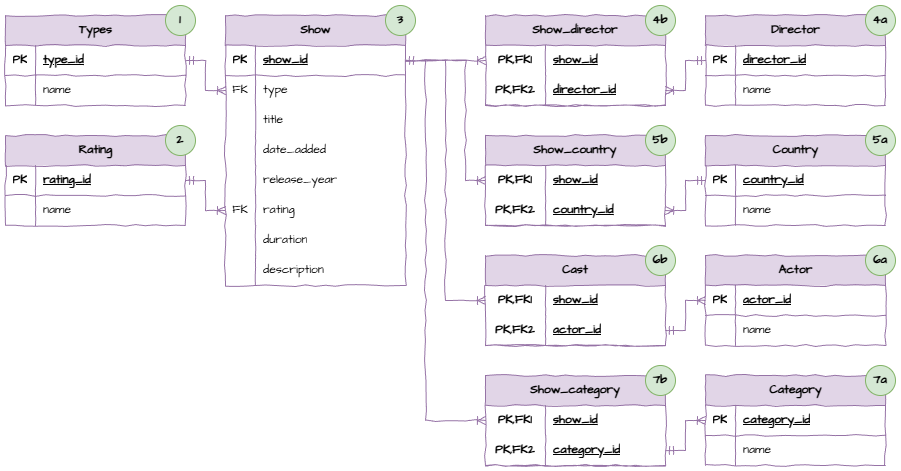
This is a much larger dataset and more complicated database. Never-the-less, the concepts and processes are the same as the F1 Drivers database.
Make sure that you follow the same process:
View the dataset in CSV
Connect and print CSV to terminal
Identify the order of tables to populate (hint: check the numbers on the ERD)
For each table:
process the data to terminal and check
write data to table and check