Coding
Coding Introduction
IPO Solutions
1. Budget Calculator
| Input | Process | Output |
|---|---|---|
| Total weekly income | Add up all expenses | Total expenses |
| List of expenses (e.g. food, transport, entertainment) | Subtract expenses from income | Remaining money |
2. Step Counter App
| Input | Process | Output |
|---|---|---|
| Step data from motion sensor | Count total steps walked Calculate distance and calories using step count and user data | Total steps Distance walked and calories burned |
3. Quiz App
| Input | Process | Output |
|---|---|---|
| User-selected answer | Compare answer to correct answer Track score for each question | Show “Correct” or “Incorrect” Final score after all questions |
Decomposition Solutions
Activity 1
Ask the user to enter homework details (subject, task, due date)
Store the homework tasks in a list or file
Display the list of tasks to the user
Allow the user to mark tasks as completed
Sort or filter tasks by due date or subject
Activity 2
Get team names and store them
Set the starting score for each team to zero
Create a way to add or subtract points during the game
Display the current score on screen
Show a final message with the winner when the game ends
Activity 3
Load a set of questions and multiple-choice answers
Display one question at a time to the user
Record the user’s selected answer
Check if the answer is correct and keep score
Show the final score after all questions are answered
Pattern Recognition Solutions
Activity 1
Quiz Feedback Program:
Each question has a structure: question text, multiple options, one correct answer
The same process is repeated: show question → get answer → check answer → give feedback
Feedback messages follow a pattern (e.g. “Correct!” or “Incorrect, the right answer is...”)
Activity 2
Weather App:
Each day’s forecast uses the same data format: day name, icon, temperature, description
Icons represent weather types (e.g. sun, cloud, rain) and are reused across days
Patterns in temperature changes (e.g. hot in afternoon, cool at night) can be recognised
Activity 3
Timetable Generator:
Class times follow regular patterns (e.g. Period 1 starts at 9:00 every day)
Subjects repeat on the same days each week
Breaks and lunch are placed in the same time slots across all timetables
Abstraction Solutions
Activity 1: Water Intake App
Necessary information and features: Date, amount of water consumed, daily goal, total intake so far, and a simple way to log each drink
Unnecessary details to leave out: Brand of water, exact time of each sip, detailed drink history beyond a few days
Abstraction used: Focus on tracking totals and goals; ignore details that don’t help the user meet their target
Activity 2: Puzzle Game
Parts that stay the same: Player controls, puzzle-solving mechanics, scoring system, level completion logic
How to group/simplify: Use a single function or module to handle shared game mechanics; only change artwork, sound, and puzzle layout per level
Abstraction used: Group repeated behaviour into reusable procedures or objects (e.g. movePlayer(), checkPuzzleComplete())
Activity 3: Staff Profiles Website
Essential information: Name, photo, job title, email address
How to keep it consistent: Use one profile template or function that fills in staff data for each person
Abstraction used: Create a reusable layout or function for all staff profiles instead of writing separate code for each one
System Thinking Solutions
Activity 1: School Attendance App
Parts of the system:
Student data input (e.g. scanned ID or manual entry)
Database storing attendance records
Notification system for sending updates to teachers and parents
Reporting interface for staff
Interactions:
When a student is marked present or absent, the database updates
The system sends notifications based on changes
Reports are generated from stored attendance data
If the input method fails, notifications and reports may be incorrect
Activity 2: Online Food Delivery System
Parts of the system:
User app (for browsing and ordering)
Restaurant system (receives and confirms orders)
Payment gateway
Delivery tracking system
Interactions:
The user order triggers updates across the system
Payment confirmation activates the restaurant system
Restaurant status affects delivery time
If one part fails (e.g. restaurant delay), it affects the whole order process
Activity 3: Smart Home Lighting System
Parts of the system:
Light bulbs or smart switches
Sensors (e.g. motion or daylight sensors)
User interface (e.g. mobile app or voice assistant)
Automation rules
Interactions:
Sensor input affects lighting behaviour
User settings control when and how lights change
Automation rules link actions together (e.g. turn off lights when no motion)
A change in settings or sensor failure can disrupt the whole system’s function
Basic Features
Algorithms Solutions
Here are the answers to the algorithm learning questions:
Algorithms are the set of commands or instructions that tell a computer what to do and how to solve a problem.
It processes instructions one after the other in the order they appear.
Assignment stores the result of an expression into a variable, which holds the value for later use in the program.
A condition checks whether something is true or false; selection uses that condition to decide if a part of the code should run.
Iteration repeats a set of instructions multiple times, while sequence runs instructions once, in order.
Example: A guessing game where the computer checks if your guess is correct (selection), and keeps asking until it is (iteration).
It makes programs easier to manage, test, reuse, and debug by breaking them into smaller, logical sections.
Sequence (to go through questions), selection (to check answers), assignment (to store score), iteration (to go through multiple questions), and possibly modularisation (to separate the quiz logic into functions).
The code could become hard to read, debug, test, and maintain. Errors in one part of the code may affect other parts.
Variable Solutions
To store values in computer memory for use in a program.
The kind of data stored at that memory location.
Dynamic types are checked at runtime and can change; static types are checked before running and cannot change.
Because type checking happens at runtime and variables can change type.
With single or double quotes.
intfloatTrueandFalseValues that evaluate to
TrueorFalsein a Boolean context.None,0,''FalsyWhere in the program a variable can be used.
Global is defined outside functions and used anywhere; local is defined inside functions and used only there.
It limits variable access to reduce bugs and improve code organisation.
Local, Enclosing, Global, Built-in
Local → Enclosing → Global → Built-in
It overrides the built-in function while the code runs.
No
No
Global variables and built-in names
Control Structures Solutions
Sequential, selection, iteration
Line by line from top to bottom
A check to see if something is true or false
TrueorFalseifandwhilevalue operator value
!=>=Choosing a path in code based on a condition
Branching
It checks conditions in order and runs the first block that is true
Yes
Nothing runs unless there’s an
elseblockRuns if all previous conditions are false
Compares a variable against fixed values
Python 3.10
Repeating a block of code
Loop
Definite has a known number of repetitions; indefinite does not
forloopwhileloopPost-test loop (
do...while)whileloopUses each item one at a time
A container you can move through one item at a time
Lists, tuples, strings (also: dictionaries, sets)
Data Structures Solutions
To store data in an organized form.
As collections of related data, like a shopping list or contact list.
Lists, tuples, sets, dictionaries.
An ordered collection of items.
Using square brackets
[]with items separated by commas.Items can be changed, added, or removed.
Index 0.
Tuples cannot be changed (immutable), lists can.
They offer faster performance and are ideal for fixed data.
Using parentheses
()with items separated by commas.A collection of unique items with no specific order.
Sets are unordered and only hold unique items.
Yes.
When you only care about whether an item exists, not order or duplicates.
Key-value pairs.
Using curly braces
{}, with a colon:between each key and value.Keys must be unique.
Yes.
The rules a programming language follows to write commands properly.
It ensures commands are written in a valid way that Python can understand.
Classes Activities
A class is a blueprint for creating objects.
Attributes and methods.
An attribute stores data in a class.
A method performs an action in a class.
colour,wheelsdrive(),brake()To define shared structure and behaviour for multiple car objects.
By calling the class name with parentheses, e.g.
Car()It creates a new object called
ferrarifrom theCarclass.It allows shared code to be reused without repetition.
Repeating code.
It calls the
drive()method on theferrariobject, passingdistanceas a value.Because they have similar features but also differences.
Objects are created from classes and follow their structure.
In the Deepest Dungeon course.
Operations Activities
To perform actions on variables or values.
Arithmetic, assignment, comparison (others: logical, identity, membership, bitwise).
Perform basic maths with numbers.
Addition.
Whole number result of dividing x by y (floor division).
Control the order of operations, like in maths.
Exponentiation (power).
Assign or update the value of a variable.
Add 3 to the current value of
x.=sets a value;+=increases the value by adding.TrueorFalse.Checks if two values are not equal.
TrueReturns
Trueif both conditions areTrue.Reverses the result of the condition
x < 5.True(sincex < 5is true).Whether two variables are the same object in memory.
Returns
Trueifxandyrefer to the same object.TrueIf a value exists in a sequence like a list or string.
TrueWhen you want to check that a value is not in a sequence.
True
Good Practice
Dependability Solutions
Dependable code runs consistently under different conditions, handles errors gracefully, and avoids crashes, building user confidence and trust.
It helps others (or your future self) quickly understand, fix, or improve the code without breaking other parts.
Lower cognitive load makes the code easier to follow, reducing errors and making updates or collaboration simpler.
A dependency chain is when one module relies on another. Changes in any linked module can cause unexpected bugs or break the program.
Small functions are easier to test and debug. Good names and comments explain what code does, making it easier to work with.
Consistent style improves readability and helps teams follow the same structure, reducing mistakes and confusion.
It allows you to write code that handles invalid input or failures safely, preventing crashes and improving user experience.
Testing finds errors before users do, making sure the program behaves correctly and consistently.
Clear names show what variables or functions do, helping all team members quickly understand and use the code correctly.
Handling edge cases avoids unexpected crashes or bugs, making the program more robust and user-friendly.
Efficiency Solutions
Efficiency means completing tasks using the least amount of time and processing power.
The right data structure makes it faster to store and access data, improving speed.
Unnecessary steps slow down programs and waste resources.
Some algorithms use fewer steps to get to the solution, making them faster.
Nested loops take more time because they run many times for each outer loop run.
Small functions are easier to test, update, and reuse, making code faster and simpler.
Your code should still perform well even as the data grows; it should use minimal time and memory.
Code efficiency is about reducing resource use, which supports the speed and structure of algorithmic efficiency.
A
forloop avoids repetition and runs faster than many repeatedif-then-elsechecks.Clear and simple code is easier to read and less likely to have mistakes that slow it down.
Functions reduce repeated code, making updates easier and programs more efficient.
Storing repeated results saves time by avoiding recalculating the same thing.
A dictionary is faster than a list for lookups because it finds items using keys.
Testing with different data sizes helps you find ways to make code faster and use fewer resources.
Effectiveness Solutions
Effectiveness measures how well an algorithm solves the intended problem.
Understanding the problem clearly ensures the solution is accurate and relevant.
Success criteria help you check if the solution works, like producing the correct output or meeting user needs.
Breaking the problem into smaller steps makes it easier to design and manage the algorithm.
Pseudocode or flowcharts help plan the logic before coding, reducing mistakes.
Clear and structured logic makes code easier to follow and less likely to have errors.
Testing with real, edge case, and invalid data ensures the algorithm handles all situations correctly.
If the algorithm doesn’t work as expected, refine or fix it based on what you learned from the results.
User or tester feedback can show issues or improvements you didn’t notice, helping you make a better solution.
A desk check can work for simple problems, but complex problems need real testing to see if they function in all conditions.
Testing Activities
The main purpose of testing is to check that code performs as expected.
Testing helps ensure the solution solves the problem (effective), runs smoothly (efficient), and works reliably (dependable).
Testing should occur throughout development to catch and fix issues early and improve quality over time.
Exploratory testing is informal testing done by trying features without a set plan.
Exploratory testing helps spot unexpected issues and ensures the solution feels usable and effective.
Unit testing focuses on checking individual parts of code, such as functions or classes.
Unit testing improves dependability by catching errors close to where they occur.
Integrated testing checks how different components of the program work together.
Integrated testing is important because some problems only appear when parts of the system interact.
Using all three types of testing helps make the solution more reliable, accurate, and high-performing.
Debugging Solutions
Debugging is finding and fixing errors (bugs) in a program so it works correctly.
Bugs can cause crashes, unexpected behaviour, or incorrect results.
Python runs line-by-line, so one error can stop the whole program from continuing.
VSCode provides breakpoints, step controls, variable and watch panels, and a call stack viewer.
Click the “Run and Debug” tab, then select “Run and Debug” and choose “Python File.”
A breakpoint pauses the code on a specific line; set one by clicking next to the line number.
The “Variables” panel shows the current values stored in variables while the program is paused.
“Step Over” runs the current line and moves to the next line in the same function.
“Step Into” enters a function call to let you debug inside that function.
“Step Out” runs the rest of a function and returns to where it was called.
Conditional breakpoints only pause when a set condition is true, helping catch specific errors.
An example is
y == 0, which pauses the code only whenyequals zero.You can change variable values while paused to test scenarios or fix bugs on the fly.
The watch panel lets you track expressions or values as the program runs.
The call stack shows the order of function calls leading to the current line.
Print-based debugging is helpful for quick checks or when you’re unsure where the bug is.
Breakpoints pause the program, and the variables panel shows what’s happening at that moment.
Install the Python and Python Debugger extensions in VSCode.
Testing different values while paused helps understand bugs or test fixes without restarting.
These tools help spot issues earlier, understand program behaviour, and fix bugs faster.
Error Correction Activities
Error correction is the process of finding and fixing mistakes in code so the program runs correctly.
Developers get better at spotting and fixing errors through regular coding and experience.
The three main types of errors are syntax errors, runtime errors, and logic errors.
Syntax errors happen when the code doesn’t follow the rules of the Python language.
Syntax errors must be fixed before running the program because they stop the program from starting.
IDEs usually highlight syntax errors to help developers find and fix them quickly.
Common syntax errors include misspelled commands, undeclared variables, and missing brackets.
Runtime errors occur while the program is running, usually causing it to crash.
Dividing by zero causes a runtime error and stops the program.
Adding a number and a string causes a runtime error because they are incompatible types.
A runtime error happens if you try to access an index in a list that doesn’t exist.
Logic errors happen when the program runs but gives the wrong result or behaviour.
A logic error doesn’t crash the program, but it causes incorrect output or actions.
Using the wrong condition, like
< 5instead of<= 5, can lead to incorrect program logic.Misplaced brackets or incorrect operations can cause logic errors in calculations.
Reusing variable names incorrectly can cause unexpected results or overwrite important data.
An unintended infinite loop causes the program to keep running without stopping.
Using Boolean operators incorrectly can change the meaning of a condition and cause logic errors.
Using a variable before it’s declared results in a syntax error.
Poor program design can lead to logic errors because the structure of the code doesn’t match the intended logic.
Coding Conventions Activities
Code simplicity means writing code that is easy to read and understand.
Clear logic and meaningful names make code easier for others (and your future self) to follow.
Simple code is easier to work with, reducing mistakes and making it easier to improve.
Python naming rules require names to use only letters, numbers, and underscores, with no spaces, and not start with a number.
Variable names can’t start with a number because it breaks Python’s syntax rules.
Case-sensitive means
nameandNameare treated as different variables in Python.Naming rules must be followed to run code, while naming conventions help others understand it.
temperature_celsiusclearly describes what the value represents, whilexgives no context.snake_caseuses lowercase letters and underscores, and it’s used for variables and functions.Constants should be written in
UPPER_CASEwith underscores, likeMAX_SIZE.CamelCasecapitalises each word without underscores and is used for class names.Python keywords have special meanings, so using them as variable names causes errors.
Comments are needed when code is complex or not immediately clear, even with good names.
A docstring is placed right after a function definition and explains what the function does.
A docstring should describe the function’s inputs, processes, and outputs.
IDEs use docstrings to show help messages, hints, and tooltips while coding.
Block comments explain specific sections of code that may be hard to understand at a glance.
They help other readers understand why a certain piece of code works the way it does.
Code portability means the same code works on different systems without changes.
Python is portable because it runs on many platforms like Windows, macOS, Linux, iOS, Android, and the web.
Good Programming Practice Solutions
Refactored booking_system.py
Refactored version of the booking_system.py file that follows good programming practices and addresses all activity tasks:
import os

def clear_screen():
    """Clears the terminal screen in a cross-platform way."""
    os.system("cls" if os.name == "nt" else "clear")


def is_valid_seat(seat_number):
    """Returns True if seat number is between 0 and 50."""
    try:
        seat = int(seat_number)
        return 0 <= seat <= 50
    except ValueError:
        return False


def collect_bookings():
    """
    Collects booking information from users.

    Returns:
        list: A list of bookings in the format [(name, seat_number), ...]
    """
    bookings = []

    while True:
        name = input("Enter your name: ").strip()
        if not name:
            print("Name cannot be empty.")
            continue

        seat = input("Enter seat number (0–50): ").strip()
        if not is_valid_seat(seat):
            print("Invalid seat number.")
            continue

        bookings.append((name, seat))
        more = input("Add another booking? (y/n): ").lower().strip()
        if more == "n":
            break

    clear_screen()
    return bookings


def show_bookings(bookings):
    """Prints all collected bookings to the screen."""
    print("Your Bookings:")
    for booking in bookings:
        print(f"{booking[0]} - Seat {booking[1]}")


def main_menu():
    """Displays the main menu and handles user choices."""
    while True:
        print("Cinema Booking System")
        print("1. Book a Seat")
        print("2. Exit")
        choice = input("Enter choice: ").strip()

        if choice == "1":
            bookings = collect_bookings()
            show_bookings(bookings)
        elif choice == "2":
            print("Goodbye!")
            break
        else:
            print("Invalid option. Please try again.")


if __name__ == "__main__":
    main_menu()
Summary of Fixes
Style and Naming Issues:
Changed function and variable names to follow
snake_caseAdded clear, descriptive names
Followed PEP 8 for formatting
Maintainability Issues:
Broke up long and unclear code into small, single-purpose functions
Added
docstringsandblock commentsRemoved hardcoded platform-specific logic from main functions
Efficiency Problems:
Removed repeated input validation logic
Used return values and parameters to pass data cleanly between functions
| Error Type | Correction |
|---|---|
| Syntax Errors | missing colons bad assignment ( = instead of ==) |
| Runtime Errors | unsafe int() conversionsuse of break outside loops |
| Logic Errors | incorrect seat validation improper input handling |
Testing Plan Example
| Test Type | Test |
|---|---|
| Exploratory Test | Input: blank name, out-of-range seat, enter “n” to exit loop Result: All errors handled, loop exits properly |
| Unit Tests | 1. is_valid_seat("25") returns True2. is_valid_seat("hello") returns False |
| Integrated Test | Run the full program, enter two valid bookings, then exit Output: Prints both bookings accurately and confirms program flow |
Programming Paradigms
Programming Paradigms Solutions
Inheritance – it lets
Carreuse the code fromVehicle, reducing repetition and improving structure.MVC pattern – separates data (Model) from display (View), making the app easier to manage and update.
Event-driven programming – event handlers respond to user actions like clicks or key presses.
One is working on the View, the other on the Model – MVC allows both to work independently without conflict.
Event handler – triggered by the event loop when the key press is detected.
Object-Oriented Programming (OOP) – allows the use of classes and objects to model shared and unique behaviours.
User Experience
User Experience Introduction
User Experience Activities
User Experience (UX) refers to the overall experience a person has when interacting with a digital product, including how easy it is to use, how efficient and satisfying the experience is, and whether it meets the user’s needs and expectations.
User-first design is important because it ensures the solution meets the needs of the people using it, while developer-first or machine-first design can lead to frustration and poor usability.
Useability
Useability Solutions
Activity 1
| Issue # | Usability Principle | Suggested Improvement |
|---|---|---|
| 1 | Safety | Move the ‘Delete’ button away from ‘Save’ and add a confirmation dialog before deletion. |
| 2 | Accessibility | Use a high-contrast colour scheme (e.g. black text on white background) and test using the Colour Contrast Analyser. |
| 3 | Learnability | Add an onboarding tutorial, tooltips, or a help screen with brief explanations. |
| 4 | Efficiency / Utility | Add a dropdown list or autocomplete for common subjects to save time and reduce errors. |
| 5 | Effectiveness / Safety | Prevent crashes by making due date optional or showing a clear error message before saving. |
| 6 | Effectiveness / Reliability | Fix the reminder system to ensure it works consistently, even after the app is closed. |
| 7 | Learnability / Accessibility | Add text labels or tooltips to icons and use familiar symbols (e.g. trash can for delete). |
| 8 | Safety | Include a confirmation step before deleting tasks to avoid accidental loss. |
| 9 | Accessibility / Effectiveness | Increase button size and spacing for easier touch use, especially on mobile. |
| 10 | Safety / Utility | Instead of deleting completed tasks, move them to a “Completed” tab with an option to restore. |
Visual Communication
Alignment Activity Solution
Examples of Alignment on the LEGO Website:
Top Navigation Bar: Menu items like “Shop,” “Discover,” “Help,” and the search and cart icons are horizontally aligned, creating a clean and organized header.
Product Grid Layout: On category pages, products are aligned vertically in columns and horizontally in rows, making it easy to scan and compare items.
Homepage Banners: Promotional text and buttons are aligned with images or backgrounds. For example, text is often left-aligned or centred depending on the layout, maintaining visual consistency.
Footer Links: Links in the footer are aligned into neat columns under headings like “About Us,” “Support,” and “Legal,” allowing for quick navigation and readability.
Text Blocks and Images: On product pages, text descriptions, prices, and buttons are left-aligned with the product image, ensuring a coherent flow of information.
Balance Activity Solution
Examples of Balance on the LEGO Website:
Homepage Hero Sections: Large feature images are visually balanced with text boxes or call-to-action buttons placed on the opposite side, achieving symmetrical or asymmetrical balance.
Product Pages: Images on the left and product information (name, price, reviews, buttons) on the right create a balanced layout that guides the user’s attention naturally.
Category Pages: Products are evenly spaced in a grid format, ensuring visual weight is distributed across the screen, maintaining consistent spacing and size.
Navigation and Icons: The logo, navigation menu, and icons (search, cart, account) are placed to balance each other across the top bar, preventing the header from feeling lopsided.
Mobile View: Sections are stacked with equal spacing and centred elements, preserving balance in a vertical layout suited for smaller screens.
Contrast Activity Solution
Examples of Contrast on the LEGO Website:
Text and Background: White or yellow text is used on dark backgrounds (e.g. banner images), and black or dark text on light backgrounds, making content easy to read.
Call-to-Action Buttons: Buttons like “Add to Bag” or “Shop Now” are in bright colours (e.g. blue, yellow, or red) that stand out against the surrounding content.
Product Thumbnails: Bold colours of LEGO sets contrast strongly with neutral backgrounds, making the products pop and attract attention.
Sale and Promotion Labels: Discounts or special offers use red or yellow tags that contrast with the usual site colours, drawing the user’s eye immediately.
Hover Effects: Interactive elements such as buttons or product cards use contrast changes (e.g. background darkens or border appears) to show they are clickable.
Harmony Activity Solution
Examples of Harmony on the LEGO Website:
Consistent Colour Palette: The site uses LEGO’s signature colours (red, yellow, blue, black, white) throughout, creating a unified and familiar brand experience.
Typography: Fonts are used consistently across headings, body text, and buttons, which helps maintain a harmonious and professional appearance.
Icon and Button Styles: Icons (e.g. cart, user profile, search) and buttons share consistent shapes, outlines, and animations, contributing to a cohesive interface.
Spacing and Layout: Margins, padding, and alignment are consistent across all pages, making each section feel like part of a unified design.
Product Presentation: Product images follow the same framing, lighting, and background style, creating visual harmony across listings and pages.
Repetition Activity Solution
Examples of Repetition on the LEGO Website:
Navigation Structure: The top menu bar with categories like “Shop,” “Discover,” and “Help” is repeated on every page, helping users know where to find information.
Product Cards: Each product uses a repeated format: image, name, price, and “Add to Bag” button. This consistent structure makes browsing easier.
Icons and Buttons: Icons (cart, user, search) and buttons use repeated shapes, sizes, and colours throughout the site for visual consistency.
Section Layouts: Sections such as “Recommended for You,” “Popular Sets,” and “New Releases” follow a repeated horizontal scrolling format.
Colour and Branding: LEGO’s red and yellow brand colours are repeated throughout the site in banners, buttons, and labels, reinforcing brand identity.
Hierarchy Activity Solution
Examples of Hierarchy on the LEGO Website:
Homepage Banners: Large images with bold headlines and smaller subtext create a clear visual order, drawing attention to key promotions first.
Product Pages: Product names appear in large, bold text, followed by price, reviews, and then detailed descriptions, guiding the user from most important to least.
Call-to-Action Buttons: Buttons like “Add to Bag” or “Shop Now” are larger, brightly coloured, and centrally placed, making them stand out as the next step.
Navigation Menu: Primary categories (e.g. “Shop,” “Discover”) are placed at the top, while subcategories appear only after interaction, showing importance levels.
Text Styling: Fonts vary in size and weight — headings are bold and larger, while supporting details are smaller — helping users quickly scan for key info.
Proximity Activity Solution
Examples of Proximity on the LEGO Website:
Product Listings: Product image, name, price, and “Add to Bag” button are grouped closely together, showing they belong to the same item.
Navigation Menu: Related links such as “Shop by Age,” “Shop by Theme,” and “Offers” are grouped in dropdown menus, helping users find related content easily.
Checkout Section: Shipping details, payment options, and order summary are placed near each other, showing they are part of the same process.
Homepage Sections: Headings are positioned close to their related images and descriptions, clearly linking the content together.
Footer Links: Information like “Customer Service,” “About Us,” and “Legal” are grouped under clear headings, showing their related purpose.
Colour Activity Solution
Examples of Colour Use on the LEGO Website:
Brand Identity: LEGO’s primary colours (red, yellow, blue) are used consistently across the site to reinforce brand recognition and create harmony.
Contrast: Bright colours (e.g. yellow buttons on dark backgrounds) are used to create contrast, making important elements like calls-to-action stand out.
Hierarchy: Colour intensity and brightness are used to highlight what’s most important. For example, “Add to Bag” buttons are brighter than surrounding text, drawing attention first.
Repetition: Consistent use of colour for buttons, icons, and headings helps users quickly recognise similar functions or sections across the site.
Grouping (Proximity and Colour): Background shades (e.g. white, grey, or coloured panels) are used to visually separate sections, aiding in grouping related content.
Form Activity Solution
Examples of Form Use on the LEGO Website:
Product Thumbnails: LEGO sets are shown in 3D-rendered images or angled photos that emphasise their physical form, helping users visualise the product.
Buttons and Icons: Rounded rectangles and consistent button shapes provide a familiar and clickable form, supporting usability and harmony.
Homepage Visuals: Large banners feature LEGO models with clear form and structure, using shadows and depth to create visual interest and contrast.
Category Icons: Icons representing age ranges, themes, or collections use simplified forms that are easy to recognise and differentiate.
Interactive Elements: Hover effects on buttons and cards create a sense of movement and depth, reinforcing form through visual feedback.
Line Activity Solution
Examples of Line Use on the LEGO Website:
Dividers Between Sections: Thin horizontal lines are used to separate content areas, helping to create clear structure and visual hierarchy.
Navigation Menus: Lines and borders are used to group dropdown items, improving proximity and making relationships between links clearer.
Product Cards: Subtle lines around product tiles or within cards separate image, title, price, and button, guiding the eye through the layout.
Grid Layouts: Invisible or faint lines structure the grid of products, creating alignment and balance across the page.
Hover Effects and Underlines: Interactive text links often use underlines or bottom borders on hover, using line to signal interactivity.
Proportion Activity Solution
Examples of Proportion Use on the LEGO Website:
Product Cards: Images are larger than text and buttons, reflecting their importance and drawing users’ attention first.
Headings vs Body Text: Headings are significantly larger than supporting text, establishing hierarchy and helping users scan pages easily.
Call-to-Action Buttons: Buttons like “Add to Bag” or “Shop Now” are proportionally larger than nearby text to make them visually dominant and easily clickable.
Hero Banners: Featured sections on the homepage use oversized images and bold text to emphasise new or promoted products.
Icons and UI Elements: Icons are proportionally balanced with the text and buttons they relate to, maintaining visual harmony and clarity.
Scale Activity Solution
Examples of Scale Use on the LEGO Website
Hero Banners: Large-scale images and headlines at the top of the homepage draw immediate attention to featured products or promotions.
Product Images: Product images are scaled larger than text or price to highlight the product and help users view details clearly.
Call-to-Action Buttons: Buttons like “Add to Bag” are scaled up compared to surrounding text, making them easy to notice and interact with.
Heading Sizes: Main headings are larger than subheadings and body text, creating a clear hierarchy and improving readability.
Mobile Responsiveness: On smaller screens, elements are rescaled to maintain usability and visual balance while keeping the most important items easy to tap.
Shape Activity Solution
Examples of Shape Use on the LEGO Website:
Buttons and Input Fields: Rectangular buttons with slightly rounded corners are used consistently, creating a clear and approachable interface.
Icons: Simple geometric shapes (circles, squares, and rectangles) are used for icons like search, cart, and profile, supporting clarity and consistency.
Product Images: LEGO sets are often photographed in ways that highlight their blocky, angular shapes, reinforcing the brand’s visual identity and creating harmony.
Content Blocks: Sections of content are arranged in rectangular containers, helping users recognise grouped information and maintaining alignment.
Promotional Badges: Shapes like stars or rounded tags are used to highlight promotions or featured products, creating visual contrast and drawing attention.
Space Activity Solution
Examples of Space Use on the LEGO Website:
Whitespace Around Elements: Generous spacing between images, text, and buttons helps reduce clutter, making the content easier to read and improving overall clarity.
Product Grids: Consistent spacing between product cards ensures balance and alignment, making it easy to scan and compare items.
Section Separation: Clear space between homepage sections (e.g. banners, featured sets, and categories) defines each area and guides the user’s flow down the page.
Navigation and Dropdowns: Menu items are spaced out to prevent accidental clicks and improve accessibility, especially on mobile devices.
Text Blocks: Paragraphs and headings are spaced with clear margins and line spacing, enhancing readability and visual hierarchy.
Tone Activity Solution
Examples of Tone Use on the LEGO Website:
Backgrounds and Overlays: Soft greys and muted tones are used behind text and product sections to maintain contrast while ensuring readability and a clean, modern look.
Product Photography: Lighting and colour tone in product images are consistent, using bright and vibrant tones that reflect LEGO’s playful and energetic brand.
Typography Tone: Bold, cheerful colours like red, yellow, and white are used in headlines and calls to action, reinforcing a friendly and enthusiastic tone.
Hover Effects: Subtle tonal shifts when hovering over buttons or links signal interactivity while maintaining a consistent visual style.
Seasonal and Promotional Themes: Darker or lighter tones may be used in themed promotions (e.g. Halloween, Christmas) to reflect mood while staying within the LEGO aesthetic.
Texture Activity Solution
Examples of Texture Use on the LEGO Website:
Product Images: High-resolution photos show the surface detail of LEGO bricks — their gloss, studs, and seams — giving a sense of physical texture and realism.
Background Graphics: Some banners and themed sections use illustrated or photographic textures (e.g. bricks, walls, packaging) to add depth and visual interest.
Hover Effects: Subtle shadowing or lighting changes on hover create the illusion of tactile response, enhancing interactivity through implied texture.
Thematic Pages: Pages for specific sets or franchises (e.g. Star Wars, Technic) may include gritty, smooth, or metallic textures in the background to match the theme’s tone.
Contrast and Depth: Textured visuals are used sparingly to contrast with flat design elements, helping key content stand out without overwhelming the user.
Impacts
Personal Impacts Solution
Activity 1: Fitness Tracker
Positive Impacts:
Improved awareness of health metrics (steps, heart rate, sleep)
Motivation to achieve daily activity goals
Negative Impacts:
Increased stress and anxiety from unmet goals
Obsessive behaviour affecting mental health
Disrupted work-life balance due to constant checking
Refinements:
Introduce “rest days” or flexible goals
Provide positive feedback without pressure
Add mental health check-ins or screen-time warnings
Activity 2: Study App
Positive Impacts:
Helps Jamie stay organised with study tasks
Improves digital literacy through regular use
Negative Impacts:
Privacy risk from data collection
Financial pressure to upgrade to premium
Distracting ads reduce usability
Refinements:
Limit ad tracking and data collection
Offer ad-free version for education users
Improve transparency in privacy policy
Activity 3: VR Social Platform
Positive Impacts:
Enhances social interaction in a safe space
May reduce social anxiety for some users
Negative Impacts:
Avoidance of real-life interactions
Excessive screen time leading to fatigue
Risk of emotional over-reliance on digital spaces
Refinements:
Add usage time limits or reminders to log off
Encourage real-life meetups or offline goals
Include features to track emotional well-being
Social Impacts Solutions
Activity 1: Facial Recognition in Public Spaces
Equity & Inclusion:
Studies show facial recognition is significantly less accurate for people with darker skin tones, women, and young people. This can lead to disproportionate targeting, mistaken identity, and harassment, particularly affecting minority and vulnerable groups.
People from culturally and linguistically diverse (CALD) backgrounds may be overrepresented in databases used for surveillance, reinforcing systemic bias.
Well-being & Safety:
Although promoted as a safety tool, the system may create anxiety and discomfort. Citizens may feel they are constantly monitored, even when not doing anything wrong.
It can erode public trust in government institutions and law enforcement, especially among communities with a history of being unfairly policed.
Unintended Societal Effects:
Normalisation of surveillance may discourage protest and free expression.
Increased social division as people perceive they are being unfairly watched, especially if surveillance is heavier in lower-income or high-diversity areas.
Sets a precedent for expanding surveillance technologies without strong public oversight.
Recommendations:
Implement strict policies defining when and where facial recognition can be used.
Require transparency about how data is stored, who has access, and for how long.
Mandate third-party bias audits and ban use in schools or areas not proven to benefit from it.
Provide clear opt-out mechanisms or alternatives for those who do not consent to be scanned.
Activity 2: AI Hiring Tool
Economic Participation:
Automating hiring processes can save time and reduce some biases, but often also reduces job opportunities for people with non-traditional experience or resumes (e.g. career changers, refugees, older adults).
If the AI prefers characteristics based on previous successful hires (e.g. attending elite schools), it reinforces existing barriers to economic mobility.
Equity & Inclusion:
Marginalised groups (e.g. women, First Nations people, people with disabilities) may be excluded due to algorithmic bias in resume screening.
AI trained on biased historical hiring data may unintentionally penalise applicants based on name, gender, or cultural background.
Neurodivergent applicants or those with non-linear career paths may be filtered out unfairly.
Social Justice:
AI hiring lacks transparency; candidates don’t know how decisions are made, and there may be no way to appeal or request human review.
Raises legal and ethical concerns under anti-discrimination laws, especially if fairness was not considered in the AI’s design.
Recommendations:
Require human review at critical stages to catch unfair rejections.
Use diverse training data and conduct regular audits to identify discriminatory outcomes.
Clearly inform applicants how AI is used and provide meaningful opt-out or appeal options.
Engage legal and ethical experts when designing or purchasing AI systems.
Activity 3: School Communication App
Community & Culture:
The app strengthens parent–teacher communication for tech-savvy families, increasing engagement and transparency.
However, it weakens relationships with families who lack devices, don’t speak English well, or feel intimidated by digital tools. These families may feel excluded from the school community.
Equity & Inclusion:
Digital divide is a major issue: low-income households may not have smartphones or internet. Remote or Indigenous communities may have limited connectivity.
Migrant parents or carers with low literacy may struggle with apps in English.
Children in these homes miss updates, permission notes, and homework alerts, increasing inequality.
Education Access and Fairness:
Homework reminders, timetable updates, or absence notifications may never reach some families, leading to lower attendance, missed assignments, and disengagement.
Some students may be embarrassed that their families don’t use the app, affecting confidence and sense of belonging.
Recommendations:
Provide printed newsletters and SMS updates for families without app access.
Translate communications into relevant community languages.
Survey families to identify barriers to access and target support.
Offer school workshops on digital literacy for parents.
Design the app to function on low-bandwidth connections and older devices.
Economic Impacts Solutions
Activity 1: Digital Tax Filing System
Economic Productivity:
Businesses save time on paperwork and manual calculations, reducing admin overhead.
The Australian Taxation Office also reduces manual processing, increasing speed and accuracy of returns.
Integration with accounting software means less duplication and fewer errors across the system.
Public Revenue & Policy:
Improved compliance through automated prompts and reduced opportunities for errors or fraud.
Broader tax base coverage due to ease of use for freelancers and small businesses.
Potential need to update tax regulations to align with digital record-keeping and enforcement.
Cost-Benefit & ROI:
Initial development costs may be high, but savings in processing and increased revenue offset these over time.
Reduced costs for physical infrastructure (e.g. fewer tax offices and mailing systems).
High return on investment if adoption is widespread.
Employment & Workforce:
Less need for front-counter staff and manual data entry roles.
New roles created in software development, cybersecurity, and digital customer support.
Upskilling programs required for current tax office staff.
Activity 2: E-Commerce Platform for Rural SMEs
Market Growth & Trade:
Enables rural producers to reach urban and international customers directly, bypassing middlemen.
Increases potential for exports of artisan goods, local produce, and niche products.
Stimulates competition and innovation among regional businesses.
Inclusion & Access:
Reduces geographic disadvantage by levelling the playing field for remote communities.
Supports Indigenous-owned or women-led rural enterprises to access new markets.
Requires support for internet access and digital literacy to be truly inclusive.
Employment & Workforce:
New jobs in order fulfilment, digital marketing, product design, and customer service.
Rural youth may see more reason to remain in their communities with online income opportunities.
Requires training programs to build e-commerce and logistics skills.
Resilience & Innovation:
Builds economic resilience by diversifying rural income sources.
Encourages innovation through digital entrepreneurship.
Helps communities adapt to agricultural downturns or climate-related challenges by tapping into non-farming revenue.
Activity 3: AI Automation in Manufacturing
Economic Productivity:
AI systems increase output speed and reduce waste through precise quality control.
Operational costs decrease due to fewer errors and downtime.
Global competitiveness improves, attracting foreign investment and increasing exports.
Employment & Workforce:
Low-skilled jobs (e.g. manual inspection, warehouse roles) are displaced.
High demand for data analysts, AI engineers, and robotics technicians.
Requires strong national focus on reskilling and vocational education reform to prevent unemployment.
Resilience & Innovation:
Automated systems adapt quickly to changes in demand or disruptions in supply chains.
AI encourages innovation in product design and customisation.
Stronger ability to compete with advanced economies in the global tech-driven market.
Public Revenue & Policy:
Decline in payroll tax from lost jobs may impact revenue.
Potential for new tax policies targeting automation or AI-driven productivity.
Public investment needed in training subsidies, social safety nets, and digital infrastructure.
Algorithm Solutions
Activity 1: Sorting Student Names
Take a list of all student names
Compare the first two names
If they are out of order, swap them
Repeat the comparison for the next pair
Continue until the entire list is sorted
Repeat the process if needed until no more swaps are made
Activity 2: Vending Machine Simulation
Display available items and their prices
Wait for the user to select an item
Ask the user to insert money
Check if the inserted amount is equal to or greater than the item price
If not enough, ask for more money
If enough, dispense the item
Give change if needed
Activity 3: Password Strength Checker
Get the password input from the user
Check if the password is at least a minimum number of characters (e.g. 8)
Check if it contains at least one uppercase letter
Check if it contains at least one number
Check if it contains at least one special character (e.g. !, @, #)
If all rules are met, mark as “Strong”; otherwise, mark as “Weak”
Data
Data Introduction
Data Activities
Data-driven solutions collect or access quality data, query that data, and interpret it to provide insight.
The DIKW Pyramid represents how raw data is transformed into wisdom through context, experience, and action.
Information is data with added context such as who, what, when, and where.
Applying action to knowledge transforms it into wisdom.
Value increases up the DIKW Pyramid because each level adds more meaning and usefulness.
3000mm becomes wisdom when you realise it won’t fit in your car and decide to get it delivered.
Data-driven programming involves filtering, transforming, and aggregating structured data.
The three layers are external (UI), logical (data organisation), and internal (storage systems).
The external layer shows the user interface and represents data in a meaningful way.
The logical layer ensures data integrity, reliability, and validity.
Data Principles
Data Management Activities
The two key factors are the timeliness of data acquisition and the ownership of the data.
Personal ownership relates to individual data, corporate ownership to organisational data, and public ownership to government or shared public data.
Data integrity means keeping data accurate, complete, consistent, and protected from unauthorized changes or damage.
Data must be complete, accurate, up to date, consistent, secure, and relevant.
A data anomaly is an error or inconsistency that can affect accuracy, completeness, or consistency in a database.
Insertion anomalies prevent adding data without unnecessary information, deletion anomalies cause loss of important data, and update anomalies create inconsistencies during changes.
Proper design, normalization, and data validation reduce anomalies and improve data reliability.
Threats include malware (viruses, worms, Trojans, ransomware, spyware, adware, rootkits), data theft, identity theft, and invasion of privacy.
User-level access control limits user access based on roles, enforces policies, and allows monitoring of activities to prevent unauthorized use.
Encryption is a reversible process using a key to scramble and unscramble data, while hashing is a one-way process that cannot be reversed, used for secure password storage.
Data Representation Solutions
Representation refers to how different types of data, like text and numbers, are converted into a format (usually 0s and 1s) that computers can understand.
ASCII represents each letter, number, or symbol as a specific number, like ‘A’ being 65.
Unicode is preferred because it can represent characters from almost all languages, as well as emojis and special symbols.
Unicode can represent non-English characters, emojis, and symbols from global languages that ASCII cannot.
Knowing whether your data uses ASCII or Unicode ensures it is interpreted and displayed correctly.
Consistent data formats ensure accuracy and reliability when storing and using data in a database.
100,000 can also be represented as $10^5$; both are the same value but different formats.
A data format must be decided early to ensure consistency across all records in a database.
The international standard for dates is
yyyy-mm-dd, known as ISO 8601.In the 24-hour system, 1:15pm is written as 13:15; in the 12-hour system, it’s written as 1:15pm.
Time formatting uses H/h for hours, m for minutes, s for seconds, and A for AM/PM.
0 represents a required digit, while 9 represents an optional digit between 0 and 9.
A common mobile number format is 0000 000 000.
Currency often uses two decimal places, such as $90.00.
Structuring Data
Database Types Solutions
A flat file database stores data in a simple table with rows and columns, where each row is a record and each column is a field.
Flat file databases can’t handle complex relationships because they only use a single table with no links between data.
Flat file databases use one table without relationships, while relational databases use multiple linked tables with predefined relationships.
Data in a relational database is organized into tables with rows representing records and columns representing attributes.
A primary key is a unique column in a table that identifies each row.
A foreign key is a primary key from one table used in another table to create a relationship between them.
SQL is used to add, update, delete, and retrieve data in relational databases.
ACID stands for Atomicity, Consistency, Isolation, and Durability.
Atomicity ensures that all steps in a transaction are completed or none are, preventing partial changes.
Consistency ensures that a transaction moves the database from one valid state to another, following the rules of the schema.
Isolation prevents interference between concurrent transactions so each behaves as if it’s the only one running.
Durability makes sure committed changes are permanent and survive system crashes.
A data value is the actual piece of information in a cell of a table.
Relational databases are good for business and web apps because they handle structured data and complex relationships efficiently.
Normalisation Solutions
The main goal of database normalisation is to minimise data redundancy and eliminate anomalies by organising data into smaller, related tables.
Data redundancy is the unnecessary repetition of data, which increases database size and risks data integrity.
An insertion anomaly happens when adding new data requires repeating existing data, leading to inefficiency and potential errors.
A deletion anomaly occurs when removing one dataset unintentionally deletes related information that should have been kept.
Update anomalies cause inconsistencies when a change isn’t applied everywhere, resulting in conflicting data about the same entity.
Normalisation reduces redundancy by breaking large tables into smaller ones and linking them through common fields.
The “Divide and Rule” approach means splitting a large table into multiple smaller tables, each focused on one concept.
The STUDENTS TABLE is split into a Student Table (
rollno,name,branch) and a Branch Table (branch,hod,office_tel).Normalisation solves the insertion anomaly by allowing new student entries without repeating branch details, which are stored separately.
After normalisation, updating the HOD requires a change in only one place—the Branch Table—ensuring consistency for all students.
First Normal Form Solutions
Table 1
| SaleID | Region | ProductName | ProductPrice |
|---|---|---|---|
| 301 | East | Laptop | 999 |
| 302 | West | Phone | 799 |
| 303 | North | Tablet | 599 |
| 304 | South | Monitor | 299 |
| 305 | East | Mouse | 49 |
Table 2
| BookID | Title | Author | Available |
|---|---|---|---|
| 401 | Python Basics | John | TRUE |
| 401 | Python Basics | Maria | TRUE |
| 402 | Data Science Intro | Alice | TRUE |
| 403 | SQL in Practice | Robert | FALSE |
| 403 | SQL in Practice | Emma | FALSE |
| 403 | SQL in Practice | Lee | FALSE |
| 404 | Web Dev Essentials | Sophia | TRUE |
| 405 | Coding with Kids | Chris | FALSE |
| 405 | Coding with Kids | Dana | FALSE |
Table 3
| EmployeeID | Name | Phone | |
|---|---|---|---|
| 201 | Oliver White | 0400123456 | NULL |
| 202 | Jack Smith | NULL | jack@example.com |
| 203 | Emily Rose | 0499123456 | NULL |
| 204 | Grace Blue | NULL | grace@email.com |
| 205 | Harry Gray | 0420123456 | NULL |
Table 4
| OrderID | CustomerName | Item |
|---|---|---|
| 101 | Emma Stone | Laptop |
| 101 | Emma Stone | Mouse |
| 102 | Liam Gray | Phone |
| 103 | Ava Green | Tablet |
| 103 | Ava Green | Stylus |
| 104 | Noah Brown | Monitor |
| 105 | Mia Black | Keyboard |
| 105 | Mia Black | Mousepad |
Second Normal Form Solutions
Table 1
Enrolments Table
| student_id | course_id | grade |
|---|---|---|
| 101 | C01 | B |
| 102 | C02 | A |
| 103 | C01 | C |
| 104 | C03 | B |
| 105 | C02 | B |
Courses Table
| course_id | course_title |
|---|---|
| C01 | Web Design |
| C02 | Data Structures |
| C03 | Networking |
Table 2
Transactions Table
| customer_id | product_id | quantity |
|---|---|---|
| C01 | P01 | 2 |
| C02 | P02 | 1 |
| C03 | P01 | 1 |
| C04 | P03 | 3 |
| C05 | P02 | 1 |
Products Table
| product_id | product_name |
|---|---|
| P01 | Smartphone |
| P02 | Laptop |
| P03 | Headphones |
Table 3
Borrowings Table
| member_id | book_id | borrow_date |
|---|---|---|
| M01 | B01 | 2024-01-01 |
| M02 | B02 | 2024-01-05 |
| M03 | B01 | 2024-01-06 |
| M04 | B03 | 2024-01-07 |
| M05 | B02 | 2024-01-08 |
Books Table
| book_id | book_title |
|---|---|
| B01 | Python Basics |
| B02 | SQL Fundamentals |
| B03 | Java Programming |
Table 4
Attendance Table
| participant_id | session_id | attended |
|---|---|---|
| P01 | S01 | Yes |
| P02 | S02 | No |
| P03 | S01 | Yes |
| P04 | S03 | Yes |
| P05 | S02 | Yes |
Sessions Table
| session_id | session_topic |
|---|---|
| S01 | Cybersecurity |
| S02 | Web Accessibility |
| S03 | Cloud Computing |
Third Normal Form Solutions
Table 1
Employee Table
| employee_id | employee_name | department_id |
|---|---|---|
| E01 | Alice | D01 |
| E02 | Bob | D02 |
| E03 | Charlie | D01 |
| E04 | Dana | D03 |
| E05 | Ethan | D02 |
Department Table
| department_id | department_name |
|---|---|
| D01 | Marketing |
| D02 | IT |
| D03 | HR |
Table 2
Book Table
| book_id | title | publisher_id |
|---|---|---|
| B01 | Learn SQL | P01 |
| B02 | Python in Action | P02 |
| B03 | Web Design Pro | P01 |
| B04 | Java for Teens | P03 |
| B05 | HTML Basics | P02 |
Publisher Table
| publisher_id | publisher_name |
|---|---|
| P01 | TechBooks |
| P02 | CodeWorks |
| P03 | DevPress |
Table 3
Customer Table
| customer_id | name | suburb_code |
|---|---|---|
| C01 | Mia | S01 |
| C02 | Jake | S02 |
| C03 | Ruby | S01 |
| C04 | Noah | S03 |
| C05 | Chloe | S02 |
Suburb Table
| suburb_code | suburb_name |
|---|---|
| S01 | Southport |
| S02 | Ashmore |
| S03 | Burleigh |
Table 4
Product Table
| product_id | product_name | category_id |
|---|---|---|
| PR01 | Mouse | CAT01 |
| PR02 | Keyboard | CAT01 |
| PR03 | Monitor | CAT02 |
| PR04 | Webcam | CAT03 |
| PR05 | Headset | CAT03 |
Full Normalisation Solution
Student Table
| student_id | student_name |
|---|---|
| S001 | Ali |
| S002 | Bella |
| S003 | Caleb |
| S004 | Diana |
| S005 | Ethan |
Subject Table
| subject_id | subject_name | teacher_name | department_id |
|---|---|---|---|
| SUB01 | Maths | Mr. Kay | D01 |
| SUB02 | English | Ms. Smith | D02 |
| SUB03 | History | Dr. Lee | D02 |
Department Table
| department_id | department_name |
|---|---|
| D01 | Science |
| D02 | Humanities |
Enrolment Table
| student_id | subject_id |
|---|---|
| S001 | SUB01 |
| S001 | SUB02 |
| S002 | SUB02 |
| S002 | SUB03 |
| S003 | SUB01 |
| S003 | SUB03 |
| S004 | SUB01 |
| S004 | SUB02 |
| S004 | SUB03 |
| S005 | SUB02 |
Managing and Manipulating Data
Data Transmission
Data Privacy
General Privacy Solutions
Collection and sale of personal data, should address:
Lack of informed consent
Limited user understanding of terms and conditions
Transparency issues with companies
Ethical concerns of data being used or sold without clear permission
Risks from poor data storage and security should address:
Data breaches as targets for hackers
Identity theft
Financial loss
Reputational damage and emotional distress
Responsible data handling practices should address:
Transparency about data use and sharing
Clear communication with users
Building trust through honesty
User confidence and stronger relationships
Data as a Commodity Solutions
How is information similar to and different from traditional physical commodities like oil or gold?
Similarities: has economic value, can be traded, drives industries
Differences: intangible, can be copied/shared infinitely, low marginal cost
What characteristics make data valuable as an economic resource in the digital age?
Intangibility
Tradability (databases, reports, software, media)
Value creation (informs decisions, competitive advantage)
Market dynamics (supply, demand, private/public goods)
Low marginal cost of reproduction
What ethical and legal concerns can arise from treating personal data as a tradable commodity?
Exploitation of individuals’ digital footprints
Lack of informed consent in data collection
Privacy violations and surveillance
Risk of data misuse by third parties
Regulatory and legal compliance issues
Handling Personal Data Solutions
Privacy Violations – How can collecting data without proper consent infringe on privacy?
Collecting without authorization or consent exposes sensitive information
Breaches confidentiality
Even anonymized data can sometimes be re-identified, leading to privacy breaches
Informed Consent – What makes informed consent critical for ethical data collection?
Individuals must clearly understand what is being collected
They need to know how the data will be used
They should be told with whom the data may be shared
Many consent processes are inadequate because terms are too complex or unclear
Data Security – Why is data security an ethical obligation for organizations?
Prevents unauthorized access to data
Reduces risks of breaches or leaks
Protects individuals from identity theft
Prevents financial harm
Reduces reputational damage to individuals and organizations
High-profile breaches highlight the importance of robust security
Bias and Discrimination – How can poor data handling reinforce bias?
Datasets can be unrepresentative
Algorithms may perpetuate or amplify bias if not carefully managed
Leads to unfair or discriminatory outcomes
Facial recognition has been criticised for racial bias and inaccuracies
Transparency and Accountability – Why are both needed in ethical data collection?
Organizations must clearly state what data is collected
Must explain why it is collected
Must explain how it will be used
Transparency enables informed choices by individuals
Lack of transparency erodes trust and can lead to misuse or abuse
Manipulative and Exploitative Practices – How can data be misused unethically?
Used for manipulative marketing
Enables psychological profiling
Can drive social manipulation
Undermines individual autonomy
Can threaten democratic processes
Data Ownership and Control – What are the debates about who owns personal data?
Ongoing debate over whether individuals or organizations own data
Issues of who has the right to control its use
Increasingly important as data becomes a valuable asset
Data Minimization and Purpose Limitation – Why should organizations limit what data they collect?
Only collect data necessary for a specific purpose
Do not retain data longer than needed
Helps balance commercial interests with protecting individual rights
Fairness in Use and Retention – Why is using data beyond original intent unethical?
Using data for other purposes breaches fairness principles
Lack of explicit consent for new uses is unethical
Even if thought beneficial, it erodes user trust
Legal and Regulatory Compliance – How do global laws influence ethical handling of personal data?
GDPR (EU): explicit consent, minimization, rights to access/delete, data portability, breach notification, heavy penalties
US: mix of federal sectoral laws (HIPAA, GLBA, COPPA, FERPA, FCRA) and state laws (CCPA, CDPA, Colorado Privacy Act)
China: PIPL with strict consent, minimization, cross-border restrictions, severe penalties
Australia: Privacy Act & APPs requiring transparency, data quality/security, access/correction rights, cross-border limits
International influence: GDPR drives cookie consent popups, COPPA shapes age restrictions on social media
APP Solutions
Why do the Australian Privacy Principles exist, and what overall purpose do they serve?
Govern how organizations and government agencies handle personal information
Ensure privacy, transparency, and accountability
Protect individual rights in collection, use, storage, and disclosure
How do the APPs balance individual rights with the needs of organizations and government agencies?
Give individuals rights to access, correction, and privacy
Allow organizations to collect and use data where necessary for functions
Impose safeguards such as consent, limitation, and accountability
What might happen to public trust if organizations consistently fail to follow the APPs?
Erosion of user confidence
Increased concern about privacy and misuse of information
Potential withdrawal from services or complaints to regulators
How do the APPs connect with global privacy frameworks, such as the GDPR?
Share common principles: consent, minimization, access, correction, security
Influence of GDPR on international data protection practices
Help Australian organizations align with global standards
Why is it important for organizations to maintain a clear and up-to-date privacy policy?
Open and transparent management of personal information
Requirement for clearly expressed and current privacy policy
In what situations might an individual reasonably choose to deal with an organization anonymously or under a pseudonym?
APP requires option of anonymity or pseudonymity
Exceptions: impracticable or unlawful to do so
What limits are placed on organizations when collecting personal information?
Collect only information necessary for functions
Must be collected by lawful and fair means
How should an organization handle personal information it receives that it did not ask for?
Assess whether it could have been collected under APP 3
If not, must destroy or de-identify it
What information must an organization provide to an individual when collecting their personal information?
Notify individual at time of collection
Purpose of collection
Any third parties with whom data may be shared
Under what conditions can an organization use or disclose personal information for purposes other than the original collection?
Use or disclose only for the collected purpose
Exceptions apply in specific lawful cases
What obligations do organizations have if they use personal information for direct marketing?
Only use under certain conditions
Must provide simple opt-out option
What steps must organizations take before sending personal information overseas?
Take reasonable steps to ensure overseas recipients comply with APPs
Why are organizations restricted in their use of government-related identifiers such as Medicare numbers?
Cannot adopt, use, or disclose government identifiers
Limited exceptions where permitted by law
What steps must organizations take to ensure the personal information they collect is accurate and complete?
Take reasonable steps to ensure accuracy
Ensure information is up-to-date
Ensure information is complete
What kinds of measures should organizations implement to protect personal information?
Protect against misuse and interference
Prevent loss of information
Guard against unauthorized access, modification, or disclosure
What rights do individuals have to access their personal information, and what are the exceptions?
Right to access personal information held by organization
Subject to lawful exceptions
How should organizations handle requests to correct inaccurate or misleading personal information?
Take reasonable steps to correct information
Ensure it is accurate, up-to-date, complete, relevant, not misleading
Open Data Solutions
What is open data, and how is it typically made available?
Freely available for anyone to access, use, modify, and share
Published by governments, public institutions, or private organizations
Provided in accessible, machine-readable formats
What are the key features that make data truly “open”?
Freely accessible to all, regardless of user or purpose
Usable, reusable, and redistributable without restrictions
Structured for easy analysis and integration with other datasets
How does open data promote transparency and accountability in governments and organizations?
Enables citizens to scrutinize actions and performance
Increases transparency and allows public oversight
Example: showing school performance or government spending to empower communities
In what ways can open data drive innovation and contribute to economic growth?
Stimulates creation of new products, services, and business models
Fosters entrepreneurship and job creation
Example: release of weather and GPS data created new industries and billions in value
How does open data improve public services and government efficiency?
Sharing data across agencies improves decision-making
Reduces duplication of effort
Identifies unnecessary spending
Improves overall service delivery
Why is open data important for scientific research and collaboration?
Accelerates discovery by enabling validation of findings
Allows researchers to build upon existing work
Encourages collaboration across disciplines and borders
How can open data empower individuals and communities to make informed decisions?
Provides access to relevant information
Enables informed choices
Supports participation in civic life
Helps advocate for community needs
What role does open data play in encouraging social welfare and civic participation?
Informs public debate
Supports evidence-based policy
Enables social innovation
Improves social outcomes
What are some major open data sources available in Australia at national, state, and local government levels?
National: Data.gov.au, ABS, NationalMap
State/Territory: Data.NSW, Data.VIC, Data.Qld, DataSA, DataWA, LIST (Tasmania), DataACT, NT Open Data Portal
Council: Brisbane, Gold Coast, Logan, Redland open data portals
What is de-identification, and why is it important when publishing open data?
Removing or altering personal information so individuals cannot be identified
Protects privacy while allowing analysis and research
Helps organizations comply with laws like APPs or GDPR
Enables freer data sharing for research, policy, and innovation
What are the key steps involved in de-identifying data before it is released?
Removing direct identifiers (names, addresses, phone numbers, emails, Medicare numbers)
Modifying or generalizing indirect identifiers (e.g., age ranges instead of birth dates, partial removal of postcodes)
Applying data masking or perturbation (e.g., swapping data, adding noise, aggregating)
How does de-identification help organizations comply with privacy laws such as the APPs or GDPR?
Reduces the risk that individuals can be identified
Meets requirements of privacy laws regarding personal data handling
Allows safe sharing of data for research, policy-making, and innovation
What are the limitations and risks associated with de-identification of open data?
Not foolproof—re-identification still possible
Advances in analytics and other datasets can expose identities
Greater risk when datasets are rich or unique
Why must de-identification be treated as a continuous process rather than a one-time action?
New technologies create new re-identification risks
Additional datasets may combine to reveal identities
Requires regular review and updating to stay effective
Networks
Network Transmission Principles Solutions
Question 1
Latency is the delay when data travels from source to destination. It is important for gaming because high latency makes actions respond slowly, creating lag and reducing gameplay quality.
Question 2
Propagation: delay caused by the time signals take to travel through cables or fibre.
Queuing: delay caused when packets wait in line at routers or switches before being sent.
Question 3
Jitter is the variation in packet arrival times. In video streaming it can cause:
Stuttering or freezing: video pauses briefly, then suddenly resumes.
Uneven playback speed: video may speed up or slow down, making motion appear unnatural.
Frame drops: some frames never display, leading to jerky or jumpy playback.
Audio-video desynchronisation: sound may lag behind or run ahead of the video.
Pixelation or visual artifacts: inconsistent delivery can cause blocks or distortions in the image.
Buffering delays: the video stops to load more data, interrupting smooth viewing.
Question 4
One of:
Network congestion, where too many packets compete for bandwidth, increases jitter.
Different routing paths: packets may take different routes across the network, arriving at different times.
Processing delays: routers and switches may take longer to inspect and forward some packets than others.
Wireless interference: signals can be disrupted by obstacles or competing devices, causing irregular delivery times.
Insufficient bandwidth: when too many users or applications compete for the same bandwidth, packet delivery becomes inconsistent.
Buffering in devices: network devices sometimes hold packets briefly in buffers, releasing them unevenly.
Question 5
QoS guarantee is assurance that certain traffic (e.g. voice or video) will receive priority and required performance, with low latency and minimal packet loss.
Question 6
QoS prioritises voice packets so they are not delayed or dropped, ensuring clear, uninterrupted calls.
Question 7
Timeliness of delivery means data arrives within a timeframe that keeps it relevant and useful, such as real-time updates.
Question 8
Possible answers:
Video conferencing: delays cause people to talk over each other, breaking the flow of conversation.
Online gaming: if actions (like moving or shooting) arrive late, players lose accuracy and fairness.
Stock trading systems: late delivery of market data can cause financial loss if trades are made on outdated prices.
Emergency services communication: delayed data (like location tracking or medical telemetry) can risk lives.
Autonomous vehicles: late sensor data could cause unsafe driving decisions.
Live sports streaming: late delivery results in lag behind the actual event, ruining the real-time experience.
Network Transmission Protocols Solutions
Question 1
Transmission Control Protocol / Internet Protocol; it is the standard suite of rules that allows computers to communicate over the internet.
Question 2
| Layer | Description | Example Protocols / Use |
|---|---|---|
| Application Layer | Provides services for applications such as web browsing, email, and file transfer. | HTTP/HTTPS, SMTP, IMAP, POP3, FTP |
| Transport Layer | Manages delivery of data: breaks data into segments, checks for errors, ensures correct order. | TCP (reliable), UDP (fast) |
| Internet Layer | Handles addressing and routing: puts data into packets with source and destination IP addresses. | IP (IPv4/IPv6), ICMP |
| Network Access Layer | Manages physical transmission: converts packets into signals over cables or Wi-Fi. | Ethernet, Wi-Fi, ARP |
Question 3
| Feature | TCP | UDP |
|---|---|---|
| Delivery | Reliable – resends lost packets to ensure data arrives | Unreliable – does not resend lost packets |
| Order | Maintains packet order, reassembles data correctly | No guarantee of order – packets may arrive out of sequence |
| Error Checking | Performs error detection and correction | Performs error detection only, no correction |
| Speed | Slower because of overhead from checking and resending | Faster because there is no overhead for reliability |
| Best Use Cases | Web browsing, emails, file downloads, banking transactions | Online gaming, video calls, live streams, real-time communication |
Question 4
IP handles addressing and routing so data packets can move between devices on different networks.
Question 5
IPv4 uses 32-bit addresses written as four dotted numbers (e.g., 192.168.1.1), while IPv6 uses 128-bit hexadecimal addresses (e.g., 2001:db8::1) to allow many more unique addresses.
Question 6
IP only delivers packets on a best-effort basis, so TCP adds reliability by resending lost packets and reordering them.
Question 7
One of:
| Feature | HTTP | HTTPS |
|---|---|---|
| Full Name | Hypertext Transfer Protocol | Hypertext Transfer Protocol Secure |
| Security | No encryption; data sent in plain text | Encrypted using SSL/TLS, protects against interception and tampering |
| Port Number | Uses port 80 by default | Uses port 443 by default |
| Server Authentication | No verification of server identity | Uses digital certificates to verify the server |
| URL Prefix | http:// | https:// |
| Use Cases | General browsing of non-sensitive data | Sensitive data like logins, payments, personal info |
| Browser Indicator | No padlock icon; modern browsers may warn “Not Secure” | Shows a padlock icon indicating a secure connection |
| SEO Benefit | No ranking boost | Preferred by search engines for higher ranking |
Question 8
One of:
| Example Situation | Why HTTPS is Essential |
|---|---|
| Online shopping checkout | Encrypts payment details so credit card numbers and addresses cannot be stolen. |
| Online banking | Protects account logins and transactions from interception or tampering. |
| Social media login | Secures usernames and passwords from hackers on public Wi-Fi. |
| Healthcare portals | Keeps medical records private and prevents unauthorised access. |
| Government services | Ensures confidentiality of personal details like tax or ID information. |
| School or workplace logins | Protects staff/student accounts and sensitive organisational data. |
Question 9
It indicates that the site is using HTTPS with a valid security certificate.
Question 10
To transfer files between a client and a server over a network.
Question 11
FTPS encrypts login credentials and file transfers using SSL/TLS, preventing interception.
Question 12
It creates a secure, private tunnel for internet traffic, protecting data from eavesdropping.
Question 13
IKEv2/IPsec; it is fast, secure, and handles switching between Wi-Fi and mobile data smoothly.
Question 14
Live streaming delivers content in real-time, while on-demand lets users watch pre-recorded content at any time.
Question 15
WebRTC, because it provides real-time, low-latency communication directly in browsers.
Question 16
Unicast is one-to-one, broadcast is one-to-all, multicast is one-to-many (a specific group).
Question 17
DHCP.
Question 18
To map an IP address to a device’s MAC address by broadcasting a request on the local network.
Data Exchange Methods Activities
Question 1
REST stands for Representational State Transfer. It is an architectural style for designing networked applications that use HTTP to perform CRUD operations on resources.
Question 2
Stateless means the server does not keep track of client sessions. Each request must contain all the information the server needs to process it.
Question 3
Create uses POST, and Delete uses DELETE.
Question 4 JSON is used to exchange data between clients and servers in web applications, often through APIs.
Question 5
One of:
| Advantages of JSON | Disadvantages of JSON |
|---|---|
| Lightweight and compact, so it uses less bandwidth than XML. | Limited data types (no direct support for dates, binary data, or complex objects). |
| Easy for humans to read and write. | No schema validation, which can cause inconsistent data structures. |
| Supported across most programming languages. | Can become verbose and harder to manage with very complex or deeply nested structures. |
| Native to JavaScript, making it ideal for web applications. | Security risks such as injection attacks if input is not properly sanitised. |
| Works well for APIs and configuration files. | No support for comments, which makes it harder to document data inside the file. |
Question 6
Arrays are enclosed in square brackets [ ] and contain a list of values. Example: "students": ["Alice", "Bob", "Charlie"].
Question 7
Data is organised in a hierarchical, tree-like structure using nested tags.
Q8. Give one advantage and one disadvantage of XML compared to JSON.
One of:
| Advantages of XML compared to JSON | Disadvantages of XML compared to JSON |
|---|---|
| Extensible – users can define custom tags to describe any data. | Verbose – larger file sizes due to opening/closing tags. |
| Self-descriptive – tags clearly label the meaning of each element. | Slower to parse, requiring more processing power. |
| Standardised by W3C, ensuring interoperability across systems. | More complex to write and read than JSON. |
| Suitable for hierarchical and document-style data. | Less efficient for web APIs where lightweight data is preferred. |
| Widely used in enterprise systems (e.g., SOAP, configuration). | Declining adoption compared to JSON in modern web development. |
Question 9
XML is used for RSS feeds to distribute website updates.
Question 10
CSV uses commas to separate values, while TSV uses tabs.
Question 11
They store data as plain text and have smaller file sizes, making them efficient for storage and transfer.
Question 12
One of:
| Disadvantages of CSV/TSV | Explanation |
|---|---|
| Lack of standardisation | Different programs may treat delimiters, quotes, or line breaks differently. |
| Limited data types | Only supports plain text, not complex data like objects or binary. |
| Delimiter conflicts | CSV struggles when data contains commas; TSV struggles with tab characters. |
| No support for metadata | Does not store information about data types, schema, or encoding. |
| Scalability issues | Large files are slow to process because they must be read line by line. |
| No hierarchical data | Cannot represent nested or relational data structures. |
| Data validation missing | Errors and inconsistencies can occur without external validation. |
Data Security Management
Data Security Threats
Documentation
Mind Maps
User Insights
Use Case Diagrams
Existing Soluitions
Success Criteria
Mock-Ups
Psuedocode
Desk Checking
Desk Check Activities
Simple selection (Pass/Fail)
Error: boundary error (uses
>instead of>=, so 50 fails)
BEGIN check_pass
    INPUT mark
    IF mark >= 50 THEN
        OUTPUT "Pass"
    ELSE
        OUTPUT "Fail"
    ENDIF
END
Counted loop + accumulator (sum 5 numbers)
Error: accumulator not initialised (
totalstarts undefined)
BEGIN sum_five_numbers
    DECLARE count AS INTEGER
    DECLARE total AS INTEGER = 0

    FOR count = 1 TO 5
        INPUT num
        total = total + num
    NEXT count
    ENDFOR

    OUTPUT total
END
Pre-test loop (countdown)
Error: infinite loop (counter moves the wrong way)
BEGIN countdown
    INPUT n
    WHILE n > 0
        OUTPUT n
        n = n - 1
    ENDWHILE
    OUTPUT "Done"
END
Login attempts
Error 1: loop condition impossible (
login_attempts < 0will be false when starting at 3)Error 2: attempts go up instead of down
BEGIN user_login
    DECLARE login_attempts AS INTEGER = 3

    WHILE login_attempts > 0
        INPUT user_name
        INPUT user_password

        IF is_valid(user_name, user_password) THEN
            OUTPUT "Login successful"
            login_attempts = 0
        ELSE
            login_attempts = login_attempts - 1
            OUTPUT "Invalid. " + login_attempts + " attempts left."
        ENDIF
    ENDWHILE

    OUTPUT "Try again later"
END
Nested selection (grading)
Error: unreachable branches (the first test
mark >= 50catches 70 and 85 before later checks)
BEGIN grade_score
    INPUT mark

    IF mark >= 85 THEN
        OUTPUT "A"
    ELSE IF mark >= 70 THEN
        OUTPUT "B"
    ELSE IF mark >= 50 THEN
        OUTPUT "C"
    ELSE
        OUTPUT "D"
    ENDIF
END
Data validation (age range)
Error: impossible condition (cannot be
< 0AND> 120at the same time)
BEGIN validate_age
    INPUT age

    IF age < 0 OR age > 120 THEN
        OUTPUT "Invalid age"
    ELSE
        OUTPUT "Age accepted"
    ENDIF
END
Data Flow Diagrams
ERDs and RS
ERD from datafiles activities
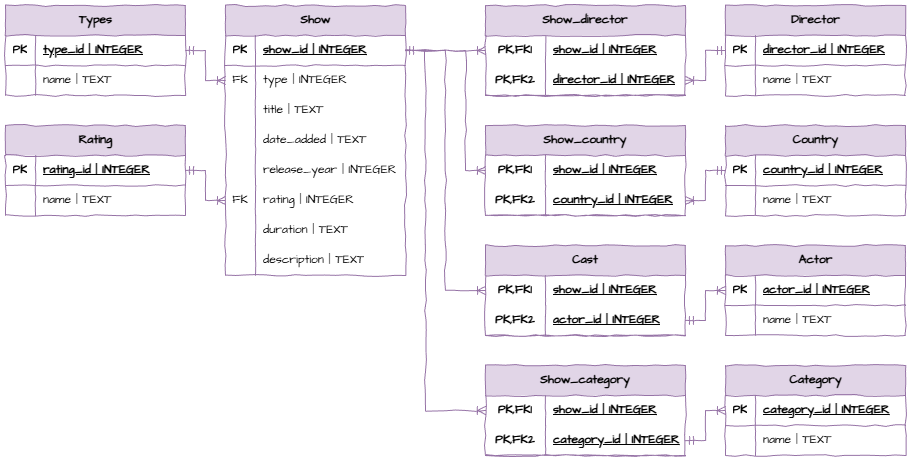
Data Dictionaries
Data Connection Diagrams
Testing
User Feedback
Evaluation Table
Impacts Table
Python Skills
PyQt
Working with CSV
Type Hints
Querying Databases
Creating Databases
Populating Databases
Working with JSON and XML
Requests
OurAPI
Ciphers
Hashing
Checksums
SQL Skills
SELECT Solutions
SELECT dirname
FROM directorSELECT memname
FROM membersSELECT *
FROM movieSELECT DISTINCT year
FROM movieSELECT movienumber, duedate
FROM movies_onhire
WHERE Activities
Using the Movies database
SELECT dirname
FROM director
WHERE country = "US"SELECT dirname
FROM director
WHERE country <> "US"SELECT memname
FROM members
WHERE owes IS NOT NULLSELECT movname
FROM movie
WHERE movname LIKE "%the%"SELECT movname
FROM movie
WHERE movname LIKE "Z%"Using the Repairs database
SELECT owner
FROM repair
WHERE ready = "Yes"SELECT owner
FROM repair
WHERE type = "iMac" AND ready = "No"Using the World database
SELECT CountryName
FROM country
WHERE IndepenYear IS NULL AND Capital IS NOT NULLSELECT *
FROM country
WHERE CountryName IS NULL
OR Continent IS NULL
OR Region IS NULL
OR Area IS NULL
OR IndepenYear IS NULL
OR Population IS NULL
OR LifeExp IS NULL
OR GNP IS NULL
OR Government IS NULL
OR Capital IS NULLSELECT CountryName
FROM country
WHERE Government LIKE "%Constitutional Monarchy%"
OR Government LIKE "%Republic%"Filters and Aggregators Solutions
Using the Movies database
SELECT COUNT(dirnumb)
FROM director
WHERE country = "Australia"SELECT COUNT(dirname)
FROM director
WHERE dirname LIKE "%John"SELECT MAX(length)
FROM movieSELECT SUM(length)
FROM movieSELECT AVG(time)
FROM repairSELECT COUNT(job_numb)
FROM repair
WHERE ready = "Yes"SELECT COUNT(CoCode)
FROM company
WHERE Risk = "High"SELECT CoName, MAX(YearHigh - YearLow)
FROM companySELECT CoName, MIN(CurPrice)
FROM company
WHERE (Risk = "Medium" OR Risk = "Low")
AND Exchange = "NYSE"SELECT CoName
FROM company
WHERE YearHigh - CurPrice < YearHigh * 0.1ORDER BY Solutions
Using the Movies database
SELECT COUNT(dirnumb)
FROM director
WHERE country = "Australia"SELECT movname
FROM movie
ORDER BY year DESC
LIMIT 5SELECT movname, year
FROM movie
ORDER BY year, movnameUsing the School Database
SELECT stname
FROM student
ORDER BY stnameSELECT stnumb
FROM results
ORDER BY percent DESC
LIMIT 3SELECT stname, born
FROM student
ORDER BY gender, bornGROUP BY and HAVING Solutions
Using the Movies database
SELECT country, COUNT(dirnumb)
FROM director
GROUP BY countrySELECT memberid, COUNT(movienumber)
FROM movies_onhire
GROUP BY memberidSELECT year, COUNT(movienumb)
FROM movie
GROUP BY yearUsing the School database
SELECT subjnumb, AVG(percent)
FROM results
GROUP BY subjnumbSELECT grade, gender, COUNT(stnumb)
FROM student
GROUP BY grade, genderUsing the Shares database
SELECT Risk, COUNT(CoCode)
FROM company
GROUP BY RiskSELECT Risk, CoName, MIN(CurPrice)
FROM company
WHERE Exchange = "NYSE"
GROUP BY Risk
Using the Chinook database
SELECT Country, COUNT(CustomerId)
FROM customers
GROUP BY Country
HAVING COUNT(CustomerId) > 1SELECT AlbumId
FROM tracks
GROUP BY AlbumId
HAVING SUM(Milliseconds)/1000 > 3600SELECT BillingCountry, SUM(Total)
FROM invoices
GROUP BY BillingCountry
HAVING SUM(Total) > 100
ORDER BY BillingCountrySubqueries Solutions
Using the Schools database
SELECT percent
FROM results
WHERE stnumb IN (
	SELECT stnumb
	FROM student
	WHERE grade = 7
)SELECT subjname
FROM subject
WHERE tname IN (
SELECT tname
FROM teacher
WHERE room = "A2"
)SELECT subjname
FROM subject
WHERE subjnumb IN (
SELECT subjnumb
FROM results
WHERE percent > 90
)SELECT stname
FROM student
WHERE stnumb IN (
SELECT stnumb
FROM results
WHERE subjnumb IN (
SELECT subjnumb
FROM subject
WHERE subjname = "science"
)
)
SELECT stname
FROM student
WHERE stnumb IN (
	SELECT stnumb
	FROM results
	WHERE percent > 50
	AND subjnumb IN (
		SELECT subjnumb
		FROM subject
		WHERE subjname = "language"
		)
	)
Repairs database
SELECT owner
FROM repair
WHERE id_numb IN (
	SELECT id_numb
	FROM technicians
	WHERE name = "Carrol"
)SELECT name
FROM technicians
WHERE id_numb IN (
SELECT id_numb
FROM experience
WHERE type = "iMac" AND qualification = "N"
)SELECT rate
FROM devices
WHERE type IN (
SELECT type
FROM repair
WHERE owner = "Byrne"
)SELECT owner
FROM repair
WHERE type IN (
SELECT type
FROM devices
WHERE priority = "H"
)SELECT qualification
FROM experience
WHERE (id_numb, type) IN (
SELECT id_numb, type
FROM repair
WHERE owner = "James"
)JOIN Solutions
Using Repairs database
SELECT repair.job_numb, technicians.name
FROM repair
JOIN technicians ON repair.id_numb = technicians.id_numbSELECT technicians.name, experience.type
FROM technicians
JOIN experience ON technicians.id_numb = experience.id_numb
WHERE experience.qualification = "E"SELECT repair.id_numb, technicians.name, repair.type, repair.owner, repair.ready
FROM repair
JOIN technicians ON repair.id_numb = technicians.id_numb
ORDER BY repair.ready DESCSELECT repair.job_numb, repair.owner, repair.type, repair.time, repair.time * devices.rate AS "Cost"
FROM repair
JOIN devices ON repair.type = devices.type
WHERE repair.ready = "Yes"Using the Chinook database
SELECT albums.Title AS "Album", artists.Name AS "Artist"
FROM albums
JOIN artists ON albums.ArtistId = artists.ArtistId
ORDER BY artists.NameSELECT tracks.Name AS "Track"
FROM tracks
JOIN genres ON tracks.GenreId = genres.GenreId
WHERE genres.Name LIKE "%Metal%"SELECT tracks.Name AS "Track", albums.Title AS "Album", genres.Name AS "Genre", tracks.Composer, tracks.Milliseconds / 1000 AS "Length", tracks.UnitPrice
FROM tracks
JOIN albums ON tracks.AlbumId = albums.AlbumId
JOIN genres ON tracks.GenreId = genres.GenreId
JOIN artists ON albums.ArtistId = artists.ArtistId
WHERE artists.Name = "Def Leppard"Using the Schools database
SELECT student.stname AS "Student", subject.subjname AS "Subject", results.percent AS "Result"
FROM student
JOIN results ON student.stnumb = results.stnumb
JOIN subject ON results.subjnumb = subject.subjnumb
SELECT subject.subjname AS "Subject", student.gender AS "Gender", COUNT(student.gender) AS "Enroled"
FROM subject
JOIN results ON subject.subjnumb = results.subjnumb
JOIN student ON results.stnumb = student.stnumb
GROUP BY subject.subjname, student.genderSELECT teacher.tname, AVG(results.percent)
FROM teacher
JOIN subject ON teacher.tname = subject.tname
JOIN results ON subject.subjnumb = results.subjnumb
GROUP BY teacher.tnameCREATE TABLE Solutions
Activity 1
-- Product table has no foreign keys

CREATE TABLE "Product" (
	"product_id" INTEGER,
	"name" TEXT NOT NULL,
	"quantity" INTEGER NOT NULL,
	PRIMARY KEY("product_id" AUTOINCREMENT)
);-- Supplier table has no foreign keys
CREATE TABLE "Supplier" (
"supplier_id" INTEGER,
"name" TEXT NOT NULL,
"email" TEXT NOT NULL,
PRIMARY KEY("supplier_id" AUTOINCREMENT)
);-- Component table has no foreign keys
CREATE TABLE "Component" (
"component_id" INTEGER,
"name" TEXT NOT NULL,
"description" TEXT NOT NULL,
PRIMARY KEY("component_id" AUTOINCREMENT)
);-- Tables for foreign keys exist
CREATE TABLE "Component Supplier" (
"component_id" INTEGER,
"supplier_id" INTEGER,
PRIMARY KEY("component_id","supplier_id"),
FOREIGN KEY("component_id") REFERENCES "Component"("component_id"),
FOREIGN KEY("supplier_id") REFERENCES "Supplier"("supplier_id")
);-- Tables of foreign keys exist
CREATE TABLE "Product Components" (
"product_id" INTEGER,
"component_id" INTEGER,
"quantity" INTEGER NOT NULL,
PRIMARY KEY("product_id","component_id"),
FOREIGN KEY("component_id") REFERENCES "Component"("component_id"),
FOREIGN KEY("product_id") REFERENCES "Product"("product_id"),
FOREIGN KEY("quantity") REFERENCES ""
);Activity 2
-- Students table has no foreign keys

CREATE TABLE "Students" (
	"student_id" INTEGER,
	"name" TEXT NOT NULL,
	"form" TEXT NOT NULL,
	PRIMARY KEY("student_id" AUTOINCREMENT)
);-- Genre table has no foreign keys
CREATE TABLE "Genre" (
"genre_id" INTEGER,
"name" TEXT NOT NULL,
PRIMARY KEY("genre_id" AUTOINCREMENT)
);-- Nationality table has no foreign keys
CREATE TABLE "Nationality" (
"nationality_id" INTEGER,
"name" TEXT NOT NULL,
PRIMARY KEY("nationality_id" AUTOINCREMENT)
);-- Table of foreign key exists
CREATE TABLE "Author" (
"author_id" INTEGER,
"name" TEXT NOT NULL,
"nationality" INTEGER NOT NULL,
PRIMARY KEY("author_id" AUTOINCREMENT),
FOREIGN KEY("nationality") REFERENCES "Nationality"("nationality_id")
);CREATE TABLE "Book" (
"book_id" INTEGER,
"title" TEXT NOT NULL,
"author" INTEGER NOT NULL,
"genre" INTEGER NOT NULL,
"year" INTEGER NOT NULL,
PRIMARY KEY("book_id" AUTOINCREMENT),
FOREIGN KEY("author") REFERENCES "Author"("author_id"),
FOREIGN KEY("genre") REFERENCES "Genre"("genre_id")
);-- Tables of foreign keys exist
CREATE TABLE "Loan" (
"book_id" INTEGER,
"student_id" INTEGER,
"borrow_date" TEXT NOT NULL,
"return_date" TEXT,
PRIMARY KEY("book_id","student_id"),
FOREIGN KEY("book_id") REFERENCES "Book"("book_id"),
FOREIGN KEY("student_id") REFERENCES "Students"("student_id")
);Activity 3
-- Customer table has no foreign keys

CREATE TABLE "Customer" (
	"customer_id"	INTEGER,
	"name"	TEXT NOT NULL,
	"email"	TEXT,
	"phone"	TEXT,
	PRIMARY KEY("customer_id" AUTOINCREMENT)
);-- Product table has no foreign keys
CREATE TABLE "Product" (
"product_id" INTEGER,
"name" TEXT NOT NULL,
"price" REAL NOT NULL,
"stock" INTEGER NOT NULL,
PRIMARY KEY("product_id" AUTOINCREMENT)
);-- Table for foreign key exists
CREATE TABLE "Order" (
"order_id" INTEGER,
"customer" INTEGER NOT NULL,
PRIMARY KEY("order_id" AUTOINCREMENT),
FOREIGN KEY("customer") REFERENCES "Customer"("customer_id")
);-- Tables of foreign keys exist
CREATE TABLE "Order Products" (
"order_id" INTEGER,
"product_id" INTEGER,
"quantity" INTEGER NOT NULL,
"price" REAL NOT NULL,
PRIMARY KEY("order_id","product_id"),
FOREIGN KEY("order_id") REFERENCES "Order"("order_id"),
FOREIGN KEY("product_id") REFERENCES "Product"("product_id")
);Activity 4
-- Customer table has no foreign keys

CREATE TABLE "Customer" (
	"customer_id"	INTEGER,
	"name"	TEXT NOT NULL,
	"address"	TEXT NOT NULL,
	PRIMARY KEY("customer_id" AUTOINCREMENT)
);-- Item table has no foreign keys
CREATE TABLE "Item" (
"item_id" INTEGER,
"name" TEXT NOT NULL,
"price" REAL NOT NULL,
PRIMARY KEY("item_id" AUTOINCREMENT)
);-- Tables of foreign keys exist
CREATE TABLE "Orders" (
"customer_id" INTEGER,
"item_id" INTEGER,
"date" TEXT NOT NULL,
PRIMARY KEY("customer_id","item_id"),
FOREIGN KEY("customer_id") REFERENCES "Customer"("customer_id"),
FOREIGN KEY("item_id") REFERENCES "Item"("item_id")
);INSERT INTO Solutions
Movies Database
INSERT INTO movie
VALUES (1047, 'The Year of Living Dangerously', 1982, 115, 135);
INSERT INTO members
VALUES (5065, 'Emma Stone', 'Scottsdale, Arizona', NULL);
Schools Database
INSERT INTO teacher
VALUES ('Carter, N', 9, 'B4');
INSERT INTO results
VALUES (2230, 17, 50);INSERT INTO subject
VALUES (19, "digital technologies", 'Carter, N')Chinook Database
INSERT INTO artists (Name)
VALUES ('Imagine Dragons');
INSERT INTO albums (Title, ArtistId)
VALUES ('Evolve', 276);
INSERT INTO customers (FirstName, LastName, Company, City, Email, SupportRepId)
VALUES ('Zara', 'Lee', 'ZaraTech', 'Brisbane', 'zlee@example.com', 3);
-- Step 1
INSERT INTO playlists (Name)
VALUES ('Study Beats');-- Step 2
INSERT INTO playlist_track (PlaylistId, TrackId)
VALUES (19, 3456);-- Step 1
INSERT INTO customers (FirstName, LastName, Company, City, Email, SupportRepId)
VALUES ('Leo', 'Tran', 'TranTech', 'Melbourne', 'leo.tran@example.com', 4);INSERT INTO invoices (CustomerId, InvoiceDate, BillingAddress, BillingCity, Total)
VALUES (61, '2025-07-30', '77 Innovation Rd', 'Melbourne', 39.95);UPDATE Statement Solutions
World Database
UPDATE city
SET Population = 2780063
WHERE CityName = 'Brisbane';
UPDATE city
SET CityName = 'Mumbai'
WHERE CityName = 'Bombay';
UPDATE language
SET Percentage = 92.0
WHERE CountryCode = 'ESP' AND Language = 'Spanish';
Shares Database
UPDATE industry
SET LongName = 'Computer Hardware & Peripherals'
WHERE Code = 3573;
UPDATE clients
SET City = 'Brisbane'
WHERE FirstName = 'Debra' AND Lastname = 'Parker' AND DOB = '1957-10-10';
UPDATE holdings
SET PurPrice = PurPrice * 0.9
WHERE PurDate = (
  SELECT MAX(PurDate)
  FROM holdings
);
Chinook Database
UPDATE customers
SET SupportRepId = (
  SELECT EmployeeId FROM employees
  WHERE FirstName = 'Jane' AND LastName = 'Peacock'
)
WHERE Country = 'Brazil';
UPDATE tracks
SET UnitPrice = UnitPrice + 0.20
WHERE GenreId = (
  SELECT GenreId FROM genres
  WHERE Name = 'Rock'
);
DELETE Solutions
School Database
DELETE FROM results
WHERE percent < 50;
DELETE FROM results
WHERE stnumb IN (
  SELECT stnumb
  FROM student
  WHERE born < '2000-01-01'
);
Repairs Database
DELETE FROM repair
WHERE ready = 'Yes'
  AND date = '2010-06-03';
DELETE FROM repair
WHERE id_numb IN (
  SELECT id_numb
  FROM technicians
  WHERE grade = 'apprentice'
);
Chinook Database
-- First need to remove all invoice items to prevent conflict with invoice table
DELETE FROM invoice_items
WHERE InvoiceId IN (
  SELECT InvoiceId
  FROM invoices
  WHERE CustomerId IN (
    SELECT CustomerId
    FROM customers
    WHERE Country = 'Brazil'
  )
);-- Then need to delete invoices to void conflict with customer table
DELETE FROM invoices
WHERE CustomerId IN (
SELECT CustomerId
FROM customers
WHERE Country = 'Brazil'
);-- Finally customers from Brazil can be deleted
DELETE FROM customers
WHERE Country = 'Brazil';-- Remove from playlist_track first
DELETE FROM playlist_track
WHERE TrackId IN (
SELECT TrackId
FROM tracks
WHERE AlbumId IN (
SELECT AlbumId
FROM albums
WHERE ArtistId = (
SELECT ArtistId
FROM artists
WHERE Name = 'Queen'
)
)
);-- Remove invoice_items with those tracks
DELETE FROM invoice_items
WHERE TrackId IN (
SELECT TrackId
FROM tracks
WHERE AlbumId IN (
SELECT AlbumId
FROM albums
WHERE ArtistId = (
SELECT ArtistId
FROM artists
WHERE Name = 'Queen'
)
)
);-- Remove the tracks
DELETE FROM tracks
WHERE AlbumId IN (
SELECT AlbumId
FROM albums
WHERE ArtistId = (
SELECT ArtistId
FROM artists
WHERE Name = 'Queen'
)
);-- Remove the albums
DELETE FROM albums
WHERE ArtistId = (
SELECT ArtistId
FROM artists
WHERE Name = 'Queen'
);-- Finally, remove the artist
DELETE FROM artists
WHERE Name = 'Queen';