Learning Goals
By the end of this section you will:
understand how data dictionaries are used to plan your database
know how to create a data dictionary
A data dictionary is a reference guide that lists information about the data in a database or system, such as its name, type, and rules for use. It helps ensure accurate and consistent use of the data.
The following video explains data dictionaries:
Summary
What is a Data Dictionary? The video uses the analogy of a regular dictionary, which provides context and meaning for words. Similarly, a data dictionary provides context and meaning for data elements, especially in a database or spreadsheet.
Why is it Needed? When creating datasets, column names are often abbreviated (e.g.,
Publ.for “Publisher”) or use codes to save space and standardize entries. Without a data dictionary, the meaning of these abbreviations and codes can be lost, making the data difficult to understand or use correctly.Components of a Good Data Dictionary: A good data dictionary entry should include several key pieces of information about each data element (or column):
Name: The name of the field (e.g.,
# of pg).Definition: A clear explanation of what the field represents (e.g., “Number of pages in the book”).
Data Type: The kind of data, such as text, number, or date.
Size: The maximum length of the data (e.g., 3 characters).
Possible Values: Any constraints, such as a range of numbers (e.g., 1-998) or a list of approved codes and their meanings (e.g.,
OED= “Oxford English Dictionary”).
Practical Application: Data dictionaries ensure that data is consistently interpreted and can be found in various formats, including Word documents, Excel spreadsheets, XML files, or within a dedicated metadata registry.
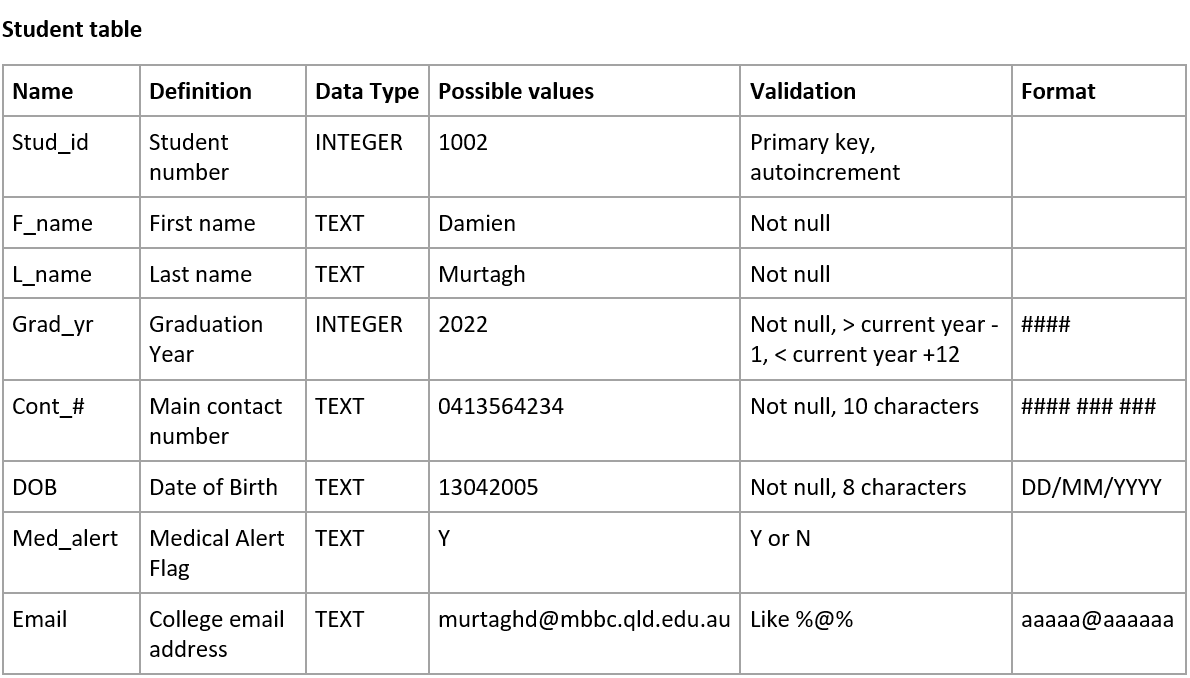
Your data dictionaries should include the following details:
Name of Field: make sure you follow you naming conventions
Definition of the Field: these details should naturally flow from the ERD
Data type: in SQLite we have Text, Integer, Real, and Blob
Possible values: taken from sample data
Validation rules: ensures only correct values can be entered
SQLite has built in validation rules:
NOT NULL - Ensures that a column cannot have NULL value
DEFAULT Constraint − Provides a default value for a column when none is specified
UNIQUE Constraint − Ensures that all values in a column are different
PRIMARY KEY Constraint − Uniquely identifies each row/record in a database table
CHECK Constraint − Ensures that all values in a column satisfies certain conditions.
Data can also be validated in Python before Inserting it into the database.
Formatting: data can either be stored formatted or can be formatted once retrieved.
Below is an example of a data dictionary. Note that you should create a data dictionary for each table is your database.
Data Dictionaries Activities
Create a data dictionary for each of the Relational Schemas you create in ERD and RS