Learning Goals
By the end of this section you will:
understand Python’s SQLite3 connection and cursor commands.
know how to use SQLite3 to access an SQLite database.
SQLite3 is a lightweight, easy-to-use database system that stores data in a single file on your computer. It’s built into Python, which means you don’t need to install anything extra to start using it. SQLite3 lets you create tables to organise data, run SQL commands to add, search or delete data, and use that data in your apps. Because it’s fast and simple, it’s perfect for small projects and will be the tool we use to work with our databases.
Databases
We will need databases in order to learn concepts and for our exercises. Below are complete databases that we also use to learn SQL.
World Database
A geographic and demographic database containing data about countries, cities, populations, and related global statistics.
Relational Schema
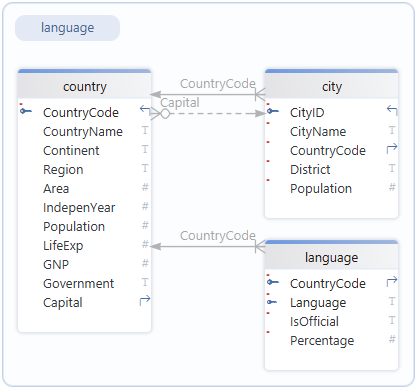
Download the world database
Movies Database
A movie database that contains information about movies on hire, such as titles, actors, directors hire and members.
Relational Schema
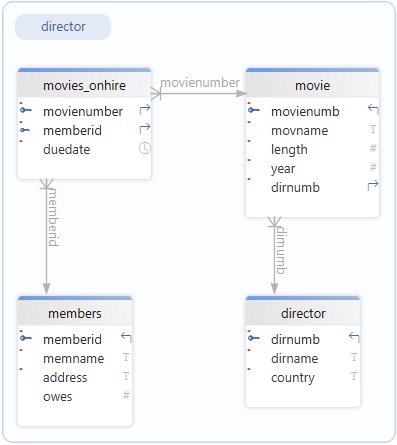
Download the movies database
School Database
A database representing a school system, containing information on students, classes, teachers, and grades or enrolments.
Relational Schema
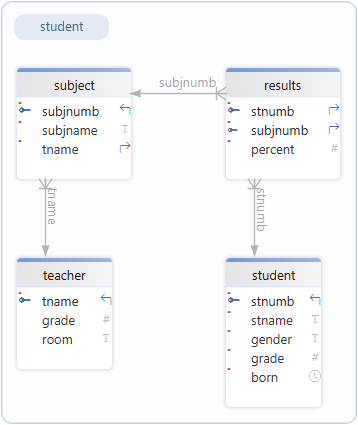
Download the school database
Repairs Database
A database designed to track repair jobs, including customers, devices, repairs performed, technicians, and costs.
Relational Schema
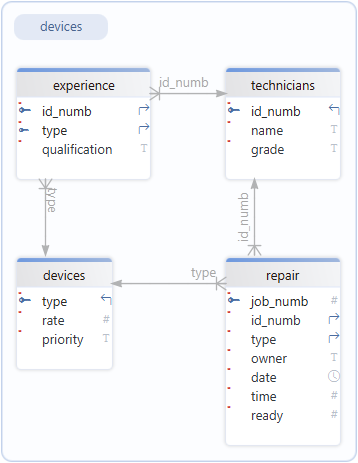
Download the repairs database
Shares Database
A database related to stock market or asset trading, storing data about companies, share transactions, and possibly investors or prices.
Relational Schema
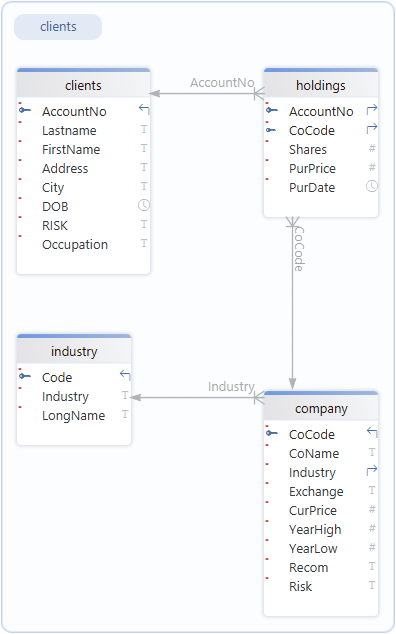
Download the shares database
Chinook Database
A sample music store database that stores data about artists, albums, tracks, customers, invoices, and employee information.
Relational Schema
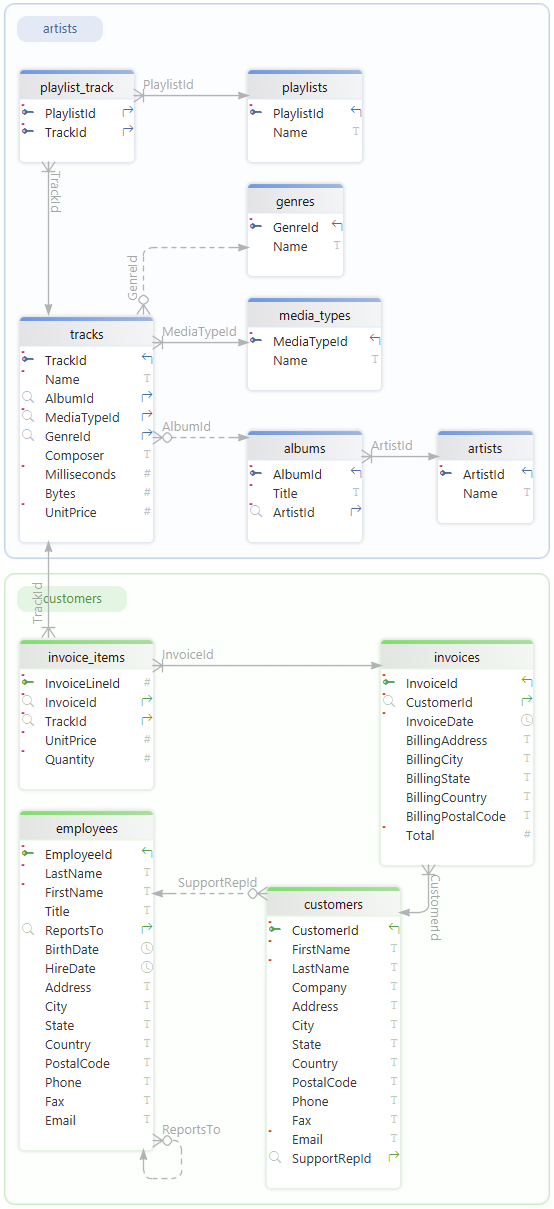
Download the chinook database
Using MVC Architecture
When we discussed the MVC Achitecture Pattern it was noted that the Model component will consist of two files. The .bd SQLite file and the datastore.py file. All of the SQLite3 code will go into the datastore.py file, so we need to create that before we continue.
Datastore file
Create the datastore.py:
Open your repository for this unit.
Create a new folder in that repo called data (if it doesn’t already exist)
Download all the databases above to the data folder
Create a new file called
datastore.pyin the repo root directoryAdd the code below to
datastore.pyand save.
1 2 3 4 5 6 7 8 9 10import sqlite3 class Datastore: def __init__(self): self.connection = sqlite3.connect("data/chinook.db") self.cursor = self.connection.cursor() def close(self): self.connection.close()
By now, much of this code and the stucture should be familiar, but there will be three things that might stand out:
sqlite3.connectself.connection.cursor()self.connection.close()
The best way to think of these three is to draw an analogy with using Microsoft Word.
Connect
When you want to write or edit a Word document, you first must open the document, this is the same as self.connection = sqlite3.connect("data/chinook.db"). You are telling sqlite3 which database file to open (for our learning purposes we will use chinook.db). The creates an object (self.connection) which represents the database file you have openned.
Cursor
Once your Word document is open, there is a little flashing line which indicates where you are access that document. If you type, words appear here. That little flashing line is called a cursor. This is the same as self.cursor = self.connection.cursor() which creates a cursor tool to access the database.
Notice that the cursor belongs to self.connection, that is it belongs to the opened database. This means that it can only access the self.connection database.
Close
Finally, once you have finished with your Word document you will want to save and close it. That is exactly what self.connection.close() does. Because RAM is faster than driver, SQLite3 might cache information in RAM to prevent holding up the program. This information will get written to drive ASAP, but it is possible there is still some data in the cache when you end your program. self.connection.close() ensures that all cache data is written to the drive as part of Python’s end of program proceedure.
Test file
Now that we have a datastore, we need to create a test.py so we can check our code.
In the same directory, create a test.py file, and add the code below.
1 2 3 4 5from datastore import Datastore database = Datastore() print(database.__sizeof__())
Explanation of Code
This code creates an instance of our datastore, then prints the size of the instance, just to check that it has been created.
Activities
In your unit 2 repo, create datastores for each of the practice databases. Call them:
world_datastore.pymovies_datastore.pyschool_datastore.pyrepairs_datastore.pyshares_datastore.pychinook_datastore.py