Learning Goals
By the end of this section you will:
know how to delete records from a database
understand that relational databases require a specific deletion order
know how to delete data that is contained in mulitple tables.
The DELETE statement is used to delete existing records in a table.
Summary
This video provides a tutorial on the SQL DELETE statement, explaining how to remove unwanted records from a database table.
Key points covered in the video include:
DELETEStatement Syntax: The basic syntax isDELETE FROM table_name WHERE condition;. TheWHEREclause is crucial as it specifies which records to delete.Importance of the
WHEREClause: The video strongly emphasizes the importance of theWHEREclause. If you omit it, all records in the table will be deleted. This is likened to accidentally deleting all your contacts.Practical Example: A demonstration shows how to delete a specific customer, “Alfreds Futterkiste,” from a “Customers” table using the
DELETEstatement with aWHEREclause.Deleting All Records: To clear all data from a table without deleting the table itself, you can use
DELETE FROM Customers;. This leaves the table structure intact for future use.DELETEvs.DROP TABLE: The video clarifies the difference between theDELETEandDROP TABLEstatements.DELETEremoves records from a table, whileDROP TABLEpermanently removes the entire table and its structure from the database.
The video concludes by advising viewers to always double-check their commands before execution to prevent accidental data loss and encourages them to practice using the interactive editor on w3schools.com.
Go to the W3schools Tutorial on the DELETE Statement and complete their exercises.
DELETE order
When deleting data that is stored in multiple tables, the order that entires are deleted is important. You cannot delete an entry where it’s primary key is used as a foreign keys in another table, ie. for the one-to-many cardinality, it is on the one side. Therefore, you need to start with the entry that is not associated with a foreign key.
Let’s look at the Movies database as an example.
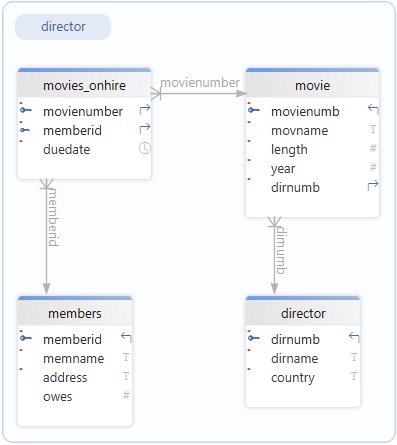
Say we wanted to delete Mel Gibson from the director database.
We cannot delete a Mel Gibson straight away since there may be movies that have his
dirnumb(118) as a foreign key, so we have delete all movies with thedirnumb118 first.But we will not be able to delete the movie, if it is currently onhire. That is, the
movienumbis in the movies_onhire table. Therefore, we need to delete any record of Mel Gibson movies from the movies_onhire table.We do not need to be worried about member nubmers as the
memberidis on the many side to the one-to-many relationship.
The steps that need to be taken are
Delete any records involving Mel Gibson movies from the movies_onhire table
DELETE FROM movies_onhire
WHERE movienumber IN (
	SELECT movienumb
	FROM movie
	WHERE dirnumb IN (
		SELECT dirnumb
		FROM director
		WHERE dirname = "Gibson, Mel"
		)
	)
Delete any movies from the movies table that have Mel Gibson as the director
DELETE FROM movie
WHERE dirnumb IN (
	SELECT dirnumb
	FROM director
	WHERE dirname = "Gibson, Mel"
	)
Finally delete Mel Gibson from the director table
DELETE FROM director
WHERE dirname = 'Gibson, Mel'
DELETE Activities
School Database
Delete all results where percent is under 50
Delete all results for students born before 2000
Repairs Database
Delete all repairs that are already ready on 2010‑06‑03
Delete all repairs done by technicians with the grade apprentice
Chinoook Database
Delete all customers and their invoices from Brazil
Delete an artist and all related data (tracks, playlist entries, albums) for ‘Queen’